• PSA: The Google Play Store app is NOT a real Android app updater

    From Maria Sophia@mariasophia@comprehension.com to comp.mobile.android on Wed Feb 25 10:19:18 2026
    From Newsgroup: comp.mobile.android

    PSA: The Google Play Store app is NOT a real Android app updater

    It might be that people may assume the Google Play Store app (com.android.vending) is an updater for all installed Android apps.

    It isn't.

    The Play Store only updates a very narrow set of apps as it completely
    ignores sideloaded software, even when the APKs originally came from
    the Play Store (& were simply archived by Aurora, Muntashirakon, etc.).

    Here's what's actually happening (AFAICT):

    1. The Play Store does not track sideloaded apps
    That means, if you install apps via:
    a. APK files
    b. Aurora Store
    c. adb
    d. backups from another device
    e. app managers (e.g., Muntashirakon App Manager)
    etc.
    Then the Play Store keeps *no record* of those installs.

    Even if the APK has the exact signature as the Play Store version, the
    Play Store still treats it as a foreign app so it won't update it.

    2. The Play Store behaves like a librarian with selective memory
    The best analogy is this:

    "The Play Store is like a librarian who only updates books she
    personally remembers checking out to you."

    If she didn't check it out, she won't update it.

    And even for the books she *did* check out, she's lazy as she optimizes
    for battery life and server load, not completeness. As a result, AFAICT,
    updates may be delayed for days or weeks.

    3. No Google account on the phone means no library on the phone.
    If you never sign into a Google account, the Play Store has:
    a. no install history
    b. no entitlement list
    c. no "library" of apps

    So in theory it shouldn't update anything.

    But in practice, it *does* update a small set of apps, which are
    about a score of apps on my device, which has over a thousand packages,
    of which I personally installed about six hundred apps.

    4. The Play Store has a second update mechanism for system-adopted packages
    Even without a Google account, the Play Store will automatically update
    any app that meets special conditions:

    a. It is a system app
    b. It was preinstalled by the OEM
    c. It is signed with the same key as the Play Store version
    d. It is bundled by the manufacturer
    e. It originally lived in /system or /product
    f. It is marked as "Play-updatable" in system metadata

    If an app does not meet *every* one of these criteria, the Play Store
    ignores it (AFAICT).

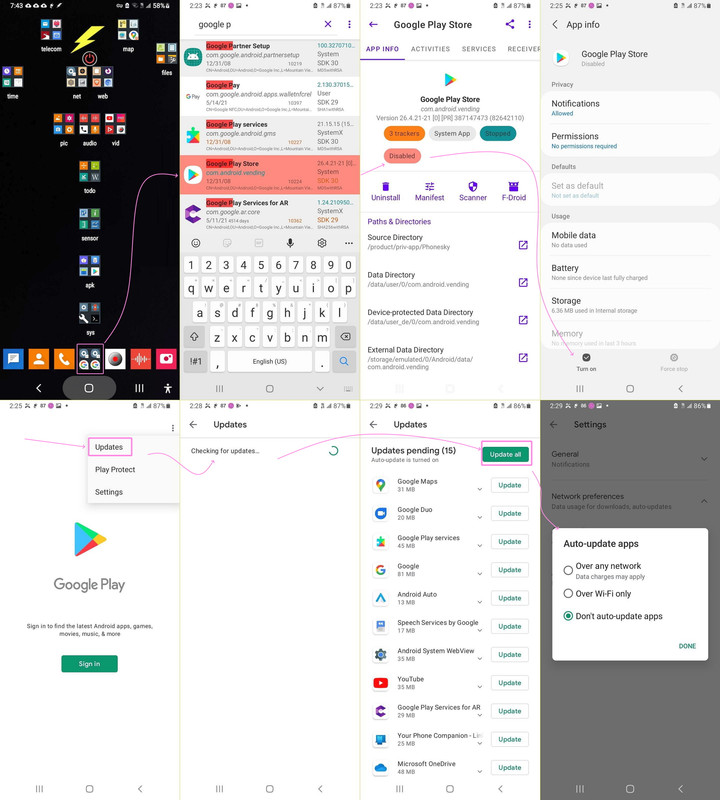
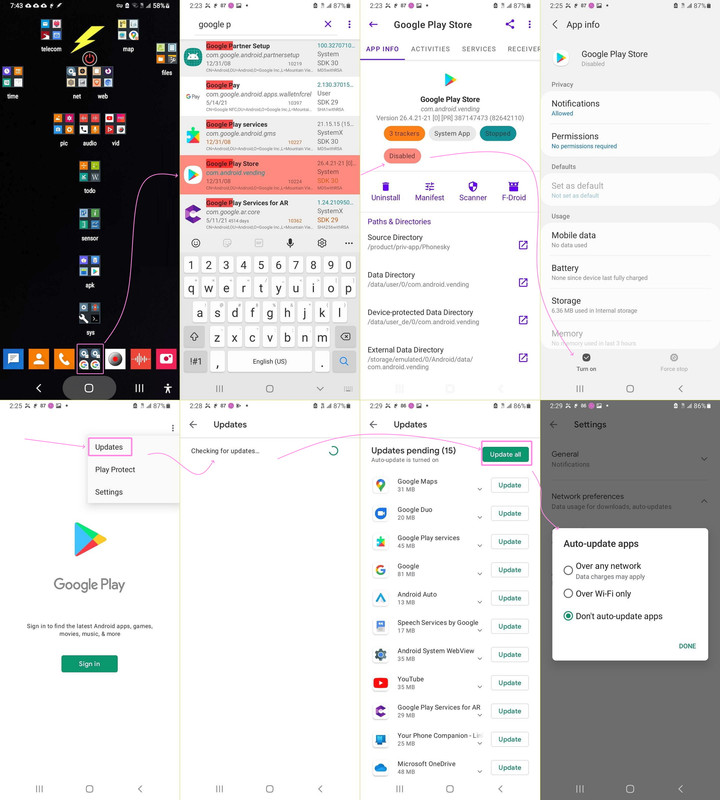
    5. Example: the ~15 apps the Play Store updates on my device
    In the past, I documented these were updated (screenshot truncated):
    <https://i.postimg.cc/HsXKj7WK/updateallapps01.jpg>
    i. Google Maps
    ii. Google Duo
    iii. Google Play Services
    iv. Google (the app)
    v. Android Auto
    vi. Speech Services by Google
    vii. Android System WebView
    viii. YouTube
    ix. Google Play Services for AR
    x. Your Phone Companion
    xi. Microsoft OneDrive
    xii. ...and a few more preinstalled items

    These fall into three categories:

    A. Google system-level components
    (e.g., Play Services, WebView, Speech Services)

    B. Google apps that shipped with the ROM
    (e.g., Maps, YouTube, Google app, Duo/Meet)

    C. OEM-bundled third-party apps
    (e.g., Microsoft OneDrive, Your Phone Companion)

    These apps satisfy all the "system-adopted" criteria above.
    Everything else is ignored.


    6. On my device, the Play Store only updates the score of apps,
    out of a thousand packages (six hundred of which I installed)
    which are...
    I. pre-installed
    II. signed with the same key as the Play Store version
    III. marked as Play-updatable
    IV. recognized as system-owned
    V. not dependent on a Google account library

    If any of those conditions fail, the Play Store simply refuses to update
    the app (in my experience).

    7. The bottom line
    If you always sign into a Google account, and you *only* install apps
    through the Play Store on that same device, and you never copy APKs
    between devices, then the Play Store should update (all?) your apps.

    However, if you sideload, or install from the Google Play Store
    repository by alternative means, then the Google Play Store app
    will likely update almost nothing.
    --
    It's simply not possible to create a Google account and still maintain meaningful privacy. So the Play Store updater will never work with privacy.
    --- Synchronet 3.21b-Linux NewsLink 1.2
  • From AJL@noemail@none.com to comp.mobile.android on Wed Feb 25 17:43:36 2026
    From Newsgroup: comp.mobile.android

    On 2/25/26 9:19 AM, Maria Sophia wrote:
    PSA: The Google Play Store app is NOT a real Android app updater

    It might be that people may assume the Google Play Store app >(com.android.vending) is an updater for all installed Android apps.

    It isn't.

    The Play Store only updates a very narrow set of apps as it completely >ignores sideloaded software, even when the APKs originally came from
    the Play Store (& were simply archived by Aurora, Muntashirakon, etc.).

    Here's what's actually happening (AFAICT):

    1. The Play Store does not track sideloaded apps
    That means, if you install apps via:
    a. APK files
    b. Aurora Store
    c. adb
    d. backups from another device
    e. app managers (e.g., Muntashirakon App Manager)

    And likely f. The Galaxy Store. My latest Android toy a Samsung Galaxy Tab
    A11+ comes with both stores, Google and Samsung. And lots and lots of apps
    that do the same thing. Choices, Choices. The bad news is that my
    newsreader PhoNews quit working on the new tablet's Android 16. So far it
    still works on this Android 12 toy and my Chromebooks. But probably not for
    long as the updates progress. And nothing else Android is out there. Is
    there?


    etc.
    Then the Play Store keeps *no record* of those installs.

    Even if the APK has the exact signature as the Play Store version, the
    Play Store still treats it as a foreign app so it won't update it.

    2. The Play Store behaves like a librarian with selective memory
    The best analogy is this:

    "The Play Store is like a librarian who only updates books she
    personally remembers checking out to you."

    If she didn't check it out, she won't update it.

    And even for the books she *did* check out, she's lazy as she optimizes
    for battery life and server load, not completeness. As a result, AFAICT,
    updates may be delayed for days or weeks.

    3. No Google account on the phone means no library on the phone.
    If you never sign into a Google account, the Play Store has:
    a. no install history
    b. no entitlement list
    c. no "library" of apps

    So in theory it shouldn't update anything.

    But in practice, it *does* update a small set of apps, which are
    about a score of apps on my device, which has over a thousand packages,
    of which I personally installed about six hundred apps.

    4. The Play Store has a second update mechanism for system-adopted packages
    Even without a Google account, the Play Store will automatically update
    any app that meets special conditions:

    a. It is a system app
    b. It was preinstalled by the OEM
    c. It is signed with the same key as the Play Store version
    d. It is bundled by the manufacturer
    e. It originally lived in /system or /product
    f. It is marked as "Play-updatable" in system metadata

    If an app does not meet *every* one of these criteria, the Play Store
    ignores it (AFAICT).

    5. Example: the ~15 apps the Play Store updates on my device
    In the past, I documented these were updated (screenshot truncated):
    <https://i.postimg.cc/HsXKj7WK/updateallapps01.jpg>
    i. Google Maps
    ii. Google Duo
    iii. Google Play Services
    iv. Google (the app)
    v. Android Auto
    vi. Speech Services by Google
    vii. Android System WebView
    viii. YouTube
    ix. Google Play Services for AR
    x. Your Phone Companion
    xi. Microsoft OneDrive
    xii. ...and a few more preinstalled items

    These fall into three categories:

    A. Google system-level components
    (e.g., Play Services, WebView, Speech Services)

    B. Google apps that shipped with the ROM
    (e.g., Maps, YouTube, Google app, Duo/Meet)

    C. OEM-bundled third-party apps
    (e.g., Microsoft OneDrive, Your Phone Companion)

    These apps satisfy all the "system-adopted" criteria above.
    Everything else is ignored.


    6. On my device, the Play Store only updates the score of apps,
    out of a thousand packages (six hundred of which I installed)
    which are...
    I. pre-installed
    II. signed with the same key as the Play Store version
    III. marked as Play-updatable
    IV. recognized as system-owned
    V. not dependent on a Google account library

    If any of those conditions fail, the Play Store simply refuses to update
    the app (in my experience).

    7. The bottom line
    If you always sign into a Google account, and you *only* install apps
    through the Play Store on that same device, and you never copy APKs
    between devices, then the Play Store should update (all?) your apps.

    However, if you sideload, or install from the Google Play Store
    repository by alternative means, then the Google Play Store app
    will likely update almost nothing.

    --- Synchronet 3.21b-Linux NewsLink 1.2
  • From mummycullen@mummycullen@gmail-dot-com.no-spam.invalid (MummyChunk) to comp.mobile.android on Wed Feb 25 13:48:00 2026
    From Newsgroup: comp.mobile.android

    Maria Sophia wrote:
    PSA: The Google Play Store app is NOT a real Android app updater

    It might be that people may assume the Google Play Store app (com.android.vending) is an updater for all installed Android apps.

    It isn't.

    The Play Store only updates a very narrow set of apps as it completely ignores sideloaded software, even when the APKs originally came from
    the Play Store (& were simply archived by Aurora, Muntashirakon, etc.).

    Here's what's actually happening (AFAICT):

    1. The Play Store does not track sideloaded apps
    That means, if you install apps via:
    a. APK files
    b. Aurora Store
    c. adb
    d. backups from another device
    e. app managers (e.g., Muntashirakon App Manager)
    etc.
    Then the Play Store keeps *no record* of those installs.

    Even if the APK has the exact signature as the Play Store version, the
    Play Store still treats it as a foreign app so it won't update it.

    2. The Play Store behaves like a librarian with selective memory
    The best analogy is this:

    "The Play Store is like a librarian who only updates books she
    personally remembers checking out to you."

    If she didn't check it out, she won't update it.

    And even for the books she *did* check out, she's lazy as she optimizes
    for battery life and server load, not completeness. As a result, AFAICT, updates may be delayed for days or weeks.

    3. No Google account on the phone means no library on the phone.
    If you never sign into a Google account, the Play Store has:
    a. no install history
    b. no entitlement list
    c. no "library" of apps

    So in theory it shouldn't update anything.

    But in practice, it *does* update a small set of apps, which are
    about a score of apps on my device, which has over a thousand packages,
    of which I personally installed about six hundred apps.

    4. The Play Store has a second update mechanism for system-adopted packages Even without a Google account, the Play Store will automatically update
    any app that meets special conditions:

    a. It is a system app
    b. It was preinstalled by the OEM
    c. It is signed with the same key as the Play Store version
    d. It is bundled by the manufacturer
    e. It originally lived in /system or /product
    f. It is marked as "Play-updatable" in system metadata

    If an app does not meet *every* one of these criteria, the Play Store
    ignores it (AFAICT).

    5. Example: the ~15 apps the Play Store updates on my device
    In the past, I documented these were updated (screenshot truncated): https://i.postimg.cc/HsXKj7WK/updateallapps01.jpg
    i. Google Maps
    ii. Google Duo
    iii. Google Play Services
    iv. Google (the app)
    v. Android Auto
    vi. Speech Services by Google
    vii. Android System WebView
    viii. YouTube
    ix. Google Play Services for AR
    x. Your Phone Companion
    xi. Microsoft OneDrive
    xii. ...and a few more preinstalled items

    These fall into three categories:

    A. Google system-level components
    (e.g., Play Services, WebView, Speech Services)

    B. Google apps that shipped with the ROM
    (e.g., Maps, YouTube, Google app, Duo/Meet)

    C. OEM-bundled third-party apps
    (e.g., Microsoft OneDrive, Your Phone Companion)

    These apps satisfy all the "system-adopted" criteria above.
    Everything else is ignored.


    6. On my device, the Play Store only updates the score of apps,
    out of a thousand packages (six hundred of which I installed)
    which are...
    I. pre-installed
    II. signed with the same key as the Play Store version
    III. marked as Play-updatable
    IV. recognized as system-owned
    V. not dependent on a Google account library

    If any of those conditions fail, the Play Store simply refuses to update
    the app (in my experience).

    7. The bottom line
    If you always sign into a Google account, and you *only* install apps
    through the Play Store on that same device, and you never copy APKs
    between devices, then the Play Store should update (all?) your apps.

    However, if you sideload, or install from the Google Play Store
    repository by alternative means, then the Google Play Store app
    will likely update almost nothing.
    --
    It's simply not possible to create a Google account and still maintain meaningful privacy. So the Play Store updater will never work with privacy.


    Why do they need to make it all so complicated with Android?


    This is a response to the post seen at: http://www.jlaforums.com/viewtopic.php?p=701904802#701904802
    --- Synchronet 3.21b-Linux NewsLink 1.2
  • From Arno Welzel@usenet@arnowelzel.de to comp.mobile.android on Wed Feb 25 20:33:18 2026
    From Newsgroup: comp.mobile.android

    MummyChunk, 2026-02-25 19:48:

    [...]
    Why do they need to make it all so complicated with Android?

    Why did you quote the whole post just for three lines of comment?

    This is a response to the post seen at: http://www.jlaforums.com/viewtopic.php?p=701904802#701904802

    "Your request to this page has been rate limited!"

    WTF?

    Anyway - the reason is, that package managers can always only update
    their own packages. If you use apt, rpm, Flatpak or Snap in Linux you
    also don't have one single tool to update everything. There may be
    programs which use all package managers to check for updates (like
    "Discover" in KDE), but these tools still need to know which package
    managers they should check. The same applies to Windows, where winget
    may update a lot, but not *all* installed applications. And some even
    forbid this, like FileZilla which can not be updated using winget:

    <https://github.com/microsoft/winget-cli/issues/2513>

    Quote:

    "TimKosse.FileZilla.Client was removed as per the application
    developer's request."
    --
    Arno Welzel
    https://arnowelzel.de
    --- Synchronet 3.21b-Linux NewsLink 1.2
  • From Maria Sophia@mariasophia@comprehension.com to comp.mobile.android on Wed Feb 25 13:33:52 2026
    From Newsgroup: comp.mobile.android

    MummyChunk wrote:
    Why do they need to make it all so complicated with Android?

    This "MummyChunk" spam is garbage spewed by a guy who is using us to feed his web site which means we all need to ignore this MummyChunk spammer
    (me included, although sometimes I don't LOOK to see that it's him).

    AJL wrote:
    And likely f. The Galaxy Store. My latest Android toy a Samsung Galaxy Tab
    A11+ comes with both stores, Google and Samsung. And lots and lots of apps
    that do the same thing. Choices, Choices.

    Hi AJL,

    Thanks for adding the Galaxy Store, which, let's all be clear, is not like
    the Aurora Store, since the Aurora Store is NOT a store, while the Galaxy Store is a store, so the word "store" doesn't convey the difference.
    a. Aurora Store is like a window into the Google Play Store APKs.
    b. Galaxy Store is like a boutique shop with Samsung-only APKs.

    The distinction matters because the APKs from the Galaxy Store are not
    signed by Google but the APKs you get from Aurora are signed by Google
    (since they're the same APKs that the Google Play Store gives you).

    Taking AJL's lead, in that section we should add not only the Galaxy Store, but also the Amazon AppStore, F-Droid, GitHub releases, Aptoide, Huawei AppGallery, etc., becasue even if the package name matches, the signatures won't match, so com.android.vending won't bother to update those apps.

    The bad news is that my
    newsreader PhoNews quit working on the new tablet's Android 16. So far it
    still works on this Android 12 toy and my Chromebooks. But probably not for
    long as the updates progress. And nothing else Android is out there. Is
    there?

    There never was a good mobile-device newsreader, but this is in my notes.

    https://play.google.com/store/apps/details?id=at.cmg.android.phonews https://play.google.com/store/apps/details?id=com.cmgapps.android.phonewspro https://play.google.com/store/apps/details?id=com.almarsoft.GroundhogReader https://play.google.com/store/apps/details?id=net.piaohong.newsgroup https://play.google.com/store/apps/details?id=ken.android.nntpreader (demo!) https://play.google.com/store/apps/details?id=ken.android.nntpreader.pro https://play.google.com/store/apps/details?id=com.noasy.newsreader https://play.google.com/store/apps/details?id=usenet.sinaapp.com

    https://mega.nz/file/uYJSwBJD#3Ya4p0HpSczyt95c_MnXjyBXYqP5J_Phkz0gZ9RbkCI (PiaHong Original Color Mod17 by alfio)
    Use M16 with original colors. If you like that, stop right there.
    If you want to change the colors, use M16 with the modified colors.

    Don't use M17 unless you want to revert back to the old behavior.
    In addition, M17 allows you to add an X-Face header.

    PiaHong NewsGroups Mod16 Original Colors
    <https://mega.nz/file/DdQyVBgY#jq7uq7r4e8waidolLyvLgD_G_Rc82_FURYxaak7NUCI>
    Name: OC-ModNewsReader 2.02.M16.apk
    Size: 3922831 bytes (3830 KiB)
    SHA256: 97B27E062306C9D6FEA9FC6EA49FEA7D920FF7C0CB05AAFBBEB9C96758A68C97

    PiaHong NewsGroups Mod16 Modified Colors
    <https://mega.nz/file/GAwnTAaI#CshrBLtSl2smdcmHiBD0wdj-V409CJyq9nJ7IpQ0ooY>
    Name: MC-ModNewsReader 2.02.M16.apk
    Size: 3935119 bytes (3842 KiB)
    SHA256: 010AAF7EFF0ABBE040E66BE0486F6D32936432EC16C8F2FB56717479C76F4CDA

    PiaHong NewsGroups Mod17 Original Colors by Alfie.
    <https://mega.nz/file/uYJSwBJD#3Ya4p0HpSczyt95c_MnXjyBXYqP5J_Phkz0gZ9RbkCI>
    Name: OC-ModNewsReader 2.02.M17.apk
    Size: 3926860 bytes (3834 KiB)
    SHA256: BB05B9FD454AD8D38047484FEA338DE9FDAB056F56B66D39C114162A53883815

    PiaHong NewsGroups Mod17 Modified Colors by Alfie.
    <https://mega.nz/file/CIhiFKDT#H4FvPyZ_SIWKitPvaUxjKstjNmgPJhyMqwZxI4VkWVE>
    Name: MC-ModNewsReader 2.02.M17.apk
    Size: 3935052 bytes (3842 KiB)
    SHA256: DA8C8DF91DFAA68047F58A3339B6D5B91857185623CB7F386B74F9DFE84D5B03

    I'll write up a separate thread on the Android newsreaders.
    --
    The nice thing about Usenet is you get good ideas from everyone.
    --- Synchronet 3.21b-Linux NewsLink 1.2
  • From Maria Sophia@mariasophia@comprehension.com to comp.mobile.android on Wed Feb 25 13:46:55 2026
    From Newsgroup: comp.mobile.android

    Arno Welzel wrote:
    Why do they need to make it all so complicated with Android?

    Why did you quote the whole post just for three lines of comment?

    The guy is a spammer. Sometimes I fall prey to him as I have to look.
    But he's just feeding us advertisements for his web site.

    Anyway - the reason is, that package managers can always only update
    their own packages. If you use apt, rpm, Flatpak or Snap in Linux you
    also don't have one single tool to update everything. There may be
    programs which use all package managers to check for updates (like
    "Discover" in KDE), but these tools still need to know which package
    managers they should check. The same applies to Windows, where winget
    may update a lot, but not *all* installed applications. And some even
    forbid this, like FileZilla which can not be updated using winget:

    <https://github.com/microsoft/winget-cli/issues/2513>

    I doubt the "MummyChunk" spammer even read the post he replied to,
    so your explanation (for him) will fall on deaf ears, but it's a good
    summary of why the Google Play Store app is NOT a real app updater.

    We could go into what apps are real app updaters, which I had tested years
    ago, but I haven't tested any of them recently. I have a ton on my system.

    It would take a while to summarize which are the "real" app updaters
    as some update off of Google Play while others handle other repos.
    --- Synchronet 3.21b-Linux NewsLink 1.2
  • From Maria Sophia@mariasophia@comprehension.com to comp.mobile.android on Wed Feb 25 14:28:59 2026
    From Newsgroup: comp.mobile.android

    Maria Sophia wrote:
    I'll write up a separate thread on the Android newsreaders.

    I accidentally posted it twice, so ignore the Android-only one.

    Newsgroups: comp.mobile.android,news.software.readers
    Subject: PSA: What is the current state of Android Usenet nntp newsreaders?
    Date: Wed, 25 Feb 2026 13:40:56 -0600
    Message-ID: <10nnj88$1g23$1@nnrp.usenet.blueworldhosting.com>
    --- Synchronet 3.21b-Linux NewsLink 1.2
  • From mummycullen@mummycullen@gmail-dot-com.no-spam.invalid (MummyChunk) to comp.mobile.android on Wed Feb 25 18:23:19 2026
    From Newsgroup: comp.mobile.android

    Arno Welzel wrote:
    MummyChunk, 2026-02-25 19:48:

    [...]

    Why do they need to make it all so complicated with Android?


    Why did you quote the whole post just for three lines of comment?


    This is a response to the post seen at:
    http://www.jlaforums.com/viewtopic.php?p=701904802#701904802


    "Your request to this page has been rate limited!"

    WTF?

    Anyway - the reason is, that package managers can always only update
    their own packages. If you use apt, rpm, Flatpak or Snap in Linux you
    also don't have one single tool to update everything. There may be
    programs which use all package managers to check for updates (like
    "Discover" in KDE), but these tools still need to know which package
    managers they should check. The same applies to Windows, where winget
    may update a lot, but not *all* installed applications. And some even
    forbid this, like FileZilla which can not be updated using winget:

    https://github.com/microsoft/winget-cli/issues/2513

    Quote:

    "TimKosse.FileZilla.Client was removed as per the application
    developer's request."


    --
    Arno Welzel
    https://arnowelzel.de


    Yeah, that makes sense, and it's a good comparison. I think what trips people up on Android is that the Play Store is presented like a central, system level thing, so it feels like it should be closer to "update manager for the whole phone" than just "one package manager among others." On Linux you already expect there to be multiple lanes and you know which tool owns which installs, but on Android most people never touch anything outside Play, so they assume Play equals updates, full stop.

    The catch is that with Android the "other lanes" are very common even for privacy minded normal use. Sideloading, restoring apps from backups, using Aurora, installing via adb, all of that is routine, and Play just does not consider those installs to be its responsibility even if the APK originally came from Play. So you end up in this weird spot where there isn't really a mainstream equivalent of KDE Discover that cleanly ties everything together, because there's no single trusted source of truth for what you installed and who is allowed to replace it.

    And the FileZilla winget example is a perfect illustration of the bigger point. Even if you build an aggregator, it still depends on what each ecosystem allows. On Android, Play's incentives are also different: it optimizes for account based entitlement, security policy, and its own install history, not for being a universal updater for anything that happens to be installed on the device. If you want a phone setup that avoids a Google account for privacy reasons, that tradeoff becomes really visible, because you're essentially opting out of the one ecosystem that tries to do automatic updates at scale.


    This is a response to the post seen at: http://www.jlaforums.com/viewtopic.php?p=701904802#701904802
    --- Synchronet 3.21b-Linux NewsLink 1.2
  • From Maria Sophia@mariasophia@comprehension.com to comp.mobile.android on Thu Feb 26 17:48:19 2026
    From Newsgroup: comp.mobile.android

    MummyChunk wrote:
    Sideloading, restoring apps from backups, using Aurora, installing
    via adb, all of that is routine, and Play just does not consider
    those installs to be its responsibility even if the APK originally
    came from Play.

    Android Authority reported Google is rolling out a feature where the Play
    Store can detect sideloaded apps to offer an 'Update from Play' option.
    <https://www.androidauthority.com/play-store-update-permission-apk-3466169/>

    However, that was published long ago, in August 2024.

    I have no idea what the status of that rollout option is though.
    Does anyone?

    Note this feature won't work without a Google account, so it's not for me. Besides, I manually update an app only when I know it needs updating.
    --
    The point of Usenet is for smart people to help each other & for results
    to be archived so that anyone can access our immense tribal knowledge.
    --- Synchronet 3.21b-Linux NewsLink 1.2
  • From Maria Sophia@mariasophia@comprehension.com to comp.mobile.android on Thu Feb 26 18:14:05 2026
    From Newsgroup: comp.mobile.android

    It's probably critically important to note that while the Google Play Store app <com.android.vending> contains the Google Play Protect settings and
    scan results inside the Play Store app GUI, it doesn't do the scanning.

    <https://arstechnica.com/gadgets/2023/10/android-will-now-scan-sideloaded-apps-for-malware-at-install-time/>

    Every app we install, no matter how we install it, is scanned by the Google Play Protect Service <com.google.android.odad> which is actually
    inside Google Play Services <com.google.android.gms> (I think).

    <https://security.googleblog.com/2023/10/enhanced-google-play-protect-real-time.html>

    Apparently com.google.android.odad is the package name for the standalone Google Play Protect Service which was split out of Google Play Service.

    <https://www.xda-developers.com/google-publishes-play-protect-as-separate-app-for-quicker-updates/>
    But it doesn't live on my Android 13 system according to Muntashirakon.

    The scan UI is inside the play store, but the play-protect APK contains
    The malware signatures
    The scanning engine
    The enforcement logic (blocking, disabling, warning)
    The background scanning scheduler

    Note that the scan is run on *every* installation, and a background scan
    is run "periodically", which is hard to pin down the schedule, but it's
    Likely at least once per day (at least on Pixels and Samsungs)
    Whenever the device is idle + charging
    Whenever Play Services updates
    Whenever a new app is installed or updated
    Whenever Play Protectos signature database updates

    There's more about it here.
    <https://developers.google.com/android/play-protect/client-protections>
    <https://support.google.com/googleplay/answer/2812853?hl=en>

    In summary, while the UI to the scanning is in the Google Play Store app,
    the actual code doing the scanning is not in the Google Play Store app.
    --
    I invest energy in responding to Usenet posts because I care about people getting full & complete information so we move tribal knowledge forward.
    --- Synchronet 3.21b-Linux NewsLink 1.2