• PSA: Using a PC to download Google Play Store APKs w/o a Google Account

    From Maria Sophia@mariasophia@comprehension.com to comp.mobile.android,alt.comp.os.windows-10,alt.comp.os.windows-11 on Sun Jan 4 01:07:27 2026
    From Newsgroup: comp.mobile.android

    PSA: Using a PC to download Google Play Store APKs w/o a Google Account

    This cross-platform PSA is about browsing the Google Play Store APK
    repository from a Windows PC and downloading the official APK files
    directly from the Google Play Store repository and then installing that official Google Play Store APK onto your Android device, without the need
    to create a Google mothership account on your phone or on your Windows PC.

    There are many ways to install an APK to Android, but this PSA is not
    about:
    1. APK mirrors or alternative app stores
    (Amazon, F-Droid, Galaxy, APK Mirror, etc.)
    2. Sideloading APKs from another phone
    (although remember, the APK on Android is NEVER deleted!)
    3. Using adb to install an APK you already have
    (C:\> adb install myapp.apk)
    4. Finding and using older versions of the APK
    5. Modifying build.prop or spoofing device identity
    (which requires root on Android anyway)
    etc.

    Instead, this PSA is about using a Windows program to
    A. Browse the Google Play Store catalog from a PC
    B. Download the official APKs directly from Google
    C. Use anonymous login so your Google account is not exposed
    D. Save those official APKs for archiving or later installation
    E. Manage those APKs on a Windows computer instead of on a phone

    Note that you do not need to create a Google Account on Windows (nor on Android), and, be advised, if you use the official Google Play Store app on Android, it automatically creates a Google Account on the phone!

    You do not want that! (for privacy anyway).
    You NEVER need a Google Account on your phone. Ever!

    This method does NOT need or create a Google Account on your PC or phone!

    The PC version identifies itself as a generic "no-device" client.
    Google Play then returns whatever catalog it gives to a client with no
    device profile at all. So it generally shows *fewer* APKs than if you ran
    the FOSS Google Play Store client equivalent (Aurora Store) on Android.

    However, a quirk of the process is that for older Android devices, the PC version may actually show more apps than the Play Store app on the phone, because the phone's outdated device profile may hide apps unnecessarily.

    Download the PC version here:
    <https://aurorastore.org/aurora-store-pc/>

    Official project links to the Android Google Play Store client replacement:
    <https://aurorastore.org/>
    <https://auroraoss.com/>
    <https://gitlab.com/AuroraOSS/AuroraStore/-/releases>
    <https://f-droid.org/packages/com.aurora.store/>

    Once the APK is on the PC, you can install it on Android in several ways:
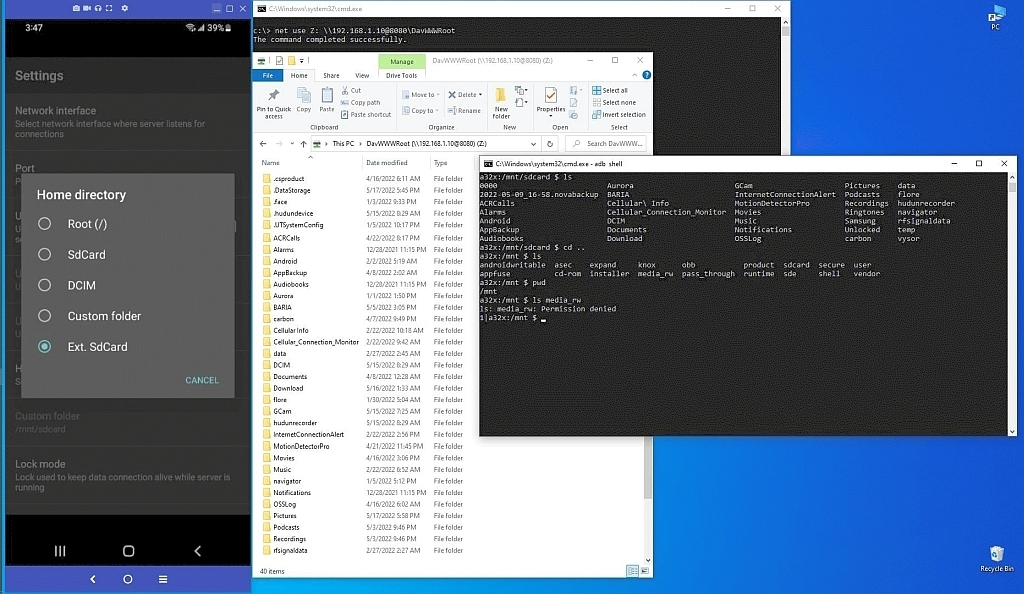
    1. Copy the APK from Windows to the phone and install it directly
    <https://i.postimg.cc/6371SxNd/mountandroidonwindows.jpg>
    2. Run Windows adb to install from the PC to the phone over USB or Wi-Fi:
    C:\> adb install myapp.apk
    3. Use Windows scrcpy and drag the APK into the mirrored Android screen
    <https://i.postimg.cc/wvsbcNBz/scrcpy05.jpg>
    --
    My posts aim to explore how the system actually works beneath the surface,
    in ways most users may never understand because it's a subtle hidden path.
    --- Synchronet 3.21a-Linux NewsLink 1.2
  • From Siard@saylor259@mailbox.org to comp.mobile.android,alt.comp.os.windows-10,alt.comp.os.windows-11 on Sun Jan 4 16:35:14 2026
    From Newsgroup: comp.mobile.android

    Maria Sophia wrote:
    You NEVER need a Google Account on your phone. Ever!

    How about paid apps? As far as I'm aware of, I need a Google account to purchase them. It's the only reason why I still have a Google account.
    --- Synchronet 3.21a-Linux NewsLink 1.2
  • From Maria Sophia@mariasophia@comprehension.com to comp.mobile.android,alt.comp.os.windows-10,alt.comp.os.windows-11 on Sun Jan 4 12:39:43 2026
    From Newsgroup: comp.mobile.android

    Siard wrote:
    Maria Sophia wrote:
    You NEVER need a Google Account on your phone. Ever!

    How about paid apps? As far as I'm aware of, I need a Google account to purchase them. It's the only reason why I still have a Google account.

    Ah! <slaps head!> I forgot about paid apps. I've never bought any, and my
    phone does whatever I need it to do (which is a lot, mind you) w/o them.

    First, this thread is NOT about payware vs freeware, as it's about privacy,
    but I did completely forget about payware (which is as foreign to me as
    malware is), so I do very much apologize for NOT making the statement that
    you don't ever need a Google Account on Android to install all the free
    apps in teh world (and, in fact, "some" payware apps become free).

    If someone is already going to surrender their privacy by buying things
    with their phone, then this PSA simply doesn't apply to them at all.

    You make a good point though, that the process I described only works for
    free software, where, let's be clear, I have over 1000 apps currently
    installed on my Android 64GB Samsung Galaxy A32-5G, all of which are
    freeware, and the combination of which allows me to do what I need to do.

    We could ask what do you need to pay for but that's the topic of many
    threads on the Android newsgroup already, so we won't ask that question.

    It's not applicable to this discussion WHY anyone would willingly throw
    away their privacy by purchasing an app on the Google Play Store. What is applicable is most paid Android apps use Google Play Licensing (LVL) or
    Google Play Billing to verify that we actually bought the app.

    These payment systems require:
    1. Google Play Store installed (it's not installed on my non-rooted phone)
    2. Google Play Services active (you pretty much have to have this though)
    3. A signed-in Google account (once you have that, your privacy is toast)

    Some payware apps, one of which I personally helped the developer with to understand the privacy aspect of, implement a fallback licensing mode.

    For example, Skyica App Finder (which is the best APK search engine for
    Google Play) tries to check Google Play but fails on my system because
    there is no Play Store and no Google account. Instead of refusing to run, Skyica detects the failure and gives you a link to the payware for free
    (where the result is akin to how OSMAND+ payware is free if you download OSMAND~ from outside of the Google Play Store repository).
    <https://skyica.com/appfinder/get/>
    But Skyica uses server-side licensing, which is different than most apps.

    In summary, THANK YOU for pointing out that one sentence should have been clarified (or maybe redacted altogether) from the PSA, as the point was
    that you can download FREE apps without a Google Account.

    It slipped my mind that people PAY for apps (but I'm sure that they do!).
    So I apologize openly and publicly and profusely for that PSA omission!
    --
    Just one person paying it forward with tested steps & free tools to share.
    --- Synchronet 3.21a-Linux NewsLink 1.2
  • From Maria Sophia@mariasophia@comprehension.com to comp.mobile.android,alt.comp.os.windows-10,alt.comp.os.windows-11 on Sun Jan 4 13:08:30 2026
    From Newsgroup: comp.mobile.android

    Siard wrote:
    How about paid apps? As far as I'm aware of, I need a Google account to purchase them. It's the only reason why I still have a Google account.

    Apologies for the doubletap response but I should also have noted that if
    you are willing to sign into your Google Account using the PC, then you
    will obtain the APK, which you can then copy to Android as usual.

    Category 1 apps (see definition below) avoid Google Play for licensing, but they do not avoid Google Play for distribution. You still need to sign in
    once to obtain the paid APK, but after that the app works normally without
    any Google services on the device (which is done for privacy reasons).

    But the Google Play web site will also work if you are willing to sign in.

    The important detail is that downloading the paid APK is only half of the story. Whether the paid features actually work after installation depends entirely on how the app developer implemented licensing.

    Most developers have chosen out of these three categories of licensing:

    Category 1: Apps that do NOT use Google Play Licensing (LVL)
    These apps unlock based on their own internal logic. Some use a built-in
    flag, some use a local "pro key" APK, and some use a server login. If you download the paid APK using Aurora PC while signed into your Google
    account, these apps will install and run normally even on a device with no Google Play services at all.

    Category 2: Apps that use Google Play Licensing but allow fallback
    These apps try to contact Google Play to verify the license, but if that
    fails they either fall back to free mode or rely on a cached license from a previous device. The APK will install, but the paid features may or may not unlock depending on how the developer coded the fallback.

    Category 3: Apps that require Google Play Licensing every time
    These apps will install, but they will not unlock the paid features unless Google Play Store, Google Play Services, and a valid Google account are all present on the device. Without that, the app either refuses to run or
    reverts to free mode. Downloading the APK alone is not enough.

    So the short answer is: yes, you can download the paid APK using Aurora PC
    if you sign in, but whether the paid version actually works on Android
    depends entirely on which of the three categories the app falls into.
    --
    Just one person paying it forward with clear lessons for a better PC.
    --- Synchronet 3.21a-Linux NewsLink 1.2
  • From Jeff Layman@Jeff@invalid.invalid to comp.mobile.android,alt.comp.os.windows-10,alt.comp.os.windows-11 on Mon Jan 5 08:20:08 2026
    From Newsgroup: comp.mobile.android

    On 04/01/2026 06:07, Maria Sophia wrote:
    PSA: Using a PC to download Google Play Store APKs w/o a Google Account

    This cross-platform PSA is about browsing the Google Play Store APK repository from a Windows PC and downloading the official APK files
    directly from the Google Play Store repository and then installing that official Google Play Store APK onto your Android device, without the need
    to create a Google mothership account on your phone or on your Windows PC.

    Snip - see OP for detailed info.

    With the method(s) stated, how do you get app update notifications? I
    assume you don't as there is no GA for Google to let you know there's
    been an update. Of course, often there's no need to update as the
    original app works well, but there might be for security reasons. This
    could be of particular importance with "OS apps" supplied with the phone
    (many are not required for phone use, of course, but are just bloatware according to the App Manager). In fact, how do you get OS updates with
    no GA?

    Also, I'm not sure how this works with "amended" Android systems such as
    those provided my Xiaomi, and no doubt certain apps provided by the cell providers who sell locked phones.
    --
    Jeff
    --- Synchronet 3.21a-Linux NewsLink 1.2
  • From Theo@theom+news@chiark.greenend.org.uk to comp.mobile.android,alt.comp.os.windows-10,alt.comp.os.windows-11 on Mon Jan 5 15:06:01 2026
    From Newsgroup: comp.mobile.android

    Maria Sophia <mariasophia@comprehension.com> wrote:
    Download the PC version here:
    <https://aurorastore.org/aurora-store-pc/>

    According to the Aurora author, aurorastore.org is a phishing site: https://t.me/AuroraSupport/392133

    uBlock Origin has it on a 'badware' list and doesn't let me visit it. I'd
    not download .apks from there.

    Official project links to the Android Google Play Store client replacement:
    <https://aurorastore.org/>
    <https://auroraoss.com/>
    <https://gitlab.com/AuroraOSS/AuroraStore/-/releases>
    <https://f-droid.org/packages/com.aurora.store/>

    Once the APK is on the PC, you can install it on Android in several ways:
    1. Copy the APK from Windows to the phone and install it directly
    <https://i.postimg.cc/6371SxNd/mountandroidonwindows.jpg>
    2. Run Windows adb to install from the PC to the phone over USB or Wi-Fi:
    C:\> adb install myapp.apk
    3. Use Windows scrcpy and drag the APK into the mirrored Android screen
    <https://i.postimg.cc/wvsbcNBz/scrcpy05.jpg>

    There's no need. If you install the Aurora Store app on Android (from the legit Gitlab above, or F-droid) you can use it to download apks directly
    from the Play Store database. You can set it to spoof a different model of device, and if you can find out the versionCode (an integer number) you can download old versions of apps.

    eg here's an old version of a random app: https://www.apkmirror.com/apk/air-canada/air-canada/air-canada-aeroplan-5-67-0-release/

    Underneath 'Variant' is the human version number ('5.67.0') and then the versionCode ('2020013137').

    If I go to Aurora Store, search 'Air Canada', then press 'Manual download'
    and type in the versionCode above, it'll download and install the old
    version of the app.

    It only goes back a certain way - I tried with a 2020 version of the Air
    Canada app and it wasn't able to download it.

    Theo
    --- Synchronet 3.21a-Linux NewsLink 1.2
  • From Siard@saylor259@mailbox.org to comp.mobile.android,alt.comp.os.windows-10,alt.comp.os.windows-11 on Mon Jan 5 16:26:12 2026
    From Newsgroup: comp.mobile.android

    Maria Sophia wrote:
    It slipped my mind that people PAY for apps (but I'm sure that they do!).
    So I apologize openly and publicly and profusely for that PSA omission!

    Why, no need to worry. My words were not meant as criticism. I was just wondering if there is a way to get a paid app without a Google account.

    I have one app where this is possible: the CalenGoo calendar app.
    See 'Alternative Store' in this page: https://android.calengoo.com/pagestore/styled/pagebuy.html

    However, I now understand that the general answer is 'no'.
    --- Synchronet 3.21a-Linux NewsLink 1.2
  • From Maria Sophia@mariasophia@comprehension.com to comp.mobile.android,alt.comp.os.windows-10,alt.comp.os.windows-11 on Mon Jan 5 11:36:57 2026
    From Newsgroup: comp.mobile.android

    Siard wrote:
    Maria Sophia wrote:
    It slipped my mind that people PAY for apps (but I'm sure that they do!).
    So I apologize openly and publicly and profusely for that PSA omission!

    Why, no need to worry. My words were not meant as criticism. I was just wondering if there is a way to get a paid app without a Google account.

    I have one app where this is possible: the CalenGoo calendar app.
    See 'Alternative Store' in this page: https://android.calengoo.com/pagestore/styled/pagebuy.html

    However, I now understand that the general answer is 'no'.

    You are correct.
    i. You can only get FREE apps using the PC version of Aurora store.
    ii. But some apps (like CalenGoo) have official download sites
    iii. Which you can access from the PC & then install from the PC

    I again apologize for forgetting the payware aspect, as I wrote this PSA hastily given I had somewhere to be and this started from a DIFFERENT
    thread on Android where Vanguard and I were trying to help Qihe find an alternative app for usb-otg scanners & printers that used to show up for
    him but no longer does so I was offering the Aurora spoofing capability.

    In that research to assist Qihe in alternative ways to make apps visible, I
    ran into the PC version of the Aurora Google Play Store replacement client.

    And so I hastily wrote up the PSA off the cuff, focusing on the PC-related aspects of the Aurora ability to access the Google Play repository w/o the
    user needing to create a Google Account.

    Looking up CalenGoo's pagebuy.html, it seems to be the developer's direct purchase page helpfully provided to users as an alternative purchase page
    to Google Play for people who do not want to use a Google account.

    Keeping in technical bounds of the way Android licensing work but focusing
    on how it works within the PC environment, apparently that pageby page...
    1. Lets you buy the app directly from the developer from any platform
    2. Provides a download link for the APK after purchase on that platform
    3. Then you copy it from Windows to the Android system to install it
    4. It uses the developer's own licensing system

    This is a BETTER way to play because instead of 30% (or 15% for small developers) going to Google, the entire payment goes to the developer.

    Important: The CalenGoo developer's direct-purchase version does not use
    Google Play Billing. If it did, you would not be able to download or
    install it from a PC without a Google account or the Google Play Store.

    Most paid apps do not do this. Most developers rely on Google Play
    Licensing (LVL) or Google Play Billing, which requires:
    a. Google Play Store installed (which requires an account on the phone)
    b. Google Play Services active (which is hard to avoid non-rooted)
    c. A signed-in Google account (which destroys privacy in an instant)

    Because of that, the general rule is that you cannot get most paid apps
    without a Google account. You can only do it when the developer provides
    an alternative purchase channel, like CalenGoo does, or like a few other
    apps such as Tasker, OsmAnd, or Skyica.

    In summary,
    A. Free apps: Aurora Store PC can download them directly from Google.
    B. Paid apps: Aurora cannot download them from the PC
    C: In your case, you get it from the developer from the PC
    --
    Just one person paying it forward by helping others who later help me.

    --- Synchronet 3.21a-Linux NewsLink 1.2
  • From Maria Sophia@mariasophia@comprehension.com to comp.mobile.android,alt.comp.os.windows-10,alt.comp.os.windows-11 on Mon Jan 5 12:20:29 2026
    From Newsgroup: comp.mobile.android

    Maria Sophia wrote:
    You are correct.
    i. You can only get FREE apps using the PC version of Aurora store.
    ii. But some apps (like CalenGoo) have official download sites
    iii. Which you can access from the PC & then install from the PC

    I keep forgetting to say if you're willing to use your Google Account, you
    can also download payware app APKs using the PC version of Aurora. (But
    then you lose privacy.)

    But there's more... since Aurora does things for you Google will never do.

    The PC version of Aurora allows you to download the APK to your PC, which
    is useful for archival purposes (and for re-imaging en masse by sliding the selected set of APKs over to the Android over USB on your PC to re-install hundreds of APKs in a single swipe without needing to use the Internet).

    On the Android Aurora (but not on the PC Aurora) you can set up automatic updates which work far better than the Google Play Store autoupdate.

    Like way way way way better...
    There's no comparison.

    Most people don't realize how brain dead the Google Play Store automatic updates is. They just assume it covers all their apps, but it's not even
    close as we've tested it and it's essentially garbage compared to what a
    real auto updater for Android will do for you. But that's not on the PC.
    --- Synchronet 3.21a-Linux NewsLink 1.2
  • From Maria Sophia@mariasophia@comprehension.com to comp.mobile.android,alt.comp.os.windows-10,alt.comp.os.windows-11 on Mon Jan 5 13:23:17 2026
    From Newsgroup: comp.mobile.android

    Theo wrote:
    Maria Sophia <mariasophia@comprehension.com> wrote:
    Download the PC version here:
    <https://aurorastore.org/aurora-store-pc/>

    According to the Aurora author, aurorastore.org is a phishing site: https://t.me/AuroraSupport/392133

    uBlock Origin has it on a 'badware' list and doesn't let me visit it. I'd not download .apks from there.

    Oh Geezus. I goofed. Badly. I am sorry. I didn't actually test the PC
    version as I use Android Aurora every day for many years so I trusted it.

    I was in a rush and during my research, I ran into the Aurora PC app.
    Since I use Aurora every day, all day, I didn't check the PC app
    provenance. This is on me. 100% my bad. I apologize. I goofed.

    The links at the PC version work, but it's not from the Aurora developer!
    <https://t.me/AuroraSupport>

    My bad. That's a big mistake. I was in a rush. It bit me.
    Thanks for looking this up for the team.

    Looking at <https://t.me/AuroraSupport/392133> in PC telegram:
    Gabr asked whyorean in April of 2024:
    Was this an experiment of yours, or it's a potentially phishing site?
    All links to the apks, the donation addresses etc seem to CURRENTLY
    be correct, except for links to social network pages that I don't
    remember ever seeing before (and can't find linked from the current
    or recent material on auroraoss.com or gitlab):
    https://www.facebook.com/aurorastoreorg
    https://twitter.com/aurorastoreorg
    https://www.youtube.com/@aurorastoreorg
    Are those yours, @whyorean ?
    But most of all, is aurorastore.org yours ?

    To which "Rahul Patel in Aurora Store" responded on April 3rd, 2024:
    aurorastore.org is a phishing site, not owned or managed by me.
    t.me/AuroraSupport/392133

    Note that the links to the APKs apparently work but since it's not an
    official Aurora solution, we should likely not use it, especially since
    Android saves all the APKs anyway, by default. It's how Android works.

    Thank you Theo for clarifying that the PC app is not official.
    There is no official PC app for the Aurora project.

    Once the APK is on the PC, you can install it on Android in several ways:
    1. Copy the APK from Windows to the phone and install it directly
    <https://i.postimg.cc/6371SxNd/mountandroidonwindows.jpg>
    2. Run Windows adb to install from the PC to the phone over USB or Wi-Fi: >> C:\> adb install myapp.apk
    3. Use Windows scrcpy and drag the APK into the mirrored Android screen
    <https://i.postimg.cc/wvsbcNBz/scrcpy05.jpg>

    There's no need. If you install the Aurora Store app on Android (from the legit Gitlab above, or F-droid) you can use it to download apks directly
    from the Play Store database.

    Yes. Most people don't realize TWO things about saving Android APKs.
    1. Android saves the base APK all the time (it's how Android does things)
    /data/app/~~randomString==/com.example.app-xxxxxx==/base.apk
    In that same directory will be split APKs or App Bundles.
    base.apk
    split_config.arm64_v8a.apk
    split_config.en.apk
    split_config.xxhdpi.apk
    2. But Aurora saves the full APK (but only if you check the box)
    /Android/data/com.aurora.store/files/Downloads/

    The checkbox to NOT DELETE the APK after installation has moved around in
    the Aurora app over time. My version is 4.5.1 where it's located at
    Settings gear > Settings > Downloads > Delete APK post-install = OFF

    As Theo noted, if this is turned on, you get the ENTIRE installer saved on
    your local storage. Because of Android 11+ storage restrictions, you can no longer choose the download directory. You're stuck with internal storage.

    You can set it to spoof a different model of
    device, and if you can find out the versionCode (an integer number) you can download old versions of apps.

    eg here's an old version of a random app: https://www.apkmirror.com/apk/air-canada/air-canada/air-canada-aeroplan-5-67-0-release/

    Underneath 'Variant' is the human version number ('5.67.0') and then the versionCode ('2020013137').

    If I go to Aurora Store, search 'Air Canada', then press 'Manual download' and type in the versionCode above, it'll download and install the old
    version of the app.

    It only goes back a certain way - I tried with a 2020 version of the Air Canada app and it wasn't able to download it.

    This is good advice from Theo, which was the point of the Android thread
    that you can spoof many common devices with Aurora on Android.

    Aurora gives you filters Google play store will NEVER give you also.
    a. Don't show GSF dependent apps
    b. Don't show paid apps
    c. Don't show apps with adds
    d. Show only apps with ratings of (select one)
    e. Show only apps with download numbers of (select one)

    But best of all, without Aurora on Android, you couldn't download APKs
    directly from the Google Play Store repo without having a Google Account
    set up on the phone.

    Note very carefully that having a Google Account (e.g., for mail) and
    having a Google Account set up on the phone are very different things.

    As long as you check your email using a non-Google MUA, the Google Account
    is not set up on the phone - which makes a world of difference in privacy.
    --
    Usenet is off the cuff so sometimes we goof but if we wish to maintain credibility we need to own our mistakes to openly apologize immedately!
    --- Synchronet 3.21a-Linux NewsLink 1.2
  • From Maria Sophia@mariasophia@comprehension.com to comp.mobile.android,alt.comp.os.windows-10,alt.comp.os.windows-11 on Mon Jan 5 14:11:46 2026
    From Newsgroup: comp.mobile.android

    Jeff Layman wrote:
    With the method(s) stated, how do you get app update notifications? I
    assume you don't as there is no GA for Google to let you know there's
    been an update. Of course, often there's no need to update as the
    original app works well, but there might be for security reasons. This
    could be of particular importance with "OS apps" supplied with the phone (many are not required for phone use, of course, but are just bloatware according to the App Manager). In fact, how do you get OS updates with
    no GA?

    Also, I'm not sure how this works with "amended" Android systems such as those provided my Xiaomi, and no doubt certain apps provided by the cell providers who sell locked phones.

    Hi Jeff,

    Happy New Year!

    The PC method works but it's NOT from the official Aurora developers, so it should be taken with a healthy measure of skepticism. I should NEVER have posted this PSA but I was so excited about it when I was answering Qihe's question (about spoofing) that I wanted the PC folks to benefit from it.

    Turns out I was too hasty.
    The PC version works (apparently); but it can't be trusted.

    As for "updates", my version of Android Aurora 4.5.1 (60) has that.
    Settings gear > Settings > Updates
    Auto-update apps (off, notify only, notify & install)
    Automatic updates frequency (slider for frequency)
    Incompatible updates (show updates for incompatible or disabled apps)

    Please note very clearly the very very very non-intuitive fact that the
    Google Play Store update does NOT update what people "think" it does.

    Google Play Store update only updates a small subset of apps on my system, simply because I install apps from a variety of mechanisms, but luckily,
    the Aurora update mechanism is way (way way way) better than Google's.

    However, even Aurora's update mechanism isn't what most people might think.
    Aurora Store can update apps if...
    a. The app was originally installed by Aurora
    b. Or the app was installed from Google Play
    (but is not tied to Play Protect)
    c. With relatively minor caveats below...

    Aurora Store cannot update apps when
    A. It's a system app
    B. The app was installed by another user profile
    C. The app was installed from Play Store with Play Protect enforcement
    (e.g., banking apps)
    D. if you disabled the "session installer" (which is on by default)
    (Most apps are split APKs nowadays, so you need this installer.)

    Of course, there are app updaters which are apps specifically tailored to
    do the three things you need done in order to update all apps that have
    updates available.

    1. It scans the entire Android device (which takes a while)
    2. It scans the Google Play Store and other repositories as needed
    3. The delta in version numbers gives you a list to update

    While the app updaters generally do an almost perfect job, the aurora
    updater is good enough for most people as it updates almost everything.

    But since this is a PC thread, that's a topic for Android alone.
    --
    Every peson on Usenet adds tribal knowledge to the group & its archives.
    --- Synchronet 3.21a-Linux NewsLink 1.2
  • From Arno Welzel@usenet@arnowelzel.de to comp.mobile.android,alt.comp.os.windows-10,alt.comp.os.windows-11 on Tue Jan 6 00:42:33 2026
    From Newsgroup: comp.mobile.android

    Maria Sophia, 2026-01-04 18:39:

    [...]
    You make a good point though, that the process I described only works for free software, where, let's be clear, I have over 1000 apps currently installed on my Android 64GB Samsung Galaxy A32-5G, all of which are freeware, and the combination of which allows me to do what I need to do.

    I often use my phone to get tickets for public transport. This is much
    easier than using vending machines which often don't work. I also hate
    to deal with all these paper tickets. And I can also ask the office
    assistance to book train tickets for me and just have to enter the
    ticket code in the app to use it.

    But besides that most apps I use are also free and often open source as
    well. F-Droid is a good source for this too.
    --
    Arno Welzel
    https://arnowelzel.de
    --- Synchronet 3.21a-Linux NewsLink 1.2
  • From Maria Sophia@mariasophia@comprehension.com to comp.mobile.android,alt.comp.os.windows-10,alt.comp.os.windows-11 on Mon Jan 5 21:37:01 2026
    From Newsgroup: comp.mobile.android

    Arno Welzel wrote:
    You make a good point though, that the process I described only works for
    free software...

    I often use my phone to get tickets for public transport. This is much
    easier than using vending machines which often don't work. I also hate
    to deal with all these paper tickets. And I can also ask the office assistance to book train tickets for me and just have to enter the
    ticket code in the app to use it.

    But besides that most apps I use are also free and often open source as
    well. F-Droid is a good source for this too.

    Hi Arno,

    Happy New Year!

    I understand. This thread was never supposed to be about payware vs free.
    It had simply slipped my mind, in the rush to publish the PSA that there's
    a difference in the login for the PC Aurora, which, as we now know, Theo
    found out is not official. It works (apparently). But I wouldn't trust it.

    Especially, as Theo also noted, the Android Aurora allows you to NOT DELETE
    the downloaded APKs after installing them anyway (then copied to the PC).

    And Jeff's concerns about autoupdate notifications is also handled by
    Aurora, way (way!) better than the official google play store app does it.

    And for the lurkers, F-Droid and Aurora are nothing whatsoever alike.
    a. F-Droid is its own separate repository of Android apps
    b. Aurora is merely a Google Play Store client
    So Aurora installs EXACTLY the same files that Google Play Store does.

    Siard is correct though, that you have to log into Aurora using a Google Account in order to install purchased apps, but there are still some
    advantages which are huge in doing that over using the Google Play app.
    1. Aurora does not delete the APK installers after installation!
    2. Aurora can spoof sw/hw to make applications available to you
    3. Aurora doesn't create a Google Account on your phone
    4. Aurora does a (much) better auto update than Google Play does
    5. And Aurora has better filters than the Google Play Store has
    etc.

    While Aurora's search engine isn't better than that of Google Play Store,
    when you pair Aurora with the free Skyica app finder, it's the best
    combination in the world for scraping the Google Play repo for apps!
    <https://skyica.com/appfinder/get/>
    --
    How you use Android, particularly how you save & reuse your installers,
    is something that must be designed into everything you do on the PC.
    --- Synchronet 3.21a-Linux NewsLink 1.2
  • From Frank Slootweg@this@ddress.is.invalid to comp.mobile.android,alt.comp.os.windows-10,alt.comp.os.windows-11 on Tue Jan 6 10:38:08 2026
    From Newsgroup: comp.mobile.android

    Arno Welzel <usenet@arnowelzel.de> wrote:
    Maria Sophia, 2026-01-04 18:39:

    [...]
    You make a good point though, that the process I described only works for free software, where, let's be clear, I have over 1000 apps currently installed on my Android 64GB Samsung Galaxy A32-5G, all of which are freeware, and the combination of which allows me to do what I need to do.

    I often use my phone to get tickets for public transport. This is much
    easier than using vending machines which often don't work. I also hate
    to deal with all these paper tickets. And I can also ask the office assistance to book train tickets for me and just have to enter the
    ticket code in the app to use it.

    I'm confused! I understand what you're saying, but while you pay
    *with* these apps, these apps *themselves* are unlikely to be paid
    apps. And these apps have little to do with having a Google Account
    on/for the phone (other than the already mentioned aspect of automatic
    updating of these apps).

    Having said that, we also use several apps for public transport (bus,
    tram, metro, train) both locally and in other countries and both for
    trip planning and for purchasing/paying 'tickets'.

    But besides that most apps I use are also free and often open source as
    well. F-Droid is a good source for this too.
    --- Synchronet 3.21a-Linux NewsLink 1.2
  • From Maria Sophia@mariasophia@comprehension.com to comp.mobile.android,alt.comp.os.windows-10,alt.comp.os.windows-11 on Tue Jan 6 09:06:21 2026
    From Newsgroup: comp.mobile.android

    Maria Sophia wrote:
    Most people don't realize how brain dead the Google Play Store automatic updates is. They just assume it covers all their apps, but it's not even close as we've tested it and it's essentially garbage compared to what a
    real auto updater for Android will do for you. But that's not on the PC.

    I want to redirect this tangent since Theo found that the Aurora PC app was
    not from the approved sources, even as it seems to work by all accounts.

    Since I goofed with this premature PSA, it behooves me to explain and delve deeper to understand what this Aurora-PC stuff is, and what it is not.

    Just to be clear, what happened was three steps that led to this PSA:
    1. I was researching an answer for Qihe regarding spoofing
    2. So I wrote up that answer pointing him to Aurora's spoofing
    3. In that research, I ran into the PC Aurora so I wrote this PSA

    I should have researched further the PC Aurora, as I had simply "assumed"
    it was from the official developers. It's not. It's not an official Aurora.

    Apparently it works. According to the telegram support for the real Aurora.
    For now.

    But we can't rely on PC Aurora because we are unaware of its provenance.

    Having said that, I searched for security research on this so-called
    PC-Aurora, and, strangely, I can find none.

    So far, I can find zero published security-researcher analyses, malware reports, threat-intel writeups, CVEs, or forensic reports about aurorastore.org.

    No major malware labs, no independent analysts, no reverse-engineers, no threat-intel feeds, and no OSINT researchers have published anything on it.

    As far as I can determine in quick searches anyway, it's not listed in:
    VirusTotal collections
    Hybrid Analysis
    AnyRun
    Joe Sandbox
    Intezer
    Malpedia
    Abuse.ch
    URLHaus
    ThreatFox
    OpenPhish
    PhishTank
    AlienVault OTX
    GreyNoise

    I can't find anything in the public forums and blogs about it either.
    Recorded Future (public feeds)
    BleepingComputer forums
    MalwareTips forums
    Mastodon infosec circles
    OSINT communities
    StackExchange Security
    Twitter infosec accounts
    XDA Developers
    r/Android
    r/AndroidDev
    r/Malware

    Nor can I find security research papers on it:
    No papers
    No blog posts
    No advisories
    No CVEs
    No vendor bulletins

    There are no samples I found in public malware databases tagged with:
    aurorastore.org
    "Aurora Store PC"
    "AuroraStorePC.exe"
    "AuroraStoreSetup.exe"
    "AuroraStore Windows"
    If malware exists, it does not seem to have been submitted to any public analysis platform listed above.

    Yet I get this from uBlock-origin-protection on some browsers:
    uBlock Origin has prevented the following page from loading:
    https://aurorastore.org/aurora-store-pc/
    Because of the following filter:
    ||aurorastore.org^$document
    Found in: uBlock filters iV Badware risks
    [_]Don't warn me again about this site

    Looking that up, apparently when uBlock blocks a domain at the document
    level ($document), it means:
    a. The domain has been explicitly classified as a badware risk
    b. The classification is intentional, not heuristic
    c. The domain was added manually by a maintainer or via a trusted feed
    But, apparently uBlock does not perform malware analysis.
    It flags risk, not payload.

    But things don't get flagged lightly, where some of the rules that u-Block Origin apparently uses are these below which likely fit the PC-Aurora tool.
    a. it impersonates a known project
    b. it distributes software that does not match the official project
    c. it uses deceptive branding
    d. it has been reported as suspicious by multiple users

    As far as I can tell, there is no public threat-intel record of
    aurorastore.org being malware or phishing. However, this does not mean it's safe, but only that it has not been analyzed or reported or that it was analyzed and nothing bad was found (yet).

    But it's clearly an impersonation of branding so it's not to be trusted.
    --- Synchronet 3.21a-Linux NewsLink 1.2
  • From Maria Sophia@mariasophia@comprehension.com to comp.mobile.android,alt.comp.os.windows-10,alt.comp.os.windows-11 on Tue Jan 6 09:18:33 2026
    From Newsgroup: comp.mobile.android

    Maria Sophia wrote:
    But it's clearly an impersonation of branding so it's not to be trusted.

    Given it's not malware (yet), the ugly responsibility of determining "What
    is it?" is on me since I brought this up in haste, so I delved deeper.

    So what is it?
    What I found out, is too long (even for me) to explain fully.

    Q: What is the purpose of the PC-Aurora site?
    A: The site's purpose appears to be multiple forms of monetization.

    For gory details, see the next post, but (warning!) it's long and sordid.
    --
    Just one person paying it forward by helping others who later help me.
    --- Synchronet 3.21a-Linux NewsLink 1.2
  • From Maria Sophia@mariasophia@comprehension.com to comp.mobile.android,alt.comp.os.windows-10,alt.comp.os.windows-11 on Tue Jan 6 09:26:27 2026
    From Newsgroup: comp.mobile.android

    Maria Sophia wrote:
    Q: What is the purpose of the PC-Aurora site?
    A: The site's purpose appears to be multiple forms of monetization.


    While nobody has written up the AURORA-PC web site as far as I can tell,
    and only u-Block-Origin has manually flagged it (as far as I can tell),
    this research below explains what the site aurorastore.org seems to be.

    Q: The question here is what the site is doing and why it exists.
    A: (see below)

    1. Overview
    Aurorastore.org is not a malware operation in the classic sense.

    It is a fraudulent impersonation site that copies the name of the real
    Aurora Store project in order to collect cryptocurrency donations,
    affiliate revenue, and search traffic. It is part of a low effort SEO scam network that impersonates many unrelated apps.

    2. Identity fraud
    The site claims to represent the real Aurora Store developer.

    It even uses the real developer's name on its donation page.
    The real developer has publicly denied any connection.
    This is identity fraud for profit.

    3. Donation harvesting
    The donation page is the clearest indicator of intent.

    It asks users to send Bitcoin, Ethereum, and Bitcoin Cash to static wallet addresses. It claims the money will support the developer and maintain a
    "game mod". Aurora Store is not a game mod. This text is copied from other
    scam sites. The goal is to trick users into sending cryptocurrency to the operator of the site.

    4. Affiliate revenue
    The site contains affiliate links for Android emulators such as
    BlueStacks. These links include tracking codes. Every install generates
    money for the operator. This is a common tactic used by SEO scam sites.

    5. SEO spam network
    The site includes unrelated content about Roblox executors, modding
    tools, and other APK sites. This is a known pattern used by content farm networks that mass produce fake pages for many different apps. The text
    is generic, repetitive, and often incorrect.

    It is designed to attract search traffic, not to provide accurate
    information.

    6. Fake download links
    The site uses bit.ly links for APK downloads. Legitimate developers
    generally do not use URL shorteners for APK distribution.
    Shortened links hide the real destination and allow the operator to
    change the payload at any time.

    This is a red flag for deceptive distribution.

    7. False claims about Aurora Store
    The site makes many statements that are factually wrong.

    It claims Aurora Store is on Google Play.
    It claims you can install it through the Play Store inside BlueStacks.
    It claims it is a Windows app.
    It claims it is a FireStick app.
    None of these claims are true.

    These errors show that the operator does not know or care what
    Aurora Store actually is.

    8. Purpose of the site
    Based on the evidence, aurorastore.org is best described as a multi
    purpose scam site. Its goals are to collect cryptocurrency donations,
    earn affiliate revenue, capture search traffic, and redirect users to
    other scam pages.

    It is not a targeted attack and it is not a sophisticated malware
    operation. It is a low effort impersonation site apparently built
    from a generic template used across many fake APK and modding sites.

    9. Why it is dangerous
    Even if the site does not distribute malware, it is still harmful.

    It impersonates a real open source project, misleads users, and encourages
    them to install software from untrusted sources. It also attempts to
    steal money by pretending to be the real developer.

    10. Conclusion
    Aurorastore.org is not an alternative Aurora Store site.
    It is a fraudulent impersonation site operated by a low effort SEO scam network.

    Its purpose is to collect cryptocurrency, generate affiliate revenue,
    and exploit the reputation of the real Aurora Store project.

    Whew!
    --
    Usenet is off the cuff so sometimes we goof but if we wish to maintain credibility we need to own our mistakes to openly clarify immedately!
    --- Synchronet 3.21a-Linux NewsLink 1.2
  • From Arno Welzel@usenet@arnowelzel.de to comp.mobile.android,alt.comp.os.windows-10,alt.comp.os.windows-11 on Wed Jan 7 00:52:03 2026
    From Newsgroup: comp.mobile.android

    Frank Slootweg, 2026-01-06 11:38:

    Arno Welzel <usenet@arnowelzel.de> wrote:
    Maria Sophia, 2026-01-04 18:39:

    [...]
    You make a good point though, that the process I described only works for >>> free software, where, let's be clear, I have over 1000 apps currently
    installed on my Android 64GB Samsung Galaxy A32-5G, all of which are
    freeware, and the combination of which allows me to do what I need to do. >>
    I often use my phone to get tickets for public transport. This is much
    easier than using vending machines which often don't work. I also hate
    to deal with all these paper tickets. And I can also ask the office
    assistance to book train tickets for me and just have to enter the
    ticket code in the app to use it.

    I'm confused! I understand what you're saying, but while you pay
    *with* these apps, these apps *themselves* are unlikely to be paid
    apps. And these apps have little to do with having a Google Account
    on/for the phone (other than the already mentioned aspect of automatic updating of these apps).

    Yes, indeed - the apps are for free, I pay only for the tickets.
    --
    Arno Welzel
    https://arnowelzel.de
    --- Synchronet 3.21a-Linux NewsLink 1.2
  • From Maria Sophia@mariasophia@comprehension.com to comp.mobile.android,alt.comp.os.windows-10,alt.comp.os.windows-11 on Tue Jan 6 23:29:22 2026
    From Newsgroup: comp.mobile.android

    Arno Welzel wrote:
    I'm confused! I understand what you're saying, but while you pay
    *with* these apps, these apps *themselves* are unlikely to be paid
    apps. And these apps have little to do with having a Google Account
    on/for the phone (other than the already mentioned aspect of automatic
    updating of these apps).

    Yes, indeed - the apps are for free, I pay only for the tickets.

    Hi Arno,

    Happy New Year!

    Ah, that's a different use case then, where the Android Aurora will install even payware apps, but the difference is you have to use your Google
    Account on Aurora instead of the anonymous account to access payware apps.

    The good news is Aurora complements (or replaces) the Google Play Store app because it does useful things that Google will never let you do otherwise.

    1. Aurora does not delete the APK installers after installation!
    2. Aurora can spoof sw/hw to make applications available to you
    3. Aurora doesn't create a privacy-robbing Google Account on your phone
    4. Aurora does a (much) better auto update than Google Play does
    5. And Aurora has better filters than the Google Play Store has
    etc.
    Although even the much better filters of Aurora pale in comparison to
    Skyica App Finder (which I helped the developer test a few years ago).
    <https://skyica.com/appfinder/get/>

    If anyone can find a better search engine than Skyica, then I'll be shocked because I helped the developer add some of the nice features he has in it.

    The best of all worlds is:
    a. Use the Google Play Store, if you must, but you'll lose privacy
    b. Use the Aurora app whether or not you use the Google Play Store app
    c. Find the files you need with the Skyica App Finder filter set
    <https://skyica.com/appfinder/features/>
    --
    How you use Android, particularly how you save & reuse your installers,
    is something that must be designed into the very first install steps.
    --- Synchronet 3.21a-Linux NewsLink 1.2