I wanted to clone my 500 Gb LM nvme disk to a 500 Gb mechanical drive,
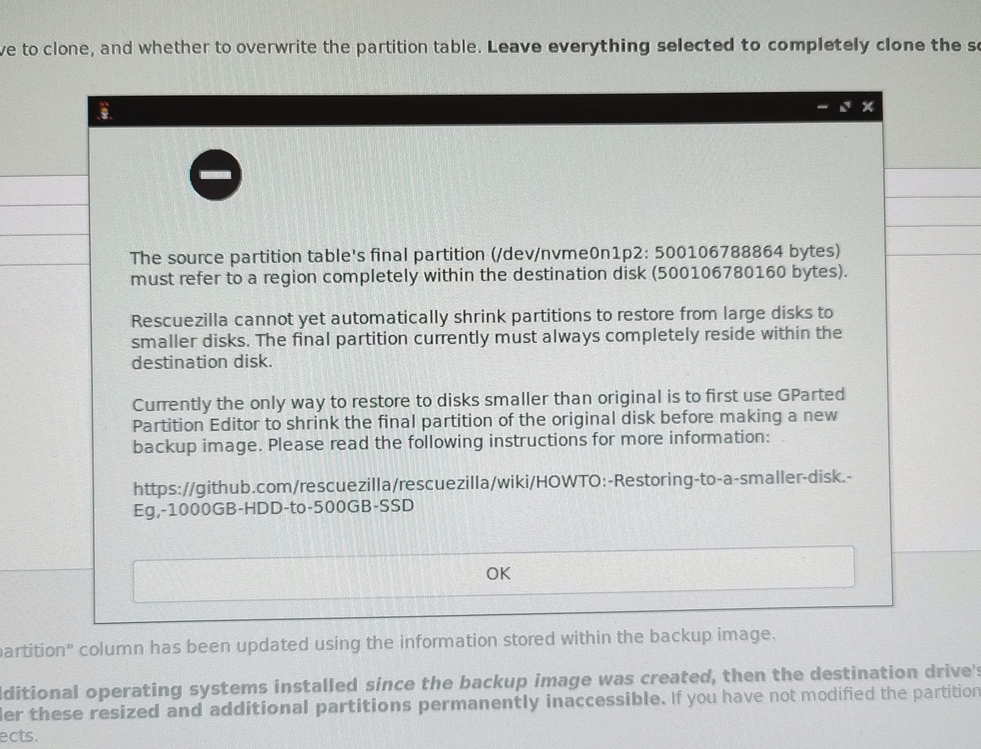
but Rescuezilla reports that the target disk is too small. ??
https://auslink.info/linux/rz.jpg
I also get that message when trying to create an image.
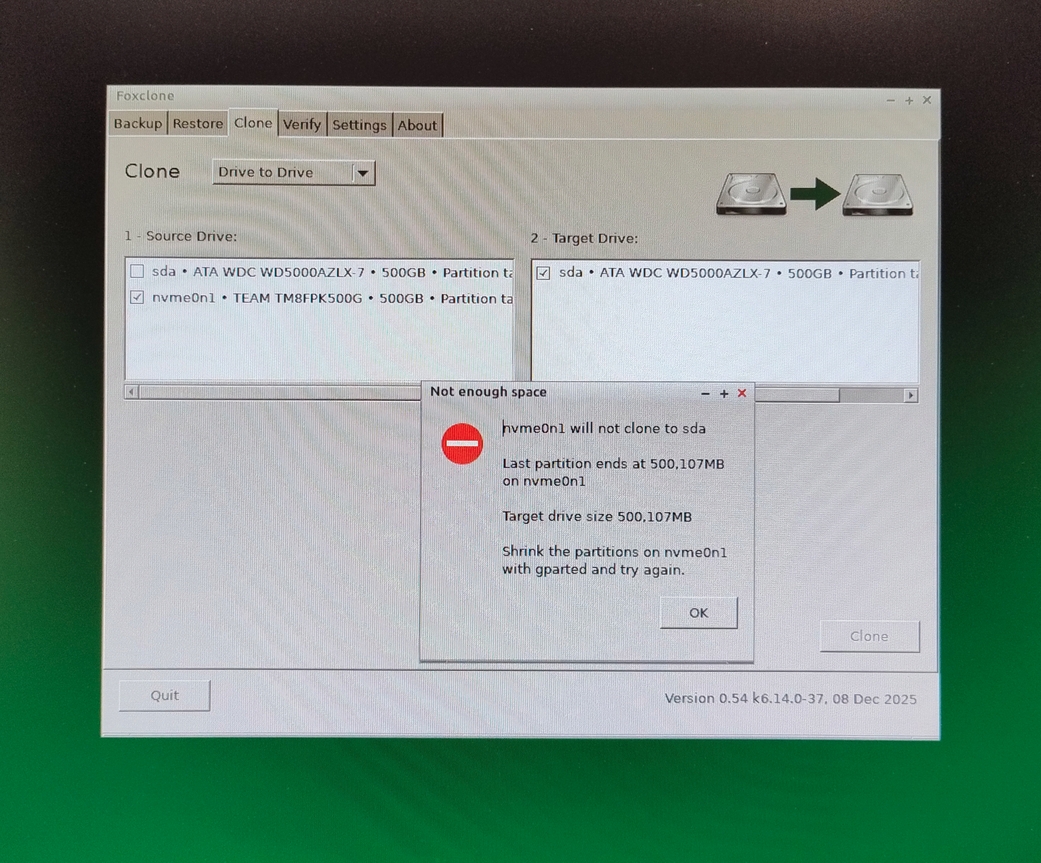
Foxclone also reports that the disk is too small.
https://auslink.info/linux/foxclone.jpg
How come? thanks,
I wanted to clone my 500 Gb LM nvme disk to a 500 Gb mechanical drive,
but Rescuezilla reports that the target disk is too small. ??
https://auslink.info/linux/rz.jpg
I also get that message when trying to create an image.
Foxclone also reports that the disk is too small.
https://auslink.info/linux/foxclone.jpg
How come? thanks,
I wanted to clone my 500 Gb LM nvme disk to a 500 Gb mechanical drive, but Rescuezilla reports that the target disk is too small. ??
https://auslink.info/linux/rz.jpg
I also get that message when trying to create an image.
Foxclone also reports that the disk is too small.
https://auslink.info/linux/foxclone.jpg
How come? thanks,
I wanted to clone my 500 Gb LM nvme disk to a 500 Gb mechanical drive,
but Rescuezilla reports that the target disk is too small. ??
https://auslink.info/linux/rz.jpg
I also get that message when trying to create an image.
Foxclone also reports that the disk is too small.
I wanted to clone my 500 Gb LM nvme disk to a 500 Gb mechanical drive,
but Rescuezilla reports that the target disk is too small. ??
https://auslink.info/linux/rz.jpg
I also get that message when trying to create an image.
Foxclone also reports that the disk is too small.
https://auslink.info/linux/foxclone.jpg
How come? thanks,
On 12/30/25 2:31 AM, Axel wrote:
This may sound off beat, but I image my linux partion(s) with Acronis True Image from Windows.-a-a Unfortunately they only sell the software as a yearly license, I got the last year 2020 that they were doing perpetual licenses.
I wanted to clone my 500 Gb LM nvme disk to a 500 Gb mechanical drive,
but Rescuezilla reports that the target disk is too small. ??
https://auslink.info/linux/rz.jpg
I also get that message when trying to create an image.
Foxclone also reports that the disk is too small.
https://auslink.info/linux/foxclone.jpg
How come? thanks,
And yes, I've imaged and restored a system 4 times.-a-a (horrible time getting vmware working).
Maybe Macrium would work from windows the same way.-a-a Never tried it.
On 12/30/25 2:31 AM, Axel wrote:
This may sound off beat, but I image my linux partion(s) with Acronis
I wanted to clone my 500 Gb LM nvme disk to a 500 Gb mechanical drive,
but Rescuezilla reports that the target disk is too small. ??
https://auslink.info/linux/rz.jpg
I also get that message when trying to create an image.
Foxclone also reports that the disk is too small.
https://auslink.info/linux/foxclone.jpg
How come? thanks,
True Image from Windows.
Unfortunately they only sell the software as a yearly license, I got
the last year 2020 that they were doing perpetual licenses.
And yes, I've imaged and restored a system 4 times.-a-a (horrible time getting vmware working).
Maybe Macrium would work from windows the same way.-a-a Never tried it.
On Tue, 30 Dec 2025 18:31:00 +1100, Axel wrote:
I wanted to clone my 500 Gb LM nvme disk to a 500 Gb mechanical drive,Why do you need to rCLclonerCY? Just do a file copy.
but Rescuezilla reports that the target disk is too small. ??
https://auslink.info/linux/rz.jpg
I also get that message when trying to create an image.
Foxclone also reports that the disk is too small.
Lawrence DrCOOliveiro wrote:
Why do you need to rCLclonerCY? Just do a file copy.
I want a duplicate of the OS drive as a direct replacement if needed
This may sound off beat, but I image my linux partion(s) with
Acronis True Image from Windows.
On Tue, 12/30/2025 2:31 AM, Axel wrote:
I wanted to clone my 500 Gb LM nvme disk to a 500 Gb mechanical drive, but Rescuezilla reports that the target disk is too small. ??First, I will post some of Pauls Demo Hardware, and put the numbers close to yours.
https://auslink.info/linux/rz.jpg
I also get that message when trying to create an image.
Foxclone also reports that the disk is too small.
https://auslink.info/linux/foxclone.jpg
How come? thanks,
These are total disk sizes. I only own one NVMe, just for demos like this.
WD5003ABYZ-011FA0 500,107,862,016 contains /dev/sdb? partitions
Samsung 970 EVO Plus 500GB 500,107,862,016 contains /dev/nvme0n1p? partitions
******* Begin Felix details
Final partition /dev/nvme0n1p2 500,106,788,864 <<=== a partition "envelope" problem???
Destination drive 500,106,780,160 <<=== too small ? Need to show me the details...
You'll need to gather more info, to decide what to do next.
A partition can be 1TB in size and have a 500GB file system inside. This is "wasteful".
A partition can be 500GB in size and have a 1TB file system. The file system "hangs
off the end" and this could/would be fatal, there could easily be damage.
A filesystem is normally "slightly smaller" than the partition size. A tiny bit of white space
lives on the end of the filesystem. This is not really all that wasteful. Fractional waste.
No notations are shown for this very slight difference internally for a partition.
These are examples of envelope problems.
Both Windows and Linux make these mistakes. Linux tends to do this slightly more
"visibly", doing one step in partition preparation before the other, during resize operations.
A "failure" in the middle of an operation, leaves one of the above "situations".
The Gparted details area, shows separate steps for partition handling.
There are typically no tools that say "I notice you have an envelope problem, let
me fix this for you". Sometimes, you may get an error notation on the gparted screen,
that it knows something is amiss.
*******
This just shows you how you can get a text printout of
your storage devices and precise byte values for the items.
sudo apt install disktype
sudo disktype /dev/sda # dumps some info for my SATA drive
sudo disktype /dev/nvme0n1 # dumps some info for my NVMe drive
bullwinkle@FLOTILLA:~$ sudo disktype /dev/nvme0n1
--- /dev/nvme0n1
Block device, size 465.8 GiB (500107862016 bytes) <=== total drive size here
DOS/MBR partition map
Partition 1: 2.000 TiB (2199023255040 bytes, 4294967295 sectors from 1)
Type 0xEE (EFI GPT protective)
GPT partition map, 128 entries
Disk size 465.8 GiB (500107862016 bytes, 976773168 sectors)
Disk GUID FAA8052D-D088-9446-A6E1-B15544E4D408
Partition 1: 100 MiB (104857600 bytes, 204800 sectors from 2048)
Type EFI System (FAT) (GUID 28732AC1-1FF8-D211-BA4B-00A0C93EC93B)
Partition Name "EFI system partition"
Partition GUID A78EC35F-0313-584D-8131-E7F305AB8CBA
FAT32 file system (hints score 4 of 5)
Volume size 96 MiB (100663296 bytes, 98304 clusters of 1 KiB)
Partition 2: 16 MiB (16777216 bytes, 32768 sectors from 206848)
Type MS Reserved (GUID 16E3C9E3-5C0B-B84D-817D-F92DF00215AE)
Partition Name "Microsoft reserved partition"
Partition GUID 424FE61B-9BF9-7A4C-A4BD-B9427F655534
Blank disk/medium
Partition 3: 82.08 GiB (88128618496 bytes, 172126208 sectors from 239616)
Type Basic Data (GUID A2A0D0EB-E5B9-3344-87C0-68B6B72699C7)
Partition Name "Basic data partition"
Partition GUID 80DBB40E-068F-5647-AB85-81AF5354DFF5
NTFS file system
Volume size 82.08 GiB (88128617984 bytes, 172126207 sectors)
Partition 4: 835 MiB (875560960 bytes, 1710080 sectors from 172365824)
Type Unknown (GUID A4BB94DE-D106-404D-A16A-BFD50179D6AC)
Partition Name ""
Partition GUID C8829DB7-BE7B-4148-90DF-ADC92FE39548
NTFS file system
Volume size 835.0 MiB (875560448 bytes, 1710079 sectors)
Partition 5: 977 MiB (1024458752 bytes, 2000896 sectors from 174077952)
Type Linux Swap (GUID 6DFD5706-ABA4-C443-84E5-0933C84B4F4F) <=== Paul notices some
Partition Name "" naughty activity needs
Partition GUID 1AA2EE74-36EB-B24D-9656-214ECF74D5FE to be fixed :-/ Anyway...
Linux swap, version 2, subversion 1, 4 KiB pages, little-endian It should be like
Swap size 977.0 MiB (1024450560 bytes, 250110 pages of 4 KiB) Partition 4.
Partition 6: unused
bullwinkle@FLOTILLA:~$ sudo disktype /dev/sdb
--- /dev/sdb
Block device, size 465.8 GiB (500107862016 bytes) <=== total drive size here
DOS/MBR partition map
Partition 1: 465.8 GiB (500107861504 bytes, 976773167 sectors from 1)
Type 0xEE (EFI GPT protective)
GPT partition map, 128 entries
Disk size 465.8 GiB (500107862016 bytes, 976773168 sectors)
Disk GUID 9248B517-FDF8-AF4A-94EF-01DA6DC27F59
Partition 1: 476 MiB (499122176 bytes, 974848 sectors from 2048)
Type EFI System (FAT) (GUID 28732AC1-1FF8-D211-BA4B-00A0C93EC93B)
Partition Name ""
Partition GUID 6A077AE2-32EA-394A-91CA-4C9C43DB461A
GRUB boot loader, unknown compat version 0
FAT32 file system (hints score 5 of 5)
Volume size 475.1 MiB (498130944 bytes, 121614 clusters of 4 KiB) Partition 2: 1.907 GiB (2047868928 bytes, 3999744 sectors from 976896) <=== an intentional swap...
Type Linux Swap (GUID 6DFD5706-ABA4-C443-84E5-0933C84B4F4F) No surprise here.
Partition Name ""
Partition GUID 62972AB2-3976-1145-8A29-9B7EF56AD1AB
Linux swap, version 2, subversion 1, 4 KiB pages, little-endian
Swap size 1.907 GiB (2047860736 bytes, 499966 pages of 4 KiB)
Partition 3: 190.7 GiB (204800524288 bytes, 400001024 sectors from 4976640)
Type Unknown (GUID AF3DC60F-8384-7247-8E79-3D69D8477DE4)
Partition Name ""
Partition GUID DF0F1722-DCCA-A340-A42E-95906218245D
Ext4 file system
UUID 3FD653C0-C199-4033-A4FD-2BB25E6EE55B (DCE, v4)
Last mounted at "/"
Volume size 190.7 GiB (204800524288 bytes, 50000128 blocks of 4 KiB) Partition 4: 181.6 GiB (194977464320 bytes, 380815360 sectors from 404977664)
Type Unknown (GUID AF3DC60F-8384-7247-8E79-3D69D8477DE4)
Partition Name "DEVUAN"
Partition GUID D88B9340-57E5-1147-8EA5-5970739BF95E
Ext4 file system
Volume name "DEVUAN"
UUID CC66CAE3-FC94-4B7B-841B-2789C71C4149 (DCE, v4)
Last mounted at "/"
Volume size 181.6 GiB (194977464320 bytes, 47601920 blocks of 4 KiB) Partition 5: unused
bullwinkle@FLOTILLA:~$
*******
Try and dump your storage info that way.
And without making changes right away, you can do
gparted # See if you got one
sudo apt install gparted # If it needs to be installed
sudo gparted # Menu driven, select drive, check for notations
# or little pimples off to the side with respect to
# something. Hold your mouse-over for details.
You don't need to do anything with the tool right away, but just
check to see if gparted is unhappy with the kibble you feed it.
You should still post your "disktype" output so we can
see what's going on. If you don't want to display the partition
names, just type something meaningful over them with a name that
indicates an OS or a name that indicates DATA.
Paul
Paul wrote:
On Tue, 12/30/2025 2:31 AM, Axel wrote:
I wanted to clone my 500 Gb LM nvme disk to a 500 Gb mechanical drive, but Rescuezilla reports that the target disk is too small. ??First, I will post some of Pauls Demo Hardware, and put the numbers close to yours.
https://auslink.info/linux/rz.jpg
I also get that message when trying to create an image.
Foxclone also reports that the disk is too small.
https://auslink.info/linux/foxclone.jpg
How come? thanks,
These are total disk sizes. I only own one NVMe, just for demos like this. >>
WD5003ABYZ-011FA0-a-a-a-a-a-a-a-a-a-a-a-a-a-a-a 500,107,862,016-a contains /dev/sdb? partitions
Samsung 970 EVO Plus 500GB-a-a-a-a-a-a 500,107,862,016-a contains /dev/nvme0n1p? partitions
******* Begin Felix details
Final partition-a /dev/nvme0n1p2-a 500,106,788,864-a-a-a <<=== a partition "envelope" problem???
Destination drive-a-a-a-a-a-a-a-a-a-a-a-a-a-a-a 500,106,780,160-a <<=== too small ? Need to show me the details...
does a disks byte capacity depend on what brand/type it is? I had just assumed all 500 Gb drives are the same size
*******
This just shows you how you can get a text printout of
your storage devices and precise byte values for the items.
-a-a-a sudo apt install disktype
-a-a-a sudo disktype /dev/sda-a-a-a-a-a-a # dumps some info for my SATA drive
-a-a-a sudo disktype /dev/nvme0n1-a-a # dumps some info for my NVMe drive
bullwinkle@FLOTILLA:~$ sudo disktype /dev/nvme0n1
--- /dev/nvme0n1
Block device, size 465.8 GiB (500107862016 bytes)-a-a-a-a-a-a-a-a-a-a-a-a-a <=== total drive size here
bullwinkle@FLOTILLA:~$ sudo disktype /dev/sdb
--- /dev/sdb
Block device, size 465.8 GiB (500107862016 bytes)-a-a-a-a-a-a-a-a-a-a-a-a-a <=== total drive size here
bullwinkle@FLOTILLA:~$
*******
Try and dump your storage info that way.
And without making changes right away, you can do
-a-a-a gparted-a-a-a-a-a-a-a-a-a-a-a-a-a-a-a-a-a-a-a # See if you got one
-a-a-a sudo apt install gparted-a-a # If it needs to be installed
-a-a-a sudo gparted-a-a-a-a-a-a-a-a-a-a-a-a-a-a # Menu driven, select drive, check for notations
-a-a-a-a-a-a-a-a-a-a-a-a-a-a-a-a-a-a-a-a-a-a-a-a-a-a-a-a-a-a # or little pimples off to the side with respect to
-a-a-a-a-a-a-a-a-a-a-a-a-a-a-a-a-a-a-a-a-a-a-a-a-a-a-a-a-a-a # something. Hold your mouse-over for details.
You don't need to do anything with the tool right away, but just
check to see if gparted is unhappy with the kibble you feed it.
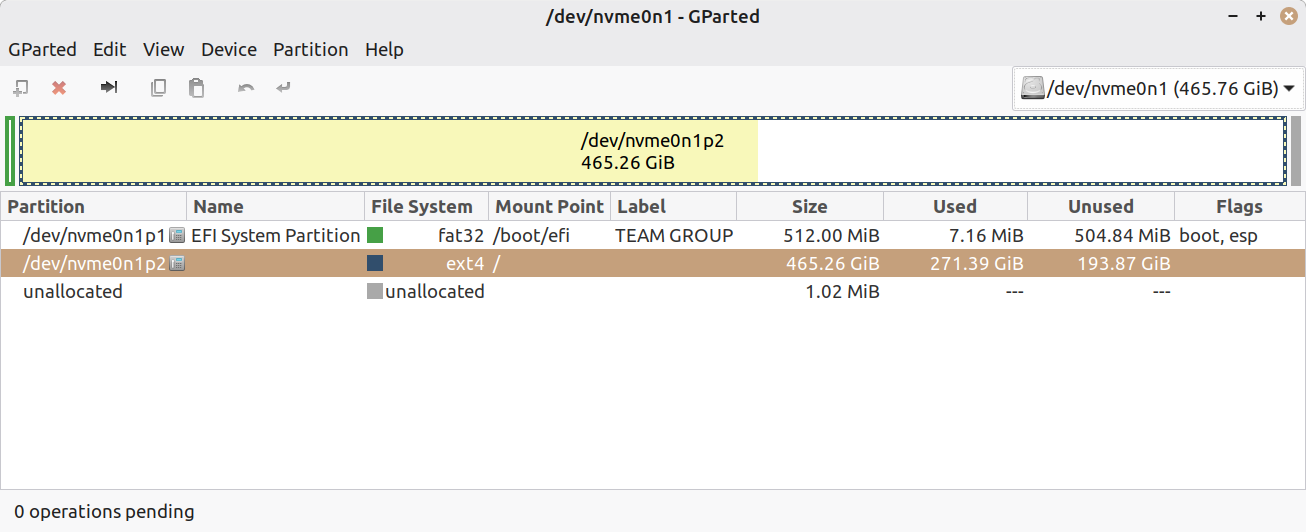
https://auslink.info/linux/gparted.png
You should still post your "disktype" output so we can
see what's going on. If you don't want to display the partition
names, just type something meaningful over them with a name that
indicates an OS or a name that indicates DATA.
Ok, here tis..
--- /dev/nvme0n1
Block device, size 465.8 GiB (500107862016 bytes) <=== Good so far
DOS/MBR partition map
Partition 1: 465.8 GiB (500107861504 bytes, 976773167 sectors from 1)
-a Type 0xEE (EFI GPT protective)
GPT partition map, 128 entries
-a Disk size 465.8 GiB (500107862016 bytes, 976773168 sectors)
-a Disk GUID 022A380C-20EF-3F45-90AC-B2BF6F79825A
Partition 1: 512 MiB (536870912 bytes, 1048576 sectors from 2048)
-a Type EFI System (FAT) (GUID 28732AC1-1FF8-D211-BA4B-00A0C93EC93B)
-a Partition Name "EFI System Partition"
-a Partition GUID B0519F73-B580-B74D-B9B0-3D02E3EB44F8
-a FAT32 file system (hints score 5 of 5)
-a-a-a Volume size 511.0 MiB (535805952 bytes, 130812 clusters of 4 KiB) -a-a-a Volume name "TEAM GROUP"
Partition 2: 465.3 GiB (499568869376 bytes, 975720448 sectors from 1050624) -a Type Unknown (GUID AF3DC60F-8384-7247-8E79-3D69D8477DE4)
-a Partition Name ""
-a Partition GUID 30CA674A-C9EF-4448-868E-9A60A263EA11
-a Ext4 file system
-a-a-a UUID 250D0C59-575A-4D9B-A411-74900FD591EF (DCE, v4)
-a-a-a Last mounted at "/"
-a-a-a Volume size 465.3 GiB (499568869376 bytes, 121965056 blocks of 4 KiB) Partition 3: unused
The 500Gb drive is unformatted.
--- /dev/sdh
Block device, size 465.8 GiB (500106780160 bytes)
did you need it formatted?
On Tue, 30 Dec 2025 14:31:12 -0500, Alan K. wrote:I can extract files from an image, granted I'm in Windows and Linux linked files don't
This may sound off beat, but I image my linux partion(s) with
Acronis True Image from Windows.
Former Windows users do seem to have this belief that they need to rCLimagerCY their Linux disks for some reason, donrCOt they.
On 12/30/25 11:59 PM, Lawrence DrCOOliveiro wrote:
On Tue, 30 Dec 2025 14:31:12 -0500, Alan K. wrote:I can extract files from an image, granted I'm in Windows and Linux linked files don't work, but for the most part I can replace the whole image or pieces.-a-a Not sure what else you can ask of a backup program.
This may sound off beat, but I image my linux partion(s) with
Acronis True Image from Windows.
Former Windows users do seem to have this belief that they need to
rCLimagerCY their Linux disks for some reason, donrCOt they.
It was then easy to recover from my little adventure. Now we know
why that folder is "Access Denied" :-) I would never have guessed,
that merely reading a file was dangerous. But that was a persistent
shadow or the like.
On 12/30/25 11:59 PM, Lawrence DrCOOliveiro wrote:
On Tue, 30 Dec 2025 14:31:12 -0500, Alan K. wrote:
This may sound off beat, but I image my linux partion(s) with
Acronis True Image from Windows.
Former Windows users do seem to have this belief that they need to
rCLimagerCY their Linux disks for some reason, donrCOt they.
I can extract files from an image...
On Wed, 31 Dec 2025 12:41:35 -0500, Alan K. wrote:Or whatever you are handy with. I extract them and then handle them afterwards.
On 12/30/25 11:59 PM, Lawrence DrCOOliveiro wrote:
On Tue, 30 Dec 2025 14:31:12 -0500, Alan K. wrote:
This may sound off beat, but I image my linux partion(s) with
Acronis True Image from Windows.
Former Windows users do seem to have this belief that they need to
rCLimagerCY their Linux disks for some reason, donrCOt they.
I can extract files from an image...
But if you just copy the files themselves, then there is nothing to rCLextractrCY. Just directly access the files you want, using the regular file-access tools.
On 12/31/25 3:45 PM, Lawrence DrCOOliveiro wrote:
Or whatever you are handy with. I extract them and then handle them afterwards.
But if you just copy the files themselves, then there is nothing to
rCLextractrCY. Just directly access the files you want, using the regular
file-access tools.
On Wed, 31 Dec 2025 16:11:56 -0500, Alan K. wrote:I hope we're not arguing, I'm not.
On 12/31/25 3:45 PM, Lawrence DrCOOliveiro wrote:
Or whatever you are handy with. I extract them and then handle them
But if you just copy the files themselves, then there is nothing to
rCLextractrCY. Just directly access the files you want, using the regular >>> file-access tools.
afterwards.
I am rCLhandyrCY with regular file-access tools because I use them every
day. Backup extraction is not something I need to do every day.
On 12/31/25 4:25 PM, Lawrence DrCOOliveiro wrote:
On Wed, 31 Dec 2025 16:11:56 -0500, Alan K. wrote:
On 12/31/25 3:45 PM, Lawrence DrCOOliveiro wrote:
Or whatever you are handy with. I extract them and then handle
But if you just copy the files themselves, then there is nothing
to rCLextractrCY. Just directly access the files you want, using the
regular file-access tools.
them afterwards.
I am rCLhandyrCY with regular file-access tools because I use them
every day. Backup extraction is not something I need to do every
day.
On Wed, 12/31/2025 12:37 AM, Axel wrote:
Paul wrote:Normally they are the same size. That's why my "spider sense" has been set off.
On Tue, 12/30/2025 2:31 AM, Axel wrote:does a disks byte capacity depend on what brand/type it is? I had just assumed all 500 Gb drives are the same size
I wanted to clone my 500 Gb LM nvme disk to a 500 Gb mechanical drive, but Rescuezilla reports that the target disk is too small. ??First, I will post some of Pauls Demo Hardware, and put the numbers close to yours.
https://auslink.info/linux/rz.jpg
I also get that message when trying to create an image.
Foxclone also reports that the disk is too small.
https://auslink.info/linux/foxclone.jpg
How come? thanks,
These are total disk sizes. I only own one NVMe, just for demos like this. >>>
WD5003ABYZ-011FA0-a-a-a-a-a-a-a-a-a-a-a-a-a-a-a 500,107,862,016-a contains /dev/sdb? partitions
Samsung 970 EVO Plus 500GB-a-a-a-a-a-a 500,107,862,016-a contains /dev/nvme0n1p? partitions
******* Begin Felix details
Final partition-a /dev/nvme0n1p2-a 500,106,788,864-a-a-a <<=== a partition "envelope" problem???
Destination drive-a-a-a-a-a-a-a-a-a-a-a-a-a-a-a 500,106,780,160-a <<=== too small ? Need to show me the details...
Reasons for the drive to not be the right size include:
1) HPA (Host Protected Area) or DCO. While Host Protected Area could be the issue,
it is unlikely to be the case. It's hard work to set an HPA. I had to use a
JMicron controller and firmware, just to have a firmware that was "sloppy
enough to allow it to happen". I clipped down two SATA drives, to only 6GB and 4GB
capacity, for some RAID testing, then un-clipped them when finished.
2) RAID-ready driver has RAID metadata at the end of the drive and the "claimed"
capacity is lowered by the driver so that there is no possibility of the user
overwriting the drive. For example, if right now, you're on an Intel SATA port,
you could connect the drive to an Asmedia port, the driver situation would be
different and the "whole" drive capacity would show up at that point.
3) Other kinds of metadata on a disk might be Veritas "Dynamic Disk", a Windows feature.
I don't know whether other softwares will readily stomp on Veritas DD. They should.
Linux may not read Veritas, but I don't see a reason it cannot be stomped.
Nothing there looks out of place.*******https://auslink.info/linux/gparted.png
This just shows you how you can get a text printout of
your storage devices and precise byte values for the items.
-a-a-a sudo apt install disktype
-a-a-a sudo disktype /dev/sda-a-a-a-a-a-a # dumps some info for my SATA drive
-a-a-a sudo disktype /dev/nvme0n1-a-a # dumps some info for my NVMe drive >>>
bullwinkle@FLOTILLA:~$ sudo disktype /dev/nvme0n1
--- /dev/nvme0n1
Block device, size 465.8 GiB (500107862016 bytes)-a-a-a-a-a-a-a-a-a-a-a-a-a <=== total drive size here
bullwinkle@FLOTILLA:~$ sudo disktype /dev/sdb
--- /dev/sdb
Block device, size 465.8 GiB (500107862016 bytes)-a-a-a-a-a-a-a-a-a-a-a-a-a <=== total drive size here
bullwinkle@FLOTILLA:~$
*******
Try and dump your storage info that way.
And without making changes right away, you can do
-a-a-a gparted-a-a-a-a-a-a-a-a-a-a-a-a-a-a-a-a-a-a-a # See if you got one >>>
-a-a-a sudo apt install gparted-a-a # If it needs to be installed
-a-a-a sudo gparted-a-a-a-a-a-a-a-a-a-a-a-a-a-a # Menu driven, select drive, check for notations
-a-a-a-a-a-a-a-a-a-a-a-a-a-a-a-a-a-a-a-a-a-a-a-a-a-a-a-a-a-a # or little pimples off to the side with respect to
-a-a-a-a-a-a-a-a-a-a-a-a-a-a-a-a-a-a-a-a-a-a-a-a-a-a-a-a-a-a # something. Hold your mouse-over for details.
You don't need to do anything with the tool right away, but just
check to see if gparted is unhappy with the kibble you feed it.
No, it's not a "formatting" problem. A Secure erase (marginal probability) might fix it, but it is a bitch to get one of those to run at the best of times.You should still post your "disktype" output so we canOk, here tis..
see what's going on. If you don't want to display the partition
names, just type something meaningful over them with a name that
indicates an OS or a name that indicates DATA.
--- /dev/nvme0n1
Block device, size 465.8 GiB (500107862016 bytes) <=== Good so far
DOS/MBR partition map
Partition 1: 465.8 GiB (500107861504 bytes, 976773167 sectors from 1)
-a Type 0xEE (EFI GPT protective)
GPT partition map, 128 entries
-a Disk size 465.8 GiB (500107862016 bytes, 976773168 sectors)
-a Disk GUID 022A380C-20EF-3F45-90AC-B2BF6F79825A
Partition 1: 512 MiB (536870912 bytes, 1048576 sectors from 2048)
-a Type EFI System (FAT) (GUID 28732AC1-1FF8-D211-BA4B-00A0C93EC93B)
-a Partition Name "EFI System Partition"
-a Partition GUID B0519F73-B580-B74D-B9B0-3D02E3EB44F8
-a FAT32 file system (hints score 5 of 5)
-a-a-a Volume size 511.0 MiB (535805952 bytes, 130812 clusters of 4 KiB)
-a-a-a Volume name "TEAM GROUP"
Partition 2: 465.3 GiB (499568869376 bytes, 975720448 sectors from 1050624) >> -a Type Unknown (GUID AF3DC60F-8384-7247-8E79-3D69D8477DE4)
-a Partition Name ""
-a Partition GUID 30CA674A-C9EF-4448-868E-9A60A263EA11
-a Ext4 file system
-a-a-a UUID 250D0C59-575A-4D9B-A411-74900FD591EF (DCE, v4)
-a-a-a Last mounted at "/"
-a-a-a Volume size 465.3 GiB (499568869376 bytes, 121965056 blocks of 4 KiB)
Partition 3: unused
The 500Gb drive is unformatted.
--- /dev/sdh
Block device, size 465.8 GiB (500106780160 bytes)
did you need it formatted?
The difference in byte count is 1,081,856 bytes or 2113 sectors.
2048 + 65 sectors. There is no 3 or 7 factor in there, so it is unlikely
to be a CHS-induced problem.
$ factor 1081856
1081856: 2 2 2 2 2 2 2 2 2 2113
\----- 512 -----/
$ factor 500107862016
500107862016: 2 2 2 2 2 2 2 2 2 2 2 2 2 3 3 3 3 7 67 1607 Disk capacity is "faked" at the factory.
\---/ CHS artifact, is to be expected. Divisible by 63.
$ factor 500106780160
500106780160: 2 2 2 2 2 2 2 2 2 5 13 15027247 This is NOT a factory pattern,
we are a hostage of something...
I checked with CoPilot llm-AI and this is the instructions I got
for illuminating the destination drive characteristic. Mainly because
I can't think of an easy way (without a lot of bother), of figuring it out.
**************** Begin CoPilot answer ***********************
If you want to confirm whatrCOs actually there, you could:
Check for HPA/DCO on the physical disk:
sudo hdparm -N /dev/sdh
Look for RAID/LVM/devicerCamapper layers:
lsblk -o NAME,SIZE,TYPE
sudo mdadm --examine /dev/sdh
sudo pvdisplay / vgdisplay
sudo dmsetup ls
**************** End CoPilot answer ***********************
The CoPilot seems to latch onto the 65 sectors amount as being
sufficient for a GPT secondary partition. But when a disk is
apparently unallocated and doesn't seem to have an MBR that has
a signature 0x55 0xAA at the end of it, is it going to sniff the
secondary GPT table ?
You could also try gdisk and see what crazy-assed defect it spots.
If there is a partial partitioning spotted, it may have various
messages regarding the partial bits and pieces (MBR and two GPT tables).
sudo gdisk /dev/sdh
If there is GPT materials present, it will start making a fuss
about repairing them and so on. In the Experts section of gdisk,
there is one option in there that can clean GPT artifacts. That
option will also ask you whether you want to clean the MBR and you
can answer yes in this case.
Just make sure before issuing a command like this, that you're
still pointed at the same disk as before. Nothing is more embarrassing
than erasing the wrong disk drive.
But other than that, if I do a Google search on the 1,081,856 byte aspect, I'm not getting an answer that suggests the number is "normal". Maybe if
I'd done the search as "2048 sectors + 65 sectors" I would have gotten an answer.
Summary: It is my personal preference when things like this happen,
to fix and return the claimed capacity to the CHS-divisible number.
This heads off future problems, related to leaving a latent fault
to trip over. For example, I have helped people to remove RAID
metadata... because it can cause an entire partition to disappear
when the drive is plugged into a different brand of SATA port!
Promise-brand metadata will do that.
However, if you're not in a "geek mood", you can use GParted to
shrink the last partition on the NVMe by 2MB or slightly more, so
that Foxclone and the like will be happy and they will do your bidding.
That's assuming that Foxclone doesn't fail when it finds an issue
at the end of the disk.
But just out of curiosity, it would be interesting to see if the
Copilot sequence can figure it out.
Paul
Paul wrote:
Summary:-a It is my personal preference when things like this happen,
-a-a-a-a-a-a-a-a-a-a to fix and return the claimed capacity to the CHS-divisible number.
-a-a-a-a-a-a-a-a-a-a This heads off future problems, related to leaving a latent fault
-a-a-a-a-a-a-a-a-a-a to trip over. For example, I have helped people to remove RAID
-a-a-a-a-a-a-a-a-a-a metadata... because it can cause an entire partition to disappear
-a-a-a-a-a-a-a-a-a-a when the drive is plugged into a different brand of SATA port!
-a-a-a-a-a-a-a-a-a-a Promise-brand metadata will do that.
-a-a-a-a-a-a-a-a-a-a However, if you're not in a "geek mood", you can use GParted to
-a-a-a-a-a-a-a-a-a-a shrink the last partition on the NVMe by 2MB or slightly more, so
-a-a-a-a-a-a-a-a-a-a that Foxclone and the like will be happy and they will do your bidding.
I assume it's safe to do that. AI says to reduce from the right side of the partition
| Sysop: | Amessyroom |
|---|---|
| Location: | Fayetteville, NC |
| Users: | 65 |
| Nodes: | 6 (0 / 6) |
| Uptime: | 01:55:35 |
| Calls: | 862 |
| Files: | 1,311 |
| D/L today: |
10 files (20,373K bytes) |
| Messages: | 264,321 |