• vbscript CSCRIPT howto : writie to screen and read from keyboard ?

    From R.Wieser@address@is.invalid to alt.comp.lang.vbscript,alt.comp.os.windows-xp,alt.windows7.general on Fri Nov 28 19:05:57 2025
    From Newsgroup: alt.windows7.general

    Hello all,

    I know that I can use wscript.stdout.write(line) (or just wscript.echo) and wscript.stdin.read(line) for that.

    The problem is that I need it to happen even when the script has its
    standard input/output redirected (imagine a console-based "do you want to continue (YN)" interaction)

    Using Win32 I can just open "CONIN$" and "CONOUT$", but I can't get those to work using OpenTextFile / CreateTextFile.

    Any ideas ?

    Regards,
    Rudy Wieser


    --- Synchronet 3.21a-Linux NewsLink 1.2
  • From Mr. Man-wai Chang@toylet.toylet@gmail.com to alt.comp.lang.vbscript,alt.comp.os.windows-xp,alt.windows7.general on Sat Dec 13 23:22:27 2025
    From Newsgroup: alt.windows7.general

    On 29/11/2025 2:05 am, R.Wieser wrote:
    Hello all,

    I know that I can use wscript.stdout.write(line) (or just wscript.echo) and wscript.stdin.read(line) for that.

    The problem is that I need it to happen even when the script has its
    standard input/output redirected (imagine a console-based "do you want to continue (YN)" interaction)

    https://www.google.com/search?q=vbscript+OpenTextFile+CreateTextFile+console&sca_esv=b83ae5ae575c3e79&udm=50&source=hp&fbs=AIIjpHybaGNnaZw_4TckIDK59Rtx4FbWz8M1G9nQGNKSn1ac4eplqW_upKgxN2l6D4QtN8nMq83_y28aH73WFhcB8ED-EQVIrcxdVLKF12WOBRNS3T2rXvCQn5CIC0IceZnzGPR-HuU9uLEupq2IsLXhy1orqtkGotN0CtVdcFp6LigbpohDSHOKflngAEj2ia_1UUt_2Q8W&aep=1&ntc=1&sa=X&ved=2ahUKEwjGy--A77qRAxWAhq8BHWagGHcQ2J8OegQIDxAE&biw=1223&bih=636&dpr=2&mstk=AUtExfD_Cf7tguK-g_QKoUNV_7zM3kyBQIbMh4mxuoweXDANNBiwfJdkSy9STQht1nxm8a9TH1RPia0UNu75BqfayD9CqD26DlS3GFP81tzzI1wtxVpRRE9otH1zrsGw4PIVgmGaSt7HOqsYFmkc_KcnSQVW4D5NxZYuW2Q&csuir=1
    --
    @~@ Simplicity is Beauty! Remain silent! Drink, Blink, Stretch!
    / v \ May the Force and farces be with you! Live long and prosper!!
    /( _ )\ https://sites.google.com/site/changmw/
    ^ ^ https://github.com/changmw/changmw
    --- Synchronet 3.21a-Linux NewsLink 1.2
  • From R.Wieser@address@is.invalid to alt.comp.lang.vbscript,alt.comp.os.windows-xp,alt.windows7.general on Sat Dec 13 17:51:11 2025
    From Newsgroup: alt.windows7.general

    Mr. Man-wai Chang,

    https://www.google.com/search?q=vbscript+OpenTextFile+CreateTextFile+console{snip}

    [quote=me]
    I can't get those to work using OpenTextFile / CreateTextFile.
    [/quote]

    And yes, I did search for the solution before posting here. Alas, no dice.

    Regards,
    Rudy Wieser


    --- Synchronet 3.21a-Linux NewsLink 1.2
  • From Paul@nospam@needed.invalid to alt.comp.lang.vbscript,alt.comp.os.windows-xp,alt.windows7.general on Sat Dec 13 16:55:54 2025
    From Newsgroup: alt.windows7.general

    On Sat, 12/13/2025 11:51 AM, R.Wieser wrote:
    Mr. Man-wai Chang,

    https://www.google.com/search?q=vbscript+OpenTextFile+CreateTextFile+console{snip}

    [quote=me]
    I can't get those to work using OpenTextFile / CreateTextFile.
    [/quote]

    And yes, I did search for the solution before posting here. Alas, no dice.

    Regards,
    Rudy Wieser


    I asked CoPilot to write me something.

    Prepare a vbscript CSCRIPT program which opens a window,
    accepts text input from the terminal session, then displays
    "You typed " followed by the text string, placing the text
    string on CONOUT and within the opened window, then waits
    for an additional carriage return to exit the program.

    This is the resulting program.

    *********************************************************
    ' Save this as input_echo.vbs
    ' Run with: cscript //nologo input_echo.vbs

    Option Explicit

    Dim WshShell, userInput, dummy

    Set WshShell = CreateObject("WScript.Shell")

    ' Prompt for input from terminal
    WScript.StdOut.Write "Type something: "
    userInput = WScript.StdIn.ReadLine

    ' Echo to console
    WScript.StdOut.WriteLine "You typed " & userInput

    ' Show in a popup window
    WshShell.Popup "You typed " & userInput, 0, "Input Echo", 64

    ' Wait for carriage return before exit
    WScript.StdOut.Write "Press ENTER to exit..."
    dummy = WScript.StdIn.ReadLine

    *********************************************************

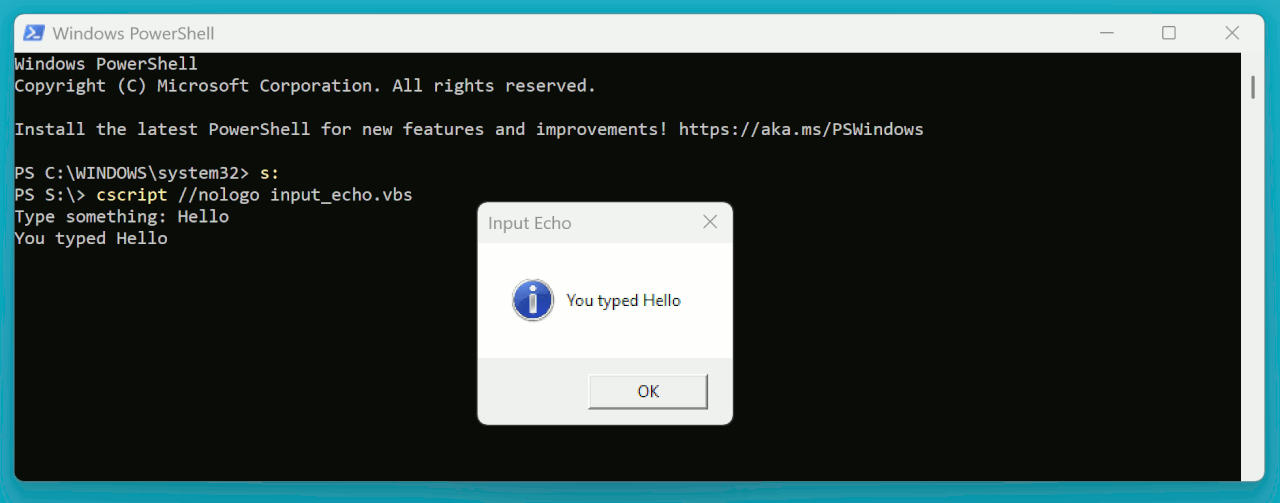
    This is the console session. The program blocks on the GUI,
    so the GUI has to be OK'ed out first, then you can type
    some input to exit the program. Oh, well. If this was a
    homework assignment, the AI would not get full marks,
    and I'd just have to deliver the query again with comments
    added about non-blocking I/O for the GUI part.

    PS S:\> cscript //nologo input_echo.vbs
    Type something: Hello
    You typed Hello
    Press ENTER to exit...
    PS S:\>

    [Picture] Click "Download original" to escape the advertising swamp

    https://i.postimg.cc/Nfrb67QT/cscript-input-echo.gif

    Paul
    --- Synchronet 3.21a-Linux NewsLink 1.2
  • From Paul@nospam@needed.invalid to alt.comp.lang.vbscript,alt.comp.os.windows-xp,alt.windows7.general on Sat Dec 13 17:14:13 2025
    From Newsgroup: alt.windows7.general

    On Sat, 12/13/2025 4:55 PM, Paul wrote:
    On Sat, 12/13/2025 11:51 AM, R.Wieser wrote:
    Mr. Man-wai Chang,

    https://www.google.com/search?q=vbscript+OpenTextFile+CreateTextFile+console{snip}

    [quote=me]
    I can't get those to work using OpenTextFile / CreateTextFile.
    [/quote]

    And yes, I did search for the solution before posting here. Alas, no dice. >>
    Regards,
    Rudy Wieser


    I asked CoPilot to write me something.

    Prepare a vbscript CSCRIPT program which opens a window,
    accepts text input from the terminal session, then displays
    "You typed " followed by the text string, placing the text
    string on CONOUT and within the opened window, then waits
    for an additional carriage return to exit the program.

    CoPilot actually commented at the end of the response, about the
    missing non-blocking part. Why it didn't do this in the first place,
    I don't know. Notice that the GUI now, isn't what you envisioned.
    But at least the program "meets specification" from an "intentions
    point of view". I don't know if this works for you though.

    What is the "GOTO 0" thing ? I don't see a magic label, so this
    might be a hallucination of some sort.

    *******************************************************************
    ' Save as input_echo3.vbs
    ' Run with: cscript //nologo input_echo3.vbs

    Option Explicit

    Dim WshShell, userInput, dummy, htmlFile, fso, ts

    Set WshShell = CreateObject("WScript.Shell")
    Set fso = CreateObject("Scripting.FileSystemObject")

    ' Prompt for input from terminal
    WScript.StdOut.Write "Type something: "
    userInput = WScript.StdIn.ReadLine

    ' Echo to console
    WScript.StdOut.WriteLine "You typed " & userInput

    ' Create a temporary HTML file for the window
    htmlFile = fso.GetSpecialFolder(2) & "\input_echo.html" ' Temp folder
    Set ts = fso.CreateTextFile(htmlFile, True)

    ts.WriteLine "<html><head><title>Input Echo</title></head>"
    ts.WriteLine "<body style='display:flex;align-items:center;justify-content:center;"
    ts.WriteLine "height:100%;font-family:sans-serif;font-size:16pt;'>" ts.WriteLine "You typed <b>" & Replace(userInput,"'","&#39;") & "</b>" ts.WriteLine "<script>"
    ts.WriteLine "window.name='EchoWin';"
    ts.WriteLine "</script>"
    ts.WriteLine "</body></html>"
    ts.Close

    ' Launch mshta to show the window
    WshShell.Run "mshta.exe """ & htmlFile & """", 1, False

    ' Wait for carriage return before exit
    WScript.StdOut.Write "Press ENTER to exit..."
    dummy = WScript.StdIn.ReadLine

    ' Close the window by sending a command to mshta
    On Error Resume Next
    WshShell.AppActivate "Input Echo"
    WshShell.SendKeys "%{F4}" ' Alt+F4 to close
    On Error GoTo 0

    ' Clean up temp file
    On Error Resume Next
    fso.DeleteFile htmlFile
    On Error GoTo 0

    *******************************************************************

    Paul


    --- Synchronet 3.21a-Linux NewsLink 1.2
  • From JJ@jj4public@gmail.com to alt.comp.lang.vbscript,alt.comp.os.windows-xp,alt.windows7.general on Sun Dec 14 08:00:35 2025
    From Newsgroup: alt.windows7.general

    On Fri, 28 Nov 2025 19:05:57 +0100, R.Wieser wrote:
    Hello all,

    I know that I can use wscript.stdout.write(line) (or just wscript.echo) and wscript.stdin.read(line) for that.

    The problem is that I need it to happen even when the script has its standard input/output redirected (imagine a console-based "do you want to continue (YN)" interaction)

    Using Win32 I can just open "CONIN$" and "CONOUT$", but I can't get those to work using OpenTextFile / CreateTextFile.

    Any ideas ?

    Regards,
    Rudy Wieser

    Console input : "CON"/"CONIN$" with mode 1 (read)
    Console output: "CON"/"CONOUT$" with mode 2 (write)

    e.g.:

    set fs = createobject("scripting.filesystemobject")

    'read from standard input. redirected or not
    strstd = wsh.stdin.readline

    'read from console input. from keyboard
    set coninp = fs.opentextfile("con", 1)
    strcon = coninp.readline

    'write to standard output. redirected or not
    wsh.stdout.writeline strstd

    'write to console output. to console window
    set conout = fs.opentextfile("con", 2)
    conout.writeline strcon
    --- Synchronet 3.21a-Linux NewsLink 1.2
  • From R.Wieser@address@is.invalid to alt.comp.lang.vbscript,alt.comp.os.windows-xp,alt.windows7.general on Sun Dec 14 07:04:19 2025
    From Newsgroup: alt.windows7.general

    Paul

    I asked CoPilot to write me something.

    [quote=me, in first post]
    The problem is that I need it to happen even when the script has its
    standard input/output redirected
    [/quote]

    Regards,
    Rudy Wieser


    --- Synchronet 3.21a-Linux NewsLink 1.2
  • From R.Wieser@address@is.invalid to alt.comp.lang.vbscript,alt.comp.os.windows-xp,alt.windows7.general on Sun Dec 14 07:09:31 2025
    From Newsgroup: alt.windows7.general

    Paul,

    What is the "GOTO 0" thing ? I don't see a magic label, so
    this might be a hallucination of some sort.

    You should have posted the whole line, not just a part of it. :-\

    Its how the "on error resume next" setting is switched off.

    Regards,
    Rudy Wieser


    --- Synchronet 3.21a-Linux NewsLink 1.2
  • From R.Wieser@address@is.invalid to alt.comp.lang.vbscript,alt.comp.os.windows-xp,alt.windows7.general on Sun Dec 14 07:28:08 2025
    From Newsgroup: alt.windows7.general

    JJ,

    First of all, did you delete your previous message just now ? I was
    reading it and suddenly it disappeared and my newsgroup reader told me he couldn't download that message. Than I re-selected it and this one
    appeared instead.

    Console input : "CON"/"CONIN$" with mode 1 (read)
    Console output: "CON"/"CONOUT$" with mode 2 (write)

    Thank you for that.

    Strange, I could have sworn I tried exactly that, but could not get it to work. Just now (re?)trying it and it just works.

    Regards,
    Rudy Wieser


    --- Synchronet 3.21a-Linux NewsLink 1.2
  • From R.Wieser@address@is.invalid to alt.comp.lang.vbscript,alt.comp.os.windows-xp,alt.windows7.general on Sun Dec 14 11:20:01 2025
    From Newsgroup: alt.windows7.general

    Mr. Man-wai Chang,

    First of all, did you delete your previous message just now ? I was
    reading it and suddenly it disappeared and my newsgroup reader told me
    he couldn't download that message. Than I re-selected it and this one
    appeared instead.

    Those are usually just communication errors. Try again later.

    No, that I don't think that was the problem. The message before it was replaced with that "can't read it" message was quite different from the one
    I got after it.

    Regards,
    Rudy Wieser


    --- Synchronet 3.21a-Linux NewsLink 1.2
  • From R.Wieser@address@is.invalid to alt.comp.lang.vbscript,alt.comp.os.windows-xp,alt.windows7.general on Sun Dec 14 11:37:10 2025
    From Newsgroup: alt.windows7.general

    Mr. Man-wai Chang,

    I guess A.I. might need better prompts to get to real solutions.

    I just searched for "wscript.stdout.write console" in regular Google, the 7th result:

    I ofcourse(?) also sought for a solution on the web and also found and
    tested GetStandardStream, and have to say I have no idea what its good for
    I'm afraid.

    "wscript.stdout" seems to do the exact same under cscript*. And fails the exact same way under wscript.

    * Meaning : both can-and-will be redirected to file.

    Regards,
    Rudy Wieser


    --- Synchronet 3.21a-Linux NewsLink 1.2
  • From JJ@jj4public@gmail.com to alt.comp.lang.vbscript,alt.comp.os.windows-xp,alt.windows7.general on Mon Dec 15 01:36:56 2025
    From Newsgroup: alt.windows7.general

    On Sun, 14 Dec 2025 07:28:08 +0100, R.Wieser wrote:
    JJ,

    First of all, did you delete your previous message just now ? I was reading it and suddenly it disappeared and my newsgroup reader told me he couldn't download that message. Than I re-selected it and this one appeared instead.

    Huh? That was my first reply in this thread. And this one is my second.
    --- Synchronet 3.21a-Linux NewsLink 1.2
  • From R.Wieser@address@is.invalid to alt.comp.lang.vbscript,alt.comp.os.windows-xp,alt.windows7.general on Sun Dec 14 20:45:07 2025
    From Newsgroup: alt.windows7.general

    JJ,

    First of all, did you delete your previous message just now ?
    I was reading it and suddenly it disappeared and my newsgroup reader
    told me he couldn't download that message. Than I re-selected it
    and this one appeared instead.

    Huh? That was my first reply in this thread. And this one is my second.

    Odd. At times like these I could have used MS build-into-the-os screen-recording thingamagotchy so I could verify what I saw. Than again,
    at most other times, not.

    Regards,
    Rudy Wieser


    --- Synchronet 3.21a-Linux NewsLink 1.2