I'm currently transitioning from Windows to Linux Mint (under dual
boot). Before I abandon Win10 for good I want to be sure I am able do everything in LM that I normally do under Win10.
Is there an LM way of backing up /synchronising my data files onto an external drive? My favourite Windows program is SyncBack, which allows
the synching of the two drives (i.e. incremental backup) without the
need for a full backup every time. It shows me which files are to be
deleted, which are to be updated and which are new files to be
transferred - displayed in an easy-to-follow screen.
Thanks for any pointers.
On 2/13/2026 8:14 AM, occam wrote:
I'm currently transitioning from Windows to Linux Mint (under dualI keep windows 11 and dual boot, and since I have a perpetual license
boot). Before I abandon Win10 for good I want to be sure I am able do
everything in LM that I normally do under Win10.
Is there an LM way of backing up /synchronising my data files onto an
external drive? My favourite Windows program is SyncBack, which allows
the synching of the two drives (i.e. incremental backup) without the
need for a full backup every time. It shows me which files are to be
deleted, which are to be updated and which are new files to be
transferred - displayed in an easy-to-follow screen.
Thanks for any pointers.
for Acronis, I use it to backup my Linux partition.-a
It's worked for me
for years.-a It's also only the 2020 version.
Do you question your process?-a Have to verified it works?-a Like blowing
out your entire docs folder and then trying to restore it?
Heck if it works fine.
I may try SyncBack and see how it works.-a I currently use mint's backup tool.-a It's a bit quirky to get setup but I do now and I make daily
backups with it. But this only makes snapshot tar files.-a Good for the
OOPS conditions.
I also use rsync to do some mirroring now and then.-a It's very easy to script since it's basically 'cp'.-a rsync source dest.-a You just add the needed flags.
I'm currently transitioning from Windows to Linux Mint (under dual
boot). Before I abandon Win10 for good I want to be sure I am able do everything in LM that I normally do under Win10.
Is there an LM way of backing up /synchronising my data files onto an external drive? My favourite Windows program is SyncBack, which allows
the synching of the two drives (i.e. incremental backup) without the
need for a full backup every time. It shows me which files are to be
deleted, which are to be updated and which are new files to be
transferred - displayed in an easy-to-follow screen.
Thanks for any pointers.
On 13/02/2026 15:42, Alan K wrote:
On 2/13/2026 8:14 AM, occam wrote:
I'm currently transitioning from Windows to Linux Mint (under dualI keep windows 11 and dual boot, and since I have a perpetual license
boot). Before I abandon Win10 for good I want to be sure I am able do
everything in LM that I normally do under Win10.
Is there an LM way of backing up /synchronising my data files onto an
external drive? My favourite Windows program is SyncBack, which allows
the synching of the two drives (i.e. incremental backup) without the
need for a full backup every time. It shows me which files are to be
deleted, which are to be updated and which are new files to be
transferred - displayed in an easy-to-follow screen.
Thanks for any pointers.
for Acronis, I use it to backup my Linux partition.
That's full backup. I'm looking for a tool for just backing up specific
data files /directories.
It's worked for me
for years.-a It's also only the 2020 version.
Do you question your process?-a Have to verified it works?-a Like blowing
out your entire docs folder and then trying to restore it?
Yes. SyncBack creates an identical data structure on the external drive.
'Restore' is just a matter of copying the directories back to the
desktop.
Heck if it works fine.
I may try SyncBack and see how it works.-a I currently use mint's backup
tool.-a It's a bit quirky to get setup but I do now and I make daily
backups with it. But this only makes snapshot tar files.-a Good for the
OOPS conditions.
I also use rsync to do some mirroring now and then.-a It's very easy to
script since it's basically 'cp'.-a rsync source dest.-a You just add the
needed flags.
Hmm. I worry about going back to doing backups by command line
instructions. The two geeks who convinced me to migrate to Linux Mint
(my two sons) promised me that the experience would be 'no different to
using Windows' . I'm going to hold them to that promise ;-) .
I'm currently transitioning from Windows to Linux Mint (under dual
boot). Before I abandon Win10 for good I want to be sure I am able do everything in LM that I normally do under Win10.
Is there an LM way of backing up /synchronising my data files onto an external drive? My favourite Windows program is SyncBack, which allows
the synching of the two drives (i.e. incremental backup) without the
need for a full backup every time. It shows me which files are to be
deleted, which are to be updated and which are new files to be
transferred - displayed in an easy-to-follow screen.
Thanks for any pointers.
My favourite Windows program is SyncBack, which allows the synching
of the two drives (i.e. incremental backup) without the need for a
full backup every time.
Hmm. I worry about going back to doing backups by command line
instructions.
Acronis can do incremental, but I don't really need it for that.
I'm currently transitioning from Windows to Linux Mint (under dual
boot). Before I abandon Win10 for good I want to be sure I am able do everything in LM that I normally do under Win10.
Is there an LM way of backing up /synchronising my data files onto an external drive? My favourite Windows program is SyncBack, which allows
the synching of the two drives (i.e. incremental backup) without the
need for a full backup every time. It shows me which files are to be
deleted, which are to be updated and which are new files to be
transferred - displayed in an easy-to-follow screen.
Thanks for any pointers.
On Fri, 13 Feb 2026 17:29:09 +0100, occam wrote:
Hmm. I worry about going back to doing backups by command line
instructions.
On *nix systems, you save the effort of performing repetitive or
complicated command lines by saving them in shell scripts.
On Fri, 13 Feb 2026 13:34:42 -0500, Alan K. wrote:
Acronis can do incremental, but I don't really need it for that.
The nice thing about rsync is, its --link-dest option lets you create incremental backups that look like full backups for restoration
purposes. It saves space by not making additional copies of files that havenrCOt changed, but because standard POSIX/*nix filesystems allow the
same file to be linked into multiple directories, that same file can
appear in multiple snapshots taken at different times, and restored
from any of them.
On Fri, 2/13/2026 8:14 AM, occam wrote:
I'm currently transitioning from Windows to Linux Mint (under dual
boot). Before I abandon Win10 for good I want to be sure I am able do
everything in LM that I normally do under Win10.
Is there an LM way of backing up /synchronising my data files onto an
external drive? My favourite Windows program is SyncBack, which allows
the synching of the two drives (i.e. incremental backup) without the
need for a full backup every time. It shows me which files are to be
deleted, which are to be updated and which are new files to be
transferred - displayed in an easy-to-follow screen.
Thanks for any pointers.
SyncBack Touch (reach into LM and copy stuff out to "backup machine")
https://www.2brightsparks.com/syncback/sbt.html
"SyncBack Touch supports: macOS, Android, Linux & Windows"
https://www.2brightsparks.com/syncback/compare.html
Pro Se Free
^^^ ^^ ^^^^
(Works with (No Linux capability)
Touch SW)
"SyncBack Touch is free to use with SyncBackPro/SE V11"
Paul
On Fri, 13 Feb 2026 14:14:31 +0100, occam wrote:
My favourite Windows program is SyncBack, which allows the synching
of the two drives (i.e. incremental backup) without the need for a
full backup every time.
Does it let you keep multiple point-in-time backups? Without
duplicating unchanged files?
On 13/02/2026 13:14, occam wrote:
I'm currently transitioning from Windows to Linux Mint (under dual
boot). Before I abandon Win10 for good I want to be sure I am able do
everything in LM that I normally do under Win10.
Is there an LM way of backing up /synchronising my data files onto an
external drive? My favourite Windows program is SyncBack, which allows
the synching of the two drives (i.e. incremental backup) without the
need for a full backup every time. It shows me which files are to be
deleted, which are to be updated and which are new files to be
transferred - displayed in an easy-to-follow screen.
Thanks for any pointers.
These tools are great if you want easy file or folder backups without
much setup:
D|-j|a Dup Backups <https://apps.gnome.org/en-GB/DejaDup/>
A user-friendly GUI backup tool (often installed by default on GNOME desktops). Supports scheduled backups, encryption, and cloud services (e.g., Google Drive).
TimeShift <https://github.com/linuxmint/timeshift>
Creates system snapshots (like Windows System Restore). Ideal for restoring your system after a bad update or change
GNOME Backups <https://help.gnome.org/gnome-help/backup-how.html>
Simple graphical backup utility with scheduled backups and
incremental support.
rsync <https://linuxize.com/post/how-to-use-rsync-for-local-and-remote-data-transfer-and-synchronization/>
The classic file-sync tool. Efficient and scriptable for custom backups, network backups, and incremental copies.
rclone <https://rclone.org/>
Syncs and backs up to cloud storage providers (Google Drive, OneDrive, S3, etc.).
On 13/02/2026 22:03, Lawrence DrCOOliveiro wrote:
On Fri, 13 Feb 2026 13:34:42 -0500, Alan K. wrote:
Acronis can do incremental, but I don't really need it for that.
The nice thing about rsync is, its --link-dest option lets you
create incremental backups that look like full backups for
restoration purposes. It saves space by not making additional
copies of files that havenrCOt changed, but because standard
POSIX/*nix filesystems allow the same file to be linked into
multiple directories, that same file can appear in multiple
snapshots taken at different times, and restored from any of them.
That's a mixed blessing. If the single set of blocks in the backup
gets corrupted, all "copies" are affected. Unlike a normal backup.
That said, I use 'timeshift' and 'back in time', which are front
ends for rsync.
On Fri, 2/13/2026 4:59 PM, Lawrence DrCOOliveiro wrote:
On Fri, 13 Feb 2026 17:29:09 +0100, occam wrote:
Hmm. I worry about going back to doing backups by command line
instructions.
On *nix systems, you save the effort of performing repetitive or
complicated command lines by saving them in shell scripts.
Yes, occam would have been using .bat on his previous platform.
*indows systems are computers too. In fact .ps1 scripting on *indows
is a thing.
I use this on windows and mint
https://freefilesync.org/
On 14/02/2026 00:08, Shimon wrote:
On 13/02/2026 13:14, occam wrote:Wow! Thanks for the menu. I'll work my way down. (Deja Dup and rsync I
I'm currently transitioning from Windows to Linux Mint (under dualThese tools are great if you want easy file or folder backups without
boot). Before I abandon Win10 for good I want to be sure I am able do
everything in LM that I normally do under Win10.
Is there an LM way of backing up /synchronising my data files onto an
external drive? My favourite Windows program is SyncBack, which allows
the synching of the two drives (i.e. incremental backup) without the
need for a full backup every time. It shows me which files are to be
deleted, which are to be updated and which are new files to be
transferred - displayed in an easy-to-follow screen.
Thanks for any pointers.
much setup:
D|-j|a Dup Backups <https://apps.gnome.org/en-GB/DejaDup/>
A user-friendly GUI backup tool (often installed by default on GNOME desktops). Supports scheduled backups, encryption, and cloud services (e.g., Google Drive).
TimeShift <https://github.com/linuxmint/timeshift>
Creates system snapshots (like Windows System Restore). Ideal for restoring your system after a bad update or change
GNOME Backups <https://help.gnome.org/gnome-help/backup-how.html>
Simple graphical backup utility with scheduled backups and
incremental support.
rsync <https://linuxize.com/post/how-to-use-rsync-for-local-and-remote-data-transfer-and-synchronization/>
The classic file-sync tool. Efficient and scriptable for custom backups, network backups, and incremental copies.
rclone <https://rclone.org/>
Syncs and backs up to cloud storage providers (Google Drive, OneDrive, S3, etc.).
have already seen mentioned above.)
I could be wrong, but I think if you use Rescuezilla/Clonezilla you
can extract files from the backup image
On 14/02/2026 00:08, Shimon wrote:
On 13/02/2026 13:14, occam wrote:
I'm currently transitioning from Windows to Linux Mint (under dual
boot). Before I abandon Win10 for good I want to be sure I am able do
everything in LM that I normally do under Win10.
Is there an LM way of backing up /synchronising my data files onto an
external drive? My favourite Windows program is SyncBack, which allows
the synching of the two drives (i.e. incremental backup) without the
need for a full backup every time. It shows me which files are to be
deleted, which are to be updated and which are new files to be
transferred - displayed in an easy-to-follow screen.
Thanks for any pointers.
These tools are great if you want easy file or folder backups without
much setup:
D|-j|a Dup Backups <https://apps.gnome.org/en-GB/DejaDup/>
A user-friendly GUI backup tool (often installed by default on GNOME desktops). Supports scheduled backups, encryption, and cloud services (e.g., Google Drive).
TimeShift <https://github.com/linuxmint/timeshift>
Creates system snapshots (like Windows System Restore). Ideal for restoring your system after a bad update or change
GNOME Backups <https://help.gnome.org/gnome-help/backup-how.html>
Simple graphical backup utility with scheduled backups and
incremental support.
rsync <https://linuxize.com/post/how-to-use-rsync-for-local-and-remote-data-transfer-and-synchronization/>
The classic file-sync tool. Efficient and scriptable for custom backups, network backups, and incremental copies.
rclone <https://rclone.org/>
Syncs and backs up to cloud storage providers (Google Drive, OneDrive, S3, etc.).
Wow! Thanks for the menu. I'll work my way down. (Deja Dup and rsync I
have already seen mentioned above.)
At Sat, 14 Feb 2026 17:22:56 +0100, occam <occam@nowhere.nix> wrote:
On 14/02/2026 00:08, Shimon wrote:Timeshift uses rsync on the backend (or btrfs snapshots, which I don't
On 13/02/2026 13:14, occam wrote:Wow! Thanks for the menu. I'll work my way down. (Deja Dup and rsync I
I'm currently transitioning from Windows to Linux Mint (under dualThese tools are great if you want easy file or folder backups without
boot). Before I abandon Win10 for good I want to be sure I am able do
everything in LM that I normally do under Win10.
Is there an LM way of backing up /synchronising my data files onto an
external drive? My favourite Windows program is SyncBack, which allows >>>> the synching of the two drives (i.e. incremental backup) without the
need for a full backup every time. It shows me which files are to be
deleted, which are to be updated and which are new files to be
transferred - displayed in an easy-to-follow screen.
Thanks for any pointers.
much setup:
D|-j|a Dup Backups <https://apps.gnome.org/en-GB/DejaDup/>
A user-friendly GUI backup tool (often installed by default on GNOME desktops). Supports scheduled backups, encryption, and cloud services (e.g., Google Drive).
TimeShift <https://github.com/linuxmint/timeshift>
Creates system snapshots (like Windows System Restore). Ideal for restoring your system after a bad update or change
GNOME Backups <https://help.gnome.org/gnome-help/backup-how.html>
Simple graphical backup utility with scheduled backups and
incremental support.
rsync <https://linuxize.com/post/how-to-use-rsync-for-local-and-remote-data-transfer-and-synchronization/>
The classic file-sync tool. Efficient and scriptable for custom backups, network backups, and incremental copies.
rclone <https://rclone.org/>
Syncs and backs up to cloud storage providers (Google Drive, OneDrive, S3, etc.).
have already seen mentioned above.)
use.) It expects the backup media to be on the local machine, but I
use it to back up to an SanDisk Corp. Extreme Pro 55AF, which is
NVME over USB, 4TB. I also have a cron job to back up the Extreme Pro
to the NAS periodically. If I didn't have the Extreme Pro, I'd
use iSCSI with the NAS, which will appear as a local block device
on Linux (which means Timeshift will use it).
By default, Timeshift doesn't back up /home directories, but you
can configure it to do so.
It's a shame we can't convince the Timeshift maintainers to support
native backup to NFS...
I'm also using the Extreme Pro for Time machine backups from our
Mac Studio, which required setting up Samba on my workstation with
the "fruit" extensions...
but if you do you will lose newer files added since the snapshot,
and existing files will be overwritten with the versions current
when the snapshot was taken. best to use timeshift without adding
personal files (the default setting) AND use Backup Tool to save
personal files. Then both apps can be used independently of each
other. ie. so the OS and personal files could be restored from
different time periods, if necessary. at least this is my
understanding of it.
occam wrote:
On 14/02/2026 00:08, Shimon wrote:
On 13/02/2026 13:14, occam wrote:Wow! Thanks for the menu. I'll work my way down. (Deja Dup and rsync I
I'm currently transitioning from Windows to Linux Mint (under dualThese tools are great if you want easy file or folder backups without
boot). Before I abandon Win10 for good I want to be sure I am able do
everything in LM that I normally do under Win10.
Is there an LM way of backing up /synchronising my data files onto an
external drive? My favourite Windows program is SyncBack, which allows >>>> the synching of the two drives (i.e. incremental backup) without the
need for a full backup every time. It shows me which files are to be
deleted, which are to be updated and which are new files to be
transferred - displayed in an easy-to-follow screen.
Thanks for any pointers.
much setup:
D|-j|a Dup Backups <https://apps.gnome.org/en-GB/DejaDup/>
A user-friendly GUI backup tool (often installed by default on GNOME desktops). Supports scheduled backups, encryption, and cloud services (e.g., Google Drive).
TimeShift <https://github.com/linuxmint/timeshift>
Creates system snapshots (like Windows System Restore). Ideal for restoring your system after a bad update or change
GNOME Backups <https://help.gnome.org/gnome-help/backup-how.html>
Simple graphical backup utility with scheduled backups and
incremental support.
rsync <https://linuxize.com/post/how-to-use-rsync-for-local-and-remote-data-transfer-and-synchronization/>
The classic file-sync tool. Efficient and scriptable for custom backups, network backups, and incremental copies.
rclone <https://rclone.org/>
Syncs and backs up to cloud storage providers (Google Drive, OneDrive, S3, etc.).
have already seen mentioned above.)
I could be wrong, but I think if you use Rescuezilla/Clonezilla you can extract files from the backup image
On Sat, 14 Feb 2026 14:04:47 +0000, mick wrote:
I use this on windows and mint
https://freefilesync.org/
The answers to rCLWhat features make FreeFileSync unique?rCY <https://freefilesync.org/faq.php#features> donrCOt seem very rCLuniquerCY ...
On 13/02/2026 22:03, Lawrence DrCOOliveiro wrote:
On Fri, 13 Feb 2026 13:34:42 -0500, Alan K. wrote:
Acronis can do incremental, but I don't really need it for that.
The nice thing about rsync is, its --link-dest option lets you create
incremental backups that look like full backups for restoration
purposes. It saves space by not making additional copies of files that
havenrCOt changed, but because standard POSIX/*nix filesystems allow the
same file to be linked into multiple directories, that same file can
appear in multiple snapshots taken at different times, and restored
from any of them.
That's a mixed blessing. If the single set of blocks in the backup gets corrupted, all "copies" are affected. Unlike a normal backup.
On Sat, 14 Feb 2026 09:29:08 +0000, Mike Scott wrote:
On 13/02/2026 22:03, Lawrence DrCOOliveiro wrote:
On Fri, 13 Feb 2026 13:34:42 -0500, Alan K. wrote:
Acronis can do incremental, but I don't really need it for that.
The nice thing about rsync is, its --link-dest option lets you
create incremental backups that look like full backups for
restoration purposes. It saves space by not making additional
copies of files that havenrCOt changed, but because standard
POSIX/*nix filesystems allow the same file to be linked into
multiple directories, that same file can appear in multiple
snapshots taken at different times, and restored from any of them.
That's a mixed blessing. If the single set of blocks in the backup
gets corrupted, all "copies" are affected. Unlike a normal backup.
ItrCOs your choice.
That said, I use 'timeshift' and 'back in time', which are front
ends for rsync.
Do they give you that choice in now rsync operates?
On 14/02/2026 22:13, Lawrence DrCOOliveiro wrote:
Do they give you that choice in now rsync operates?
For back-in-time, not explicitly AFAICS: the point of the links, is
after all, to save space. But there is an option to use checksums,
which would, presumably, catch a corrupted block and make a fresh
copy.
Some products support Verify, which allows you to detect some
failure situations.
Not forgetting about, eg, /var/mail/* which counts as "user"
territory.
Anywhere else ??
On Sun, 15 Feb 2026 06:37:31 -0500, Paul wrote:
That's a failure to do the safety checks first (FSCK before backup)
...
Not sure why that would be necessary, unless yourCOre doing low-level
access to the volume and bypassing the filesystem code in the kernel.
Otherwise you can rely on the kernel to ensure the filesystem is fit
to access -- that is the authoritative implementation of the filesystem-access code, after all.
On Sun, 2/15/2026 3:23 PM, Lawrence DrCOOliveiro wrote:
On Sun, 15 Feb 2026 06:37:31 -0500, Paul wrote:
That's a failure to do the safety checks first (FSCK before
backup) ...
Not sure why that would be necessary, unless yourCOre doing low-level
access to the volume and bypassing the filesystem code in the
kernel.
Otherwise you can rely on the kernel to ensure the filesystem is
fit to access -- that is the authoritative implementation of the
filesystem-access code, after all.
Do you remember the old SunOS OS and the file system there ? That
used to regularly tip over.
And it used to take forever to start, and read the filesystem and
make sure it would work.
On Sun, 15 Feb 2026 17:01:06 -0500, Paul wrote:
On Sun, 2/15/2026 3:23 PM, Lawrence DrCOOliveiro wrote:
On Sun, 15 Feb 2026 06:37:31 -0500, Paul wrote:
That's a failure to do the safety checks first (FSCK before
backup) ...
Not sure why that would be necessary, unless yourCOre doing low-level
access to the volume and bypassing the filesystem code in the
kernel.
Otherwise you can rely on the kernel to ensure the filesystem is
fit to access -- that is the authoritative implementation of the
filesystem-access code, after all.
Do you remember the old SunOS OS and the file system there ? That
used to regularly tip over.
And it used to take forever to start, and read the filesystem and
make sure it would work.
We have journalled filesystems now.
So, to get back to my original question, what was the need for rCLFSCK
before backuprCY, again?
I'm currently transitioning from Windows to Linux Mint (under dual
boot). Before I abandon Win10 for good I want to be sure I am able do everything in LM that I normally do under Win10.
Is there an LM way of backing up /synchronising my data files onto an external drive? My favourite Windows program is SyncBack, which allows
the synching of the two drives (i.e. incremental backup) without the
need for a full backup every time. It shows me which files are to be
deleted, which are to be updated and which are new files to be
transferred - displayed in an easy-to-follow screen.
Thanks for any pointers.
Syncthing is a free, open-source, continuous file synchronization
program ...
On Sun, 2/15/2026 6:35 PM, Lawrence DrCOOliveiro wrote:
It's to make sure that when you read metadata from the file system,
So, to get back to my original question, what was the need for rCLFSCK
before backuprCY, again?
it can successfully be used to put everything back.
On 2/13/2026 8:14 AM, occam wrote:
I'm currently transitioning from Windows to Linux Mint (under dualI keep windows 11 and dual boot, and since I have a perpetual license for Acronis, I use it to backup my Linux partition. It's worked for me for years. It's also only the
boot). Before I abandon Win10 for good I want to be sure I am able do
everything in LM that I normally do under Win10.
Is there an LM way of backing up /synchronising my data files onto an
external drive? My favourite Windows program is SyncBack, which allows
the synching of the two drives (i.e. incremental backup) without the
need for a full backup every time. It shows me which files are to be
deleted, which are to be updated and which are new files to be
transferred - displayed in an easy-to-follow screen.
Thanks for any pointers.
2020 version.
Do you question your process? Have to verified it works? Like blowing out your entire docs folder and then trying to restore it?
Heck if it works fine.
I may try SyncBack and see how it works. I currently use mint's backup tool. It's a bit quirky to get setup but I do now and I make daily backups with it. But this only
makes snapshot tar files. Good for the OOPS conditions.
I also use rsync to do some mirroring now and then. It's very easy to script since it's basically 'cp'. rsync source dest. You just add the needed flags.--- Synchronet 3.21b-Linux NewsLink 1.2
On Mon, 16 Feb 2026 02:43:51 +0000, Shimon wrote:
Syncthing is a free, open-source, continuous file synchronization
program ...
Not the same as rCLbackuprCY though, is it ... unless you only want to
count *current* files, rather than snapshots of what has gone before
...
On 2026-02-13, Alan K <AlanK@invalid.com> wrote:
On 2/13/2026 8:14 AM, occam wrote:
I'm currently transitioning from Windows to Linux Mint (under dualI keep windows 11 and dual boot, and since I have a perpetual license for Acronis,
boot). Before I abandon Win10 for good I want to be sure I am able do
everything in LM that I normally do under Win10.
Is there an LM way of backing up /synchronising my data files onto an
external drive? My favourite Windows program is SyncBack, which allows
the synching of the two drives (i.e. incremental backup) without the
need for a full backup every time. It shows me which files are to be
deleted, which are to be updated and which are new files to be
transferred - displayed in an easy-to-follow screen.
Thanks for any pointers.
I use it to backup my Linux partition. It's worked for me for years. It's also only the
2020 version.
Do you question your process? Have to verified it works?
Like blowing out your entire docs folder and then trying to restore it?
Are you able to restore the backup to a temp/partition disk?
Heck if it works fine.
But what if it does not and its the only copy you have?
I may try SyncBack and see how it works. I currently use mint's backup tool.
It's a bit quirky to get setup but I do now and I make daily backups with it. But this only
makes snapshot tar files. Good for the OOPS conditions.
Not if it will not restore.
I also use rsync to do some mirroring now and then. It's very easy to script
since it's basically 'cp'. rsync source dest. You just add the needed flags.
On 2026-02-16, Lawrence DrCOOliveiro <ldo@nz.invalid> wrote:
On Mon, 16 Feb 2026 02:43:51 +0000, Shimon wrote:
Syncthing is a free, open-source, continuous file synchronization
program ...
Not the same as rCLbackuprCY though, is it ... unless you only want to
count *current* files, rather than snapshots of what has gone before
...
More to the point we are getting the waters mudded. This thread is about Backups. A programme which sync autmatically is a dangerous tool.
The Unix philosophy is to have one tool that just does one thing well.
On 16/02/2026 05:26, Gordon wrote:
On 2026-02-16, Lawrence DrCOOliveiro <ldo@nz.invalid> wrote:
On Mon, 16 Feb 2026 02:43:51 +0000, Shimon wrote:
Syncthing is a free, open-source, continuous file synchronization
program ...
Not the same as rCLbackuprCY though, is it ... unless you only want to
count *current* files, rather than snapshots of what has gone before
...
More to the point we are getting the waters mudded. This thread is about
Backups. A programme which sync autmatically is a dangerous tool.
I agree completely. I prefer backup (master > slave) more than syncing.
A recent syncing of my bookmarks on Firefox across platforms left me
with duplicates, redundancies and a lot of mess.
The Unix philosophy is to have one tool that just does one thing well.
Ah, the Promised Land... Linux. I'm waiting for the parting of the
waters any day now.
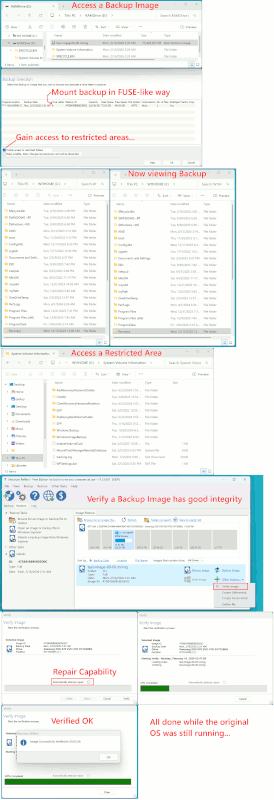
And the .mrimg has some kind of primitive repair capability (implying
hashes at some level) ...
On Mon, 16 Feb 2026 03:33:37 -0500, Paul wrote:
And the .mrimg has some kind of primitive repair capability (implying
hashes at some level) ...
You need a bit more than hashes to do rCLrepair capabilityrCY. That means error *correction*, not just *detection*.
For example, optical media make heavy use of Reed-Solomon
Cross-Interleave Redundancy Checking, applied at two separate levels:
one as an error-correction code and the other as an erasure code. As I recall, on DVD, this redundancy overhead reduces the effective storage capacity by about half.
On 15/02/2026 04:45, Axel wrote:
but if you do you will lose newer files added since the snapshot, and
existing files will be overwritten with the versions current when the
snapshot was taken. best to use timeshift without adding personal files
Not forgetting about, eg, /var/mail/* which counts as "user" territory. Anywhere else ??
(the default setting) AND use Backup Tool to save personal files. Then
both apps can be used independently of each other. ie. so the OS and
personal files could be restored from different time periods, if
necessary. at least this is my understanding of it.
On Sun, 15 Feb 2026 12:15:23 +1100, Axel wrote:
I could be wrong, but I think if you use Rescuezilla/Clonezilla you
can extract files from the backup image
It is really easier to use a backup program/regime where the backups
are just simple filesystems in their own right.
On 13/02/2026 22:58, Lawrence DrCOOliveiro wrote:
On Fri, 13 Feb 2026 14:14:31 +0100, occam wrote:
My favourite Windows program is SyncBack, which allows the synching
of the two drives (i.e. incremental backup) without the need for a
full backup every time.
Does it let you keep multiple point-in-time backups? Without
duplicating unchanged files?
Not to the best of my knowledge.
On 2026-02-14, occam <occam@nowhere.nix> wrote:
On 13/02/2026 22:58, Lawrence DrCOOliveiro wrote:
On Fri, 13 Feb 2026 14:14:31 +0100, occam wrote:
My favourite Windows program is SyncBack, which allows the synching
of the two drives (i.e. incremental backup) without the need for a
full backup every time.
Does it let you keep multiple point-in-time backups? Without
duplicating unchanged files?
Not to the best of my knowledge.
Syncing is not a backup. Com'on people, know your tools and the task.
On 2026-02-15, Lawrence DrCOOliveiro <ldo@nz.invalid> wrote:
On Sun, 15 Feb 2026 12:15:23 +1100, Axel wrote:
I could be wrong, but I think if you use Rescuezilla/Clonezilla you
can extract files from the backup image
It is really easier to use a backup program/regime where the backups
are just simple filesystems in their own right.
Very true. Clonezilla is for cloning, not backing up. Fudging functions is not best practice when there is many other backup programmes to choose from.
The real point is to get a set of programmes which suit the user and are trusted by the user.
The Free version would appear to do Fulls, the Paid version is Full, Incremental and Differential (the latter two could be related to
Fast Backup terminology).
And that is suitable for disaster recovery (a "bad disk").
On Tue, 17 Feb 2026 03:08:29 -0500, Paul wrote:
The Free version would appear to do Fulls, the Paid version is Full,
Incremental and Differential (the latter two could be related to
Fast Backup terminology).
rsync gives you all that in the free version. And thatrCOs Free
software, not freeware.
On Tue, 17 Feb 2026 05:30:23 -0500, Paul wrote:
And that is suitable for disaster recovery (a "bad disk").
So really an all-or-nothing restore? No ability to selectively restore particular files that were deleted/corrupted/etc?
On Tue, 2/17/2026 4:37 PM, Lawrence DrCOOliveiro wrote:
On Tue, 17 Feb 2026 03:08:29 -0500, Paul wrote:
The Free version would appear to do Fulls, the Paid version is
Full, Incremental and Differential (the latter two could be
related to Fast Backup terminology).
rsync gives you all that in the free version. And thatrCOs Free
software, not freeware.
The Windows backup programs, are intended to allow ordinary people
to make some kind of backup.
[goes on to describe a GUI-based product that started out pleasant
to use and became enshittified]
On Tue, 2/17/2026 4:38 PM, Lawrence DrCOOliveiro wrote:
On Tue, 17 Feb 2026 05:30:23 -0500, Paul wrote:
And that is suitable for disaster recovery (a "bad disk").
So really an all-or-nothing restore? No ability to selectively
restore particular files that were deleted/corrupted/etc?
I couldn't get anything to touch the partimage. I tried Archive
Manager, but it was not interested.
When the partimage is decompressed, like a TAR, you can see the
datablocks in there with your hex editor. It really should share
some characteristics with dynamic VHD, VDI and so on. I haven't
found a way to mount one. But maybe I'm not looking hard enough.
On 2026-02-15, Lawrence DrCOOliveiro <ldo@nz.invalid> wrote:
On Sun, 15 Feb 2026 12:15:23 +1100, Axel wrote:Very true. Clonezilla is for cloning, not backing up.
I could be wrong, but I think if you use Rescuezilla/Clonezilla youIt is really easier to use a backup program/regime where the backups
can extract files from the backup image
are just simple filesystems in their own right.
Fudging functions is--
not best practice when there is many other backup programmes to choose from.
The real point is to get a set of programmes which suit the user and are trusted by the user.
Gordon wrote:
Clonezilla is for cloning, not backing up.
it does disk imaging
On Wed, 18 Feb 2026 20:55:18 +1100, Axel wrote:
Gordon wrote:
Clonezilla is for cloning, not backing up.
it does disk imaging
So does the rCLddrCY command.
<https://manpages.debian.org/dd(1)>
On Wed, 2/18/2026 4:02 PM, Lawrence DrCOOliveiro wrote:
On Wed, 18 Feb 2026 20:55:18 +1100, Axel wrote:The difference in the example being, it does not
Gordon wrote:So does the rCLddrCY command.
Clonezilla is for cloning, not backing up.it does disk imaging
<https://manpages.debian.org/dd(1)>
use the same space that dd does.
dd is just fine, in the right circumstances, like if
some partitions are damaged, and you want to preserve
the state of the disk while you experiment on recovery
solutions. dd does not care if you are not fsck-clean.
But for backing up perfectly good disks with fsck-clean
file systems, there are other things you can use.
64GB disk, OS content 13GB, Clonezilla compressed partimage 4.7GB.
Depending on the random contents of the white space on
the ~64GB partition, that random content might not
compress well. You can "prep" a disk for "dd" backup
by using zerofree, but that takes additional time as
part of a backup procedure. You can also loopback mount
partitions on an uncompressed dd file output... as long
as you know the offset. And you can work out the offset
using disktype analysis of the dd image.
Paul--
On Tue, 17 Feb 2026 18:48:33 -0500, Paul wrote:
On Tue, 2/17/2026 4:38 PM, Lawrence DrCOOliveiro wrote:
On Tue, 17 Feb 2026 05:30:23 -0500, Paul wrote:
And that is suitable for disaster recovery (a "bad disk").
So really an all-or-nothing restore? No ability to selectively
restore particular files that were deleted/corrupted/etc?
I couldn't get anything to touch the partimage. I tried Archive
Manager, but it was not interested.
When the partimage is decompressed, like a TAR, you can see the
datablocks in there with your hex editor. It really should share
some characteristics with dynamic VHD, VDI and so on. I haven't
found a way to mount one. But maybe I'm not looking hard enough.
The KISS principle may be important in lots of software, but it seems
to me to be vital in backup software, particularly. This is because
the restoration function will often be exercised in a time of stress,
when data loss has already occurred, the customer/boss is breathing
down your neck, or in general your life is going to be seriously
buggered up if you canrCOt get the data back.
That is not the time to be discovering whether or not the restore
function actually works.
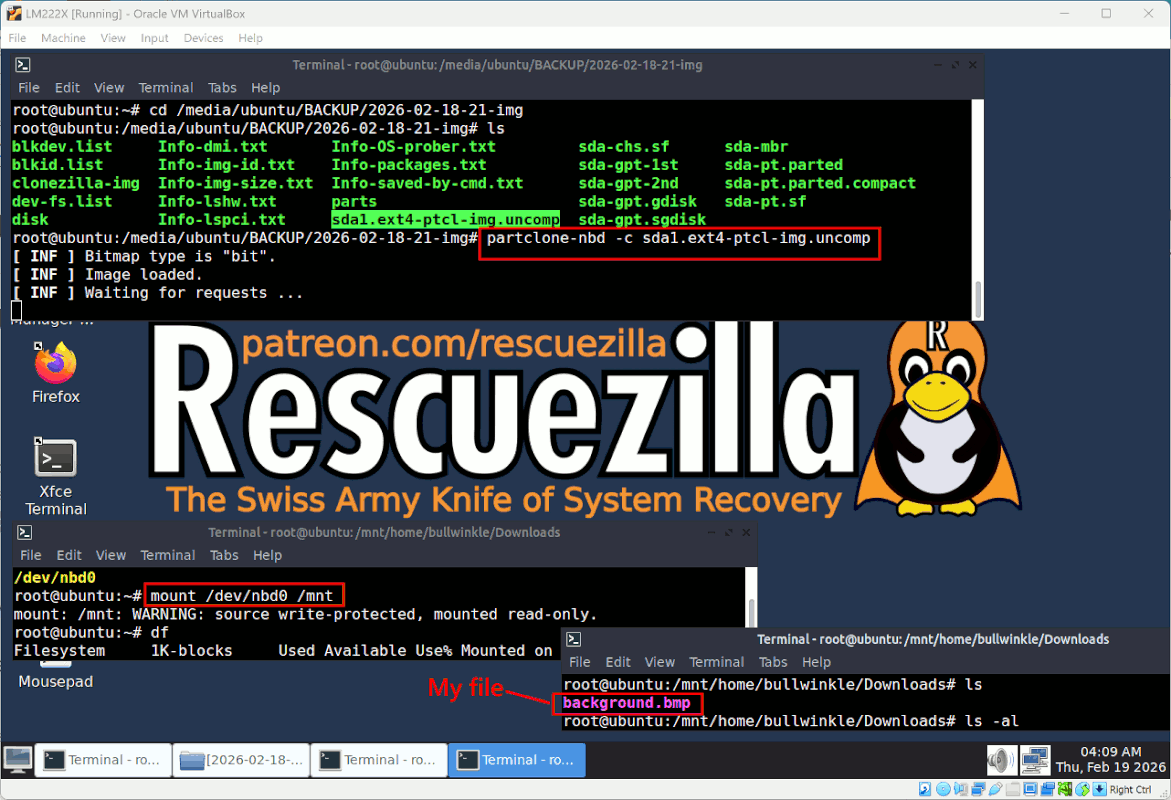
I found a method to mount a clonezilla partclone image and gain
random access.
[lots of rigmarole omitted]
On Wed, 18 Feb 2026 23:49:26 -0500, Paul wrote:
I found a method to mount a clonezilla partclone image and gain
random access.
[lots of rigmarole omitted]
ThatrCOs a helluva complicated way to gain access.
The rCLddrCY command I mentioned elsewhere can do a straight copy of a partition or entire disk to an image file, which can be directly
mounted using the regular rCLmountrCY command.
And then of course you can avoid the whole image business altogether,
by using rsync to do file-level backups, as we have discussed
(multiple times) before.
| Sysop: | Amessyroom |
|---|---|
| Location: | Fayetteville, NC |
| Users: | 59 |
| Nodes: | 6 (0 / 6) |
| Uptime: | 01:46:45 |
| Calls: | 810 |
| Files: | 1,287 |
| Messages: | 198,761 |