From Newsgroup: alt.os.linux.mint
On Sat, 1/10/2026 8:33 AM, David B. wrote:
On 10/01/2026 10:30, Monsieur wrote:
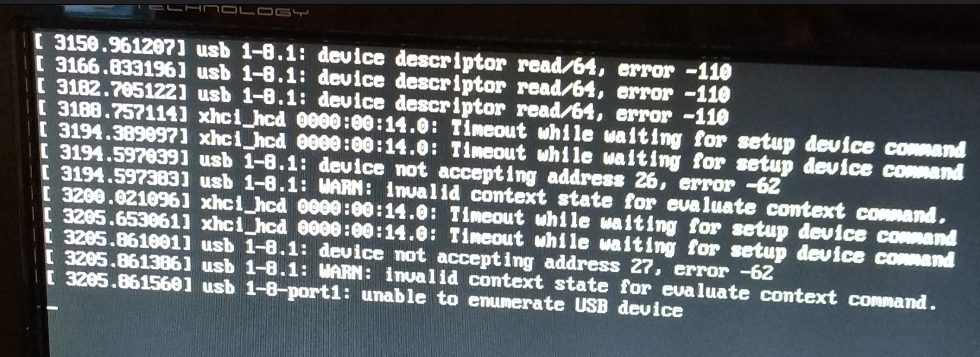
I've been using my new Dell Optiplex mini-pc for a few months now, and it works fine, but when (re)booting Mint the pc takes about 2 minutes to go through these messages:
https://i.postimg.cc/c135HzPM/boot.png
Anyone knows what it all means and what could be the cause? I suspect it might have something to do with my external 10-port usb-hub (which does have some quirks), but I'm not sure.
*Common Causes for these specific errors*
(Provided by Gemini AI)
Based on the exact error codes (-110 and -62) shown in your image:
Power Insufficiency: Error -110 is very frequently caused by a device (like an external hard drive or a USB wifi dongle) drawing more power than the port can provide.
Hardware Damage: The logs could indicate a physically damaged USB port or a failing cable.
Faulty USB Hub: Since the error is on "port 8.1," it often points to a device plugged into an internal or external USB Hub rather than directly into the motherboard.
********** CoPilot Question **********
Using a Dell Optiplex Mini with external USB ten port hub,
the following errors are noted in Linux DMESG output. What is the
most likely root cause of the messages appearing, and especially
so late after the system is started ?
[ 3150.961207] usb 1-8.1: device descriptor read/64, error -110
[ 3166.833196] usb 1-8.1: device descriptor read/64, error -110
[ 3182.785122] usb 1-8.1: device descriptor read/64, error -110
[ 3188.757114] xhci_hcd 0000:00:14.0: Timeout while waiting for setup device command
[ 3194.389097] xhci_hcd 0000:00:14.0: Timeout while waiting for setup device command
[ 3194.597039] usb 1-8.1: device not accepting address 26, error -62
[ 3194.597383] usb 1-8.1: WARN: invalid context state for evaluate context command.
[ 3200.021096] xhci_hcd 000e:00:14.0: Timeout while waiting for setup device comnand
[ 3205.653061] xhci_hcd 60ee:00:14.0: Timeout while waiting for setup device command
[ 3205.861001] usb 1-8.1: device not accepting address 27, error -62
[ 3285.861386] usb 1-8.1: WARN: invalid context state for evaluate context command.
[ 3205.861560] usb 1-8-port1: unable to enumerate USB device
********** CoPilot Answer **********
[ The cites provided are OK, but not very strong... ]
https://bbs.archlinux.org/viewtopic.php?id=245671
https://access.redhat.com/solutions/30436 <=== paywall
https://askubuntu.com/questions/1535782/usb-boot-error-device-descriptor-read-64-error-110
### Direct answer
The most likely root cause is **a marginal USB link on port `1-8.1` of your external hub** -
either a failing device, a bad cable, or more commonly in your setup,
**insufficient/unstable power on the 10rCaport USB hub**
- causing repeated USB enumeration timeouts and addressrCaset failures. The messages appear late
because the problematic device/port only starts failing or getting rerCaenumerated some time
after boot (due to hotplug, movement, or power fluctuation), so the kernel logs these errors
when that happens, not at startup.
********** End CoPilot Answer **********
You would check the hub box for an external barrel power input.
There is a limit to how much power the wall adapters provide for this
purpose, and 5V @ 3A or 5V @ 4A might be as generous as they
will drive through the barrel plug. When they make a product
and include the adapter in the box, usually there is not enough
power to give each and every port 950mA (on a USB3 hub). Once
you start hanging 2.5" HDD (like a Passport) off the hub, there
just isn't enough power for everything else. Spinup can draw 1 ampere
on a Passport 2.5" HDD. The power draw drops as the Passport settles
to idle power and remains spinning. If you were to run several Passports
off the hub, eventually the wall adapter would shut down on overload.
In the old days, connecting power to an external hub, could cause back-flow
up the cable when the PC shuts down. This could influence the RESET circuit
and cause the PC to "not boot" on the next attempt to boot. Unplugging the
USB connector from the back of the PC would break the backflow and allow
the PC to start. But there haven't been any reports of this for years, so
my assumption is, they've placed Schottky diodes or used a small relay,
to isolate the PC VCC on the USB cable leaving the PC, from the adapter
+5V, and then there are no more refusals to boot.
While the USB config information could be improperly formatted for the job, that's unlikely to be it. There are a few hardware devices, that have
"missing ports" and their config space may claim "I have 16 ports" when
the physical hardware only has 5 ports. Then, if you have a detailed
log, you are entertained by 11 attempts to communicate with the missing ones. But hubs like this, they chain silicon chips, and each device in the chain, only
declares its own characteristics as a chip and does not speak for the
other chips that work as a team. This is perfectly OK and the BIOS and
OS can traverse the chip tree with no problem.
Paul
--- Synchronet 3.21a-Linux NewsLink 1.2