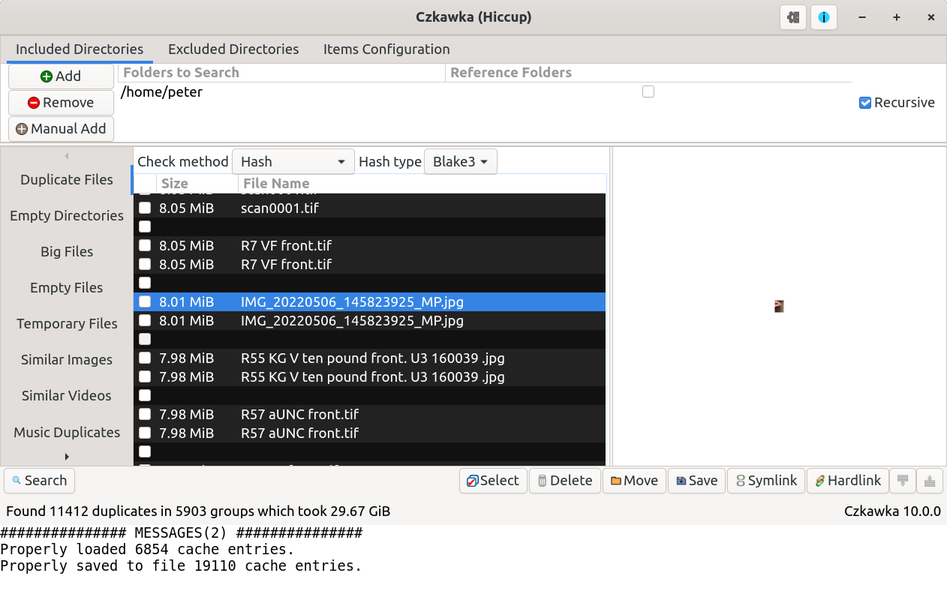
The preview image of photos/pictures is so tiny it's impossible to see what the image is. It's not supposed to be like that. When I first used this program
the image displayed properly, and would resize as needed, but now there is this
problem. I haven't had any success finding a cure on Google. I have tried uninstall/reinstall. Does anyone know how to fix this? thanks,
On Thu, 12/11/2025 3:49 AM, Felix wrote:
The preview image of photos/pictures is so tiny it's impossible to see what >> the image is. It's not supposed to be like that. When I first used this program
the image displayed properly, and would resize as needed, but now there is this
problem. I haven't had any success finding a cure on Google. I have tried >> uninstall/reinstall. Does anyone know how to fix this? thanks,
https://gitlab.com/kaisenlinux/packages/czkawka/-/blob/main/instructions/Instruction.md
"Faster checking for similar images"
It could be that the preview is done by another graphics subsystem like GTK (multiple versions).
You would have to download the source and have a look through it, for the preview method.
Notice in the video, that the selection of scale for the previews, they either
fill the preview area, or, they hardly make good usage of the preview area.
9:55
"Find and remove duplicate files - Clean up your folders with Czkawka"
https://www.youtube.com/watch?v=Jefle-6KfMc
I looked at the Config file, and there is nothing in there
that controls the scale (thumbnails versus regular sized pictures).
Paul
The preview image of photos/pictures is so tiny it's impossible to
see what the image is. It's not supposed to be like that. When I first
used this program the image displayed properly, and would resize as
needed, but now there is this problem. I haven't had any success finding
a cure on Google. I have tried uninstall/reinstall. Does anyone know
how to fix this? thanks,
On Thu, 12/11/2025 3:49 AM, Felix wrote:
The preview image of photos/pictures is so tiny it's impossible to see what >> the image is. It's not supposed to be like that. When I first used this programhttps://gitlab.com/kaisenlinux/packages/czkawka/-/blob/main/instructions/Instruction.md
the image displayed properly, and would resize as needed, but now there is this
problem. I haven't had any success finding a cure on Google. I have tried
uninstall/reinstall. Does anyone know how to fix this? thanks,
"Faster checking for similar images"
It could be that the preview is done by another graphics subsystem like GTK (multiple versions).
You would have to download the source and have a look through it, for the preview method.
Notice in the video, that the selection of scale for the previews, they either
fill the preview area, or, they hardly make good usage of the preview area.
9:55
"Find and remove duplicate files - Clean up your folders with Czkawka"
https://www.youtube.com/watch?v=Jefle-6KfMc
I looked at the Config file, and there is nothing in there
that controls the scale (thumbnails versus regular sized pictures).
Paul
On Thu, 12/11/2025 3:49 AM, Felix wrote:
The preview image of photos/pictures is so tiny it's impossible toThe developer has another version of the program you could test.
see what the image is. It's not supposed to be like that. When I first
used this program the image displayed properly, and would resize as
needed, but now there is this problem. I haven't had any success finding
a cure on Google. I have tried uninstall/reinstall. Does anyone know
how to fix this? thanks,
It's in a directory on the github page and can be found in the
assets section (39 items).
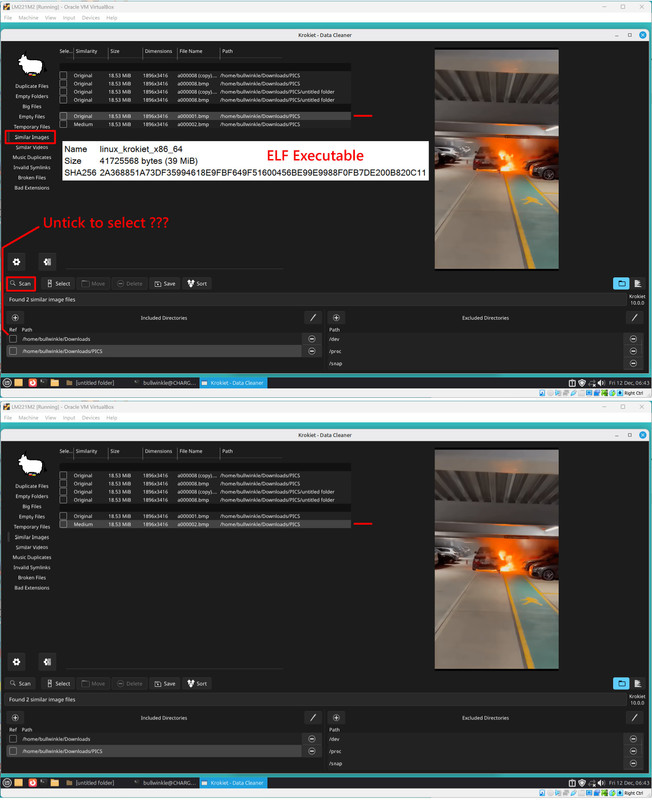
Name: linux_krokiet_x86_64 <=== ELF executable
Size: 41,725,568 bytes (39 MiB)
SHA256: 2A368851A73DF35994618E9FBF649F51600456BE99E9988F0FB7DE200B820C11
https://github.com/qarmin/czkawka/releases/
*******
Whether this will work any better for you, is debatable.
[Picture] Click "Download Original" to be able to make out the details
https://i.postimg.cc/qqdrhF7z/linux-krokiet-x86-64-Portable-ELF.jpg
The sense of the tick box seems to be reversed. I kept clicking "scan"
and nothing was getting scanned. I unticked my PIC folder and suddenly
scan started doing something.
If you click too many times on files detected as matching, it opens
an external image editor. If you click once on a file path in the
left pane, the picture is updated. The two pictures placed into
that picture, show test articles which are two different frames of a movie, which helps ensure (for a test) that the frames are roughly similar to one another (if you use the slider and turn the match level up or down).
The fit and finish of the program is annoying, to say the least.
But, it's an ambitious program, it runs on Windows and Linux and MacOS,
and I suppose it's inevitable that all the variations cause problems.
Maybe it should have been written in Java :-)
Paul
Paul wrote:
On Thu, 12/11/2025 3:49 AM, Felix wrote:
The preview image of photos/pictures is so tiny it's impossible toThe developer has another version of the program you could test.
see what the image is. It's not supposed to be like that. When I first
-a used this program the image displayed properly, and would resize as
needed, but now there is this problem. I haven't had any success finding >>> -a a cure on Google. I have tried uninstall/reinstall. Does anyone know
-a how to fix this? thanks,
It's in a directory on the github page and can be found in the
assets section (39 items).
Name: linux_krokiet_x86_64-a-a-a-a-a-a-a-a-a-a-a <=== ELF executable
Size: 41,725,568 bytes (39 MiB)
SHA256: 2A368851A73DF35994618E9FBF649F51600456BE99E9988F0FB7DE200B820C11
https://github.com/qarmin/czkawka/releases/
*******
Whether this will work any better for you, is debatable.
-a-a-a-a [Picture]-a Click "Download Original" to be able to make out the details
-a-a-a-a https://i.postimg.cc/qqdrhF7z/linux-krokiet-x86-64-Portable-ELF.jpg >>
The sense of the tick box seems to be reversed. I kept clicking "scan"
and nothing was getting scanned. I unticked my PIC folder and suddenly
scan started doing something.
If you click too many times on files detected as matching, it opens
an external image editor. If you click once on a file path in the
left pane, the picture is updated. The two pictures placed into
that picture, show test articles which are two different frames of a movie, >> which helps ensure (for a test) that the frames are roughly similar to one >> another (if you use the slider and turn the match level up or down).
The fit and finish of the program is annoying, to say the least.
But, it's an ambitious program, it runs on Windows and Linux and MacOS,
and I suppose it's inevitable that all the variations cause problems.
Maybe it should have been written in Java :-)
-a-a-a Paul
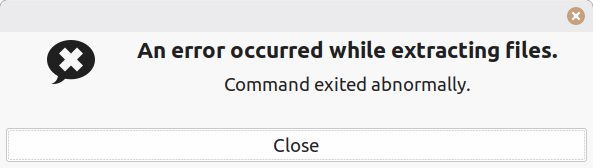
I downloaded vs. 8 and 9 zip files, but they won't unzip properly :(
https://auslink.info/linux/zip_error.png
On Sun, 12/14/2025 1:15 AM, Felix wrote:
Paul wrote:OK, you point out the item you downloaded.
On Thu, 12/11/2025 3:49 AM, Felix wrote:I downloaded vs. 8 and 9 zip files, but they won't unzip properly :(
The preview image of photos/pictures is so tiny it's impossible toThe developer has another version of the program you could test.
see what the image is. It's not supposed to be like that. When I first >>>> -a used this program the image displayed properly, and would resize as >>>> needed, but now there is this problem. I haven't had any success finding >>>> -a a cure on Google. I have tried uninstall/reinstall. Does anyone know >>>> -a how to fix this? thanks,
It's in a directory on the github page and can be found in the
assets section (39 items).
Name: linux_krokiet_x86_64-a-a-a-a-a-a-a-a-a-a-a <=== ELF executable
Size: 41,725,568 bytes (39 MiB)
SHA256: 2A368851A73DF35994618E9FBF649F51600456BE99E9988F0FB7DE200B820C11 >>>
https://github.com/qarmin/czkawka/releases/
*******
Whether this will work any better for you, is debatable.
-a-a-a-a [Picture]-a Click "Download Original" to be able to make out the details
-a-a-a-a https://i.postimg.cc/qqdrhF7z/linux-krokiet-x86-64-Portable-ELF.jpg
The sense of the tick box seems to be reversed. I kept clicking "scan"
and nothing was getting scanned. I unticked my PIC folder and suddenly
scan started doing something.
If you click too many times on files detected as matching, it opens
an external image editor. If you click once on a file path in the
left pane, the picture is updated. The two pictures placed into
that picture, show test articles which are two different frames of a movie, >>> which helps ensure (for a test) that the frames are roughly similar to one >>> another (if you use the slider and turn the match level up or down).
The fit and finish of the program is annoying, to say the least.
But, it's an ambitious program, it runs on Windows and Linux and MacOS,
and I suppose it's inevitable that all the variations cause problems.
Maybe it should have been written in Java :-)
-a-a-a Paul
https://auslink.info/linux/zip_error.png
https://github.com/qarmin/czkawka/releases/
9.0.0
Version 9.0.0 - 16.03.2025r
Assets 28
Ilnux_czkawka cll
Ilnux_czkawka_cll_arm
Ilnux_czkawka_cll_no_gllbc
Ilnux_czkawka_gul
Ilnux_czkawka_gul.Applmage
Ilnux_czkawka_gul_arm
Ilnux_czkawka_gul_helf_Ilbraw
Ilnux_czkawka_gul_minimal.Applmage
Ilnux_kroklet
Ilnux_kroklet_gul_arm
Ilnux_kroklet_gul_helf_Ilbraw
mac czkawka cll
mac_czkawka_cll_arm
mac czkawka cll helf
mac czkawka gul
mac_czkawka_gul_arm
mac_czkawka_gul_helf
mac_kroklet_gul
mac_kroklet_gul_arm
mac_kroklet_gul_helf
windows_czkawka_cll.exe
windows_czkawka_gul_412.zlp
windows_czkawka_gul_46.zlp
windows_czkawka_gul_46_console.zlp
windows kroklet.exe
wlndows_kroklet_gul_console.exe
Source code (zip)
Source code (tar.gz)
Paul
Paul wrote:
On Sun, 12/14/2025 1:15 AM, Felix wrote:
Paul wrote:OK, you point out the item you downloaded.
On Thu, 12/11/2025 3:49 AM, Felix wrote:I downloaded vs. 8 and 9 zip files, but they won't unzip properly :(
The preview image of photos/pictures is so tiny it's impossible toThe developer has another version of the program you could test.
see what the image is. It's not supposed to be like that. When I
first
-a-a used this program the image displayed properly, and would
resize as
needed, but now there is this problem. I haven't had any success
finding
-a-a a cure on Google. I have tried uninstall/reinstall. Does anyone >>>>> know
-a-a how to fix this? thanks,
It's in a directory on the github page and can be found in the
assets section (39 items).
Name: linux_krokiet_x86_64-a-a-a-a-a-a-a-a-a-a-a <=== ELF executable
Size: 41,725,568 bytes (39 MiB)
SHA256:
2A368851A73DF35994618E9FBF649F51600456BE99E9988F0FB7DE200B820C11
https://github.com/qarmin/czkawka/releases/
*******
Whether this will work any better for you, is debatable.
-a-a-a-a-a [Picture]-a Click "Download Original" to be able to make out >>>> the details
https://i.postimg.cc/qqdrhF7z/linux-krokiet-x86-64-Portable-ELF.jpg
The sense of the tick box seems to be reversed. I kept clicking "scan" >>>> and nothing was getting scanned. I unticked my PIC folder and suddenly >>>> scan started doing something.
If you click too many times on files detected as matching, it opens
an external image editor. If you click once on a file path in the
left pane, the picture is updated. The two pictures placed into
that picture, show test articles which are two different frames of
a movie,
which helps ensure (for a test) that the frames are roughly similar
to one
another (if you use the slider and turn the match level up or down).
The fit and finish of the program is annoying, to say the least.
But, it's an ambitious program, it runs on Windows and Linux and
MacOS,
and I suppose it's inevitable that all the variations cause problems.
Maybe it should have been written in Java :-)
-a-a-a-a Paul
https://auslink.info/linux/zip_error.png
-a-a-a https://github.com/qarmin/czkawka/releases/
9.0.0
Version 9.0.0 - 16.03.2025r
Assets 28
Ilnux_czkawka cll
Ilnux_czkawka_cll_arm
Ilnux_czkawka_cll_no_gllbc
Ilnux_czkawka_gul
Ilnux_czkawka_gul.Applmage
Ilnux_czkawka_gul_arm
Ilnux_czkawka_gul_helf_Ilbraw
Ilnux_czkawka_gul_minimal.Applmage
Ilnux_kroklet
Ilnux_kroklet_gul_arm
Ilnux_kroklet_gul_helf_Ilbraw
mac czkawka cll
mac_czkawka_cll_arm
mac czkawka cll helf
mac czkawka gul
mac_czkawka_gul_arm
mac_czkawka_gul_helf
mac_kroklet_gul
mac_kroklet_gul_arm
mac_kroklet_gul_helf
windows_czkawka_cll.exe
windows_czkawka_gul_412.zlp
windows_czkawka_gul_46.zlp
windows_czkawka_gul_46_console.zlp
windows kroklet.exe
wlndows_kroklet_gul_console.exe
Source code (zip)
Source code (tar.gz)
-a-a-a-a Paul
from here .. https://github.com/qarmin/czkawka/releases/
links to versions in the left margin.
v9 March 16
https://github.com/qarmin/czkawka/tree/9.0.0 zip file
v8 Oct 11 2024
https://github.com/qarmin/czkawka/tree/8.0.0 zip file
Felix wrote:
Paul wrote:
On Sun, 12/14/2025 1:15 AM, Felix wrote:
Paul wrote:OK, you point out the item you downloaded.
On Thu, 12/11/2025 3:49 AM, Felix wrote:I downloaded vs. 8 and 9 zip files, but they won't unzip properly :(
The preview image of photos/pictures is so tiny it's impossible to >>>>>> see what the image is. It's not supposed to be like that. When IThe developer has another version of the program you could test.
first
-a-a used this program the image displayed properly, and would
resize as
needed, but now there is this problem. I haven't had any success
finding
-a-a a cure on Google. I have tried uninstall/reinstall. Does
anyone know
-a-a how to fix this? thanks,
It's in a directory on the github page and can be found in the
assets section (39 items).
Name: linux_krokiet_x86_64-a-a-a-a-a-a-a-a-a-a-a <=== ELF executable >>>>> Size: 41,725,568 bytes (39 MiB)
SHA256:
2A368851A73DF35994618E9FBF649F51600456BE99E9988F0FB7DE200B820C11
https://github.com/qarmin/czkawka/releases/
*******
Whether this will work any better for you, is debatable.
-a-a-a-a-a [Picture]-a Click "Download Original" to be able to make out >>>>> the details
https://i.postimg.cc/qqdrhF7z/linux-krokiet-x86-64-Portable-ELF.jpg
The sense of the tick box seems to be reversed. I kept clicking
"scan"
and nothing was getting scanned. I unticked my PIC folder and
suddenly
scan started doing something.
If you click too many times on files detected as matching, it opens
an external image editor. If you click once on a file path in the
left pane, the picture is updated. The two pictures placed into
that picture, show test articles which are two different frames of
a movie,
which helps ensure (for a test) that the frames are roughly
similar to one
another (if you use the slider and turn the match level up or down). >>>>>
The fit and finish of the program is annoying, to say the least.
But, it's an ambitious program, it runs on Windows and Linux and
MacOS,
and I suppose it's inevitable that all the variations cause problems. >>>>> Maybe it should have been written in Java :-)
-a-a-a-a Paul
https://auslink.info/linux/zip_error.png
-a-a-a https://github.com/qarmin/czkawka/releases/
9.0.0
Version 9.0.0 - 16.03.2025r
Assets 28
Ilnux_czkawka cll
Ilnux_czkawka_cll_arm
Ilnux_czkawka_cll_no_gllbc
Ilnux_czkawka_gul
Ilnux_czkawka_gul.Applmage
Ilnux_czkawka_gul_arm
Ilnux_czkawka_gul_helf_Ilbraw
Ilnux_czkawka_gul_minimal.Applmage
Ilnux_kroklet
Ilnux_kroklet_gul_arm
Ilnux_kroklet_gul_helf_Ilbraw
mac czkawka cll
mac_czkawka_cll_arm
mac czkawka cll helf
mac czkawka gul
mac_czkawka_gul_arm
mac_czkawka_gul_helf
mac_kroklet_gul
mac_kroklet_gul_arm
mac_kroklet_gul_helf
windows_czkawka_cll.exe
windows_czkawka_gul_412.zlp
windows_czkawka_gul_46.zlp
windows_czkawka_gul_46_console.zlp
windows kroklet.exe
wlndows_kroklet_gul_console.exe
Source code (zip)
Source code (tar.gz)
-a-a-a-a Paul
from here .. https://github.com/qarmin/czkawka/releases/
links to versions in the left margin.
v9 March 16
https://github.com/qarmin/czkawka/tree/9.0.0 zip file
v8 Oct 11 2024
https://github.com/qarmin/czkawka/tree/8.0.0 zip file
these are the files I downloaded.. http://auslink.info/linux/czkawka-8.0.0.zip http://auslink.info/linux/czkawka-9.0.0.zip
so afaik they should be unpackable. ??
these are the files I downloaded.. http://auslink.info/linux/czkawka-8.0.0.zip http://auslink.info/linux/czkawka-9.0.0.zip
so afaik they should be unpackable. ??
On Sun, 12/14/2025 6:16 PM, Felix wrote:
these are the files I downloaded..$ file *
http://auslink.info/linux/czkawka-8.0.0.zip
http://auslink.info/linux/czkawka-9.0.0.zip
so afaik they should be unpackable. ??
czkawka-8.0.0.zip: Zip archive data, at least v1.0 to extract czkawka-9.0.0.zip: Zip archive data, at least v1.0 to extract
A scan with Windows Defender says "275 files" for each, to start with.
And that the scan is clean (a dont care right now).
This means the libzip it used, could handle it.
7ZIP "test" button says:
Name: czkawka-8.0.0
Folders: 77
Files: 272
Size: 2871975 bytes (2804 KiB)
There are no errors
Name: czkawka-9.0.0
Folders: 83
Files: 272
Size: 3002143 bytes (2931 KiB)
There are no errors
And those are "source files", preparation for compiling and building.
That is not specific executable material.
The items I show from the "Assets" section in the center of the page,
are executables of various sorts. The Linux ELF ones don't get a file extension. The Windows one is "windows_krokiet.exe", Linux is "linux_krokiet"
********************************
https://github.com/qarmin/czkawka/releases/
9.0.0
Version 9.0.0 - 16.03.2025r
Assets 28 <=== click the Assets link, to make the list appear
linux_czkawka cli
linux_czkawka_cli_arm
linux_czkawka_cli_no_glibc
linux_czkawka_gui <=== The Linux version you already tried.
linux_czkawka_gui.AppImage [you know this has tiny images] linux_czkawka_gui_arm
linux_czkawka_gui_heif_libraw
linux_czkawka_gui_minimal.AppImage
linux_krokiet <=== this is a Linux ELF using SLINT for photos [use this to test it]
linux_krokiet_gui_arm
linux_krokiet_gui_helf_Ilbraw (this version, if you have Apple iPhone and take pictures)
mac_czkawka_cli \
mac_czkawka_cli_arm \
mac_czkawka_cli helf \
mac_czkawka_gui \
mac_czkawka_gui_arm \___ MacOS
mac_czkawka_gui_helf /
mac_kroklet_gui /
mac_kroklet_gui_arm /
mac_kroklet_gui_helf /
windows_czkawka_cli.exe \
windows_czkawka_gui_412.zip \
windows_czkawka_gui_46.zip \
windows_czkawka_gui_46_console.zip \___ Windows
windows krokiet.exe /
windows_krokiet_gui_console.exe /
Source code (zip) >-- You already have this one, the source ZIP
Source code (tar.gz)
The OCR did a poor job on the screen shot, that
was a real eye chart test for me to fix up now.
It all looks sorta alright, until you squint at it
and notice what a mess it made.
Paul--
Paul wrote:
On Sun, 12/14/2025 6:16 PM, Felix wrote:
these are the files I downloaded..$ file *
http://auslink.info/linux/czkawka-8.0.0.zip
http://auslink.info/linux/czkawka-9.0.0.zip
so afaik they should be unpackable. ??
czkawka-8.0.0.zip:-a-a-a-a-a-a-a-a Zip archive data, at least v1.0 to extract
czkawka-9.0.0.zip:-a-a-a-a-a-a-a-a Zip archive data, at least v1.0 to extract
A scan with Windows Defender says "275 files" for each, to start with.
And that the scan is clean (a dont care right now).
This means the libzip it used, could handle it.
7ZIP "test" button says:
Name: czkawka-8.0.0
Folders: 77
Files: 272
Size: 2871975 bytes (2804 KiB)
There are no errors
Name: czkawka-9.0.0
Folders: 83
Files: 272
Size: 3002143 bytes (2931 KiB)
There are no errors
And those are "source files", preparation for compiling and building.
That is not specific executable material.
The items I show from the "Assets" section in the center of the page,
are executables of various sorts. The Linux ELF ones don't get a file
extension. The Windows one is "windows_krokiet.exe", Linux is
"linux_krokiet"
********************************
-a-a-a https://github.com/qarmin/czkawka/releases/
9.0.0
Version 9.0.0 - 16.03.2025r
Assets 28-a-a-a-a-a-a-a <=== click the Assets link, to make the list appear >>
linux_czkawka cli
linux_czkawka_cli_arm
linux_czkawka_cli_no_glibc
linux_czkawka_gui-a-a-a-a-a-a-a-a-a-a-a-a-a-a-a-a-a-a-a <=== The Linux version you
already tried.
linux_czkawka_gui.AppImage-a-a-a-a-a-a-a-a-a-a-a-a-a-a-a [you know this has tiny
images]
linux_czkawka_gui_arm
linux_czkawka_gui_heif_libraw
linux_czkawka_gui_minimal.AppImage
linux_krokiet-a-a-a-a-a-a-a-a-a-a-a-a-a-a-a-a-a-a-a-a-a-a-a <=== this is a Linux ELF using
SLINT for photos [use this to test it]
linux_krokiet_gui_arm
linux_krokiet_gui_helf_Ilbraw-a-a-a-a-a-a-a-a-a-a-a-a (this version, if you have
Apple iPhone and take pictures)
mac_czkawka_cli-a-a-a-a-a-a-a-a-a-a-a-a-a-a-a-a-a-a-a \
mac_czkawka_cli_arm-a-a-a-a-a-a-a-a-a-a-a-a-a-a-a-a \
mac_czkawka_cli helf-a-a-a-a-a-a-a-a-a-a-a-a-a-a-a-a \
mac_czkawka_gui-a-a-a-a-a-a-a-a-a-a-a-a-a-a-a-a-a-a-a-a-a-a \
mac_czkawka_gui_arm-a-a-a-a-a-a-a-a-a-a-a-a-a-a-a-a-a-a-a \___ MacOS
mac_czkawka_gui_helf-a-a-a-a-a-a-a-a-a-a-a-a-a-a-a-a-a-a /
mac_kroklet_gui-a-a-a-a-a-a-a-a-a-a-a-a-a-a-a-a-a-a-a-a-a-a /
mac_kroklet_gui_arm-a-a-a-a-a-a-a-a-a-a-a-a-a-a-a-a-a /
mac_kroklet_gui_helf-a-a-a-a-a-a-a-a-a-a-a-a-a-a-a /
windows_czkawka_cli.exe-a-a-a-a-a-a-a-a-a-a-a-a \
windows_czkawka_gui_412.zip-a-a-a-a-a-a-a-a-a \
windows_czkawka_gui_46.zip-a-a-a-a-a-a-a-a-a-a-a \
windows_czkawka_gui_46_console.zip-a-a-a-a \___ Windows
windows krokiet.exe-a-a-a-a-a-a-a-a-a-a-a-a-a-a-a-a-a-a-a /
windows_krokiet_gui_console.exe-a-a-a-a-a-a /
Source code (zip)-a-a-a-a-a-a-a-a-a-a-a-a-a-a-a-a-a >-- You already have this one, the
source ZIP
Source code (tar.gz)
The OCR did a poor job on the screen shot, that
was a real eye chart test for me to fix up now.
It all looks sorta alright, until you squint at it
and notice what a mess it made.
Ahh thank you. I download linux_krokiet v9, but I don't see/know how
to open it. clicking/double clicking does nothing, and if I use
archive manager I get a message "archive type not supported". ?? (I
also tried v10 linux_krokiet_arm64 same thing?
-a-a-a Paul
Felix wrote:
Paul wrote:
On Sun, 12/14/2025 6:16 PM, Felix wrote:
these are the files I downloaded..$ file *
http://auslink.info/linux/czkawka-8.0.0.zip
http://auslink.info/linux/czkawka-9.0.0.zip
so afaik they should be unpackable. ??
czkawka-8.0.0.zip:-a-a-a-a-a-a-a-a Zip archive data, at least v1.0 to extract
czkawka-9.0.0.zip:-a-a-a-a-a-a-a-a Zip archive data, at least v1.0 to extract
A scan with Windows Defender says "275 files" for each, to start with.
And that the scan is clean (a dont care right now).
This means the libzip it used, could handle it.
7ZIP "test" button says:
Name: czkawka-8.0.0
Folders: 77
Files: 272
Size: 2871975 bytes (2804 KiB)
There are no errors
Name: czkawka-9.0.0
Folders: 83
Files: 272
Size: 3002143 bytes (2931 KiB)
There are no errors
And those are "source files", preparation for compiling and building.
That is not specific executable material.
The items I show from the "Assets" section in the center of the page,
are executables of various sorts. The Linux ELF ones don't get a file
extension. The Windows one is "windows_krokiet.exe", Linux is "linux_krokiet"
********************************
-a-a-a https://github.com/qarmin/czkawka/releases/
9.0.0
Version 9.0.0 - 16.03.2025r
Assets 28-a-a-a-a-a-a-a <=== click the Assets link, to make the list appear >>>
linux_czkawka cli
linux_czkawka_cli_arm
linux_czkawka_cli_no_glibc
linux_czkawka_gui-a-a-a-a-a-a-a-a-a-a-a-a-a-a-a-a-a-a-a <=== The Linux version you already tried.
linux_czkawka_gui.AppImage-a-a-a-a-a-a-a-a-a-a-a-a-a-a-a [you know this has tiny images]
linux_czkawka_gui_arm
linux_czkawka_gui_heif_libraw
linux_czkawka_gui_minimal.AppImage
linux_krokiet-a-a-a-a-a-a-a-a-a-a-a-a-a-a-a-a-a-a-a-a-a-a-a <=== this is a Linux ELF using SLINT for photos [use this to test it]
linux_krokiet_gui_arm
linux_krokiet_gui_helf_Ilbraw-a-a-a-a-a-a-a-a-a-a-a-a (this version, if you have Apple iPhone and take pictures)
mac_czkawka_cli-a-a-a-a-a-a-a-a-a-a-a-a-a-a-a-a-a-a-a \
mac_czkawka_cli_arm-a-a-a-a-a-a-a-a-a-a-a-a-a-a-a-a \
mac_czkawka_cli helf-a-a-a-a-a-a-a-a-a-a-a-a-a-a-a-a \
mac_czkawka_gui-a-a-a-a-a-a-a-a-a-a-a-a-a-a-a-a-a-a-a-a-a-a \
mac_czkawka_gui_arm-a-a-a-a-a-a-a-a-a-a-a-a-a-a-a-a-a-a-a \___ MacOS
mac_czkawka_gui_helf-a-a-a-a-a-a-a-a-a-a-a-a-a-a-a-a-a-a /
mac_kroklet_gui-a-a-a-a-a-a-a-a-a-a-a-a-a-a-a-a-a-a-a-a-a-a /
mac_kroklet_gui_arm-a-a-a-a-a-a-a-a-a-a-a-a-a-a-a-a-a /
mac_kroklet_gui_helf-a-a-a-a-a-a-a-a-a-a-a-a-a-a-a /
windows_czkawka_cli.exe-a-a-a-a-a-a-a-a-a-a-a-a \
windows_czkawka_gui_412.zip-a-a-a-a-a-a-a-a-a \
windows_czkawka_gui_46.zip-a-a-a-a-a-a-a-a-a-a-a \
windows_czkawka_gui_46_console.zip-a-a-a-a \___ Windows
windows krokiet.exe-a-a-a-a-a-a-a-a-a-a-a-a-a-a-a-a-a-a-a /
windows_krokiet_gui_console.exe-a-a-a-a-a-a /
Source code (zip)-a-a-a-a-a-a-a-a-a-a-a-a-a-a-a-a-a >-- You already have this one, the source ZIP
Source code (tar.gz)
The OCR did a poor job on the screen shot, that
was a real eye chart test for me to fix up now.
It all looks sorta alright, until you squint at it
and notice what a mess it made.
Ahh thank you. I download linux_krokiet v9, but I don't see/know how to open it. clicking/double clicking does nothing, and if I use archive manager I get a message "archive type not supported". ?? (I also tried v10 linux_krokiet_arm64 same thing?
Ok figured it out. Permissions/allow executing as a program
Felix wrote:
Paul wrote:
On Sun, 12/14/2025 6:16 PM, Felix wrote:
these are the files I downloaded..$ file *
http://auslink.info/linux/czkawka-8.0.0.zip
http://auslink.info/linux/czkawka-9.0.0.zip
so afaik they should be unpackable. ??
czkawka-8.0.0.zip:-a-a-a-a-a-a-a-a Zip archive data, at least v1.0 to extract
czkawka-9.0.0.zip:-a-a-a-a-a-a-a-a Zip archive data, at least v1.0 to extract
A scan with Windows Defender says "275 files" for each, to start with.
And that the scan is clean (a dont care right now).
This means the libzip it used, could handle it.
7ZIP "test" button says:
Name: czkawka-8.0.0
Folders: 77
Files: 272
Size: 2871975 bytes (2804 KiB)
There are no errors
Name: czkawka-9.0.0
Folders: 83
Files: 272
Size: 3002143 bytes (2931 KiB)
There are no errors
And those are "source files", preparation for compiling and building.
That is not specific executable material.
The items I show from the "Assets" section in the center of the page,
are executables of various sorts. The Linux ELF ones don't get a file
extension. The Windows one is "windows_krokiet.exe", Linux is
"linux_krokiet"
********************************
-a-a-a https://github.com/qarmin/czkawka/releases/
9.0.0
Version 9.0.0 - 16.03.2025r
Assets 28-a-a-a-a-a-a-a <=== click the Assets link, to make the list appear >>>
linux_czkawka cli
linux_czkawka_cli_arm
linux_czkawka_cli_no_glibc
linux_czkawka_gui-a-a-a-a-a-a-a-a-a-a-a-a-a-a-a-a-a-a-a <=== The Linux version you
already tried.
linux_czkawka_gui.AppImage-a-a-a-a-a-a-a-a-a-a-a-a-a-a-a [you know this has tiny
images]
linux_czkawka_gui_arm
linux_czkawka_gui_heif_libraw
linux_czkawka_gui_minimal.AppImage
linux_krokiet-a-a-a-a-a-a-a-a-a-a-a-a-a-a-a-a-a-a-a-a-a-a-a <=== this is a Linux ELF using
SLINT for photos [use this to test it]
linux_krokiet_gui_arm
linux_krokiet_gui_helf_Ilbraw-a-a-a-a-a-a-a-a-a-a-a-a (this version, if you have
Apple iPhone and take pictures)
mac_czkawka_cli-a-a-a-a-a-a-a-a-a-a-a-a-a-a-a-a-a-a-a \
mac_czkawka_cli_arm-a-a-a-a-a-a-a-a-a-a-a-a-a-a-a-a \
mac_czkawka_cli helf-a-a-a-a-a-a-a-a-a-a-a-a-a-a-a-a \
mac_czkawka_gui-a-a-a-a-a-a-a-a-a-a-a-a-a-a-a-a-a-a-a-a-a-a \
mac_czkawka_gui_arm-a-a-a-a-a-a-a-a-a-a-a-a-a-a-a-a-a-a-a \___ MacOS
mac_czkawka_gui_helf-a-a-a-a-a-a-a-a-a-a-a-a-a-a-a-a-a-a /
mac_kroklet_gui-a-a-a-a-a-a-a-a-a-a-a-a-a-a-a-a-a-a-a-a-a-a /
mac_kroklet_gui_arm-a-a-a-a-a-a-a-a-a-a-a-a-a-a-a-a-a /
mac_kroklet_gui_helf-a-a-a-a-a-a-a-a-a-a-a-a-a-a-a /
windows_czkawka_cli.exe-a-a-a-a-a-a-a-a-a-a-a-a \
windows_czkawka_gui_412.zip-a-a-a-a-a-a-a-a-a \
windows_czkawka_gui_46.zip-a-a-a-a-a-a-a-a-a-a-a \
windows_czkawka_gui_46_console.zip-a-a-a-a \___ Windows
windows krokiet.exe-a-a-a-a-a-a-a-a-a-a-a-a-a-a-a-a-a-a-a /
windows_krokiet_gui_console.exe-a-a-a-a-a-a /
Source code (zip)-a-a-a-a-a-a-a-a-a-a-a-a-a-a-a-a-a >-- You already have this one,
the source ZIP
Source code (tar.gz)
The OCR did a poor job on the screen shot, that
was a real eye chart test for me to fix up now.
It all looks sorta alright, until you squint at it
and notice what a mess it made.
Ahh thank you. I download linux_krokiet v9, but I don't see/know how
to open it. clicking/double clicking does nothing, and if I use
archive manager I get a message "archive type not supported". ?? (I
also tried v10 linux_krokiet_arm64 same thing?
Ok figured it out. Permissions/allow executing as a program
-a-a-a Paul
| Sysop: | Amessyroom |
|---|---|
| Location: | Fayetteville, NC |
| Users: | 54 |
| Nodes: | 6 (0 / 6) |
| Uptime: | 13:45:27 |
| Calls: | 742 |
| Files: | 1,218 |
| D/L today: |
3 files (2,681K bytes) |
| Messages: | 183,470 |
| Posted today: | 1 |