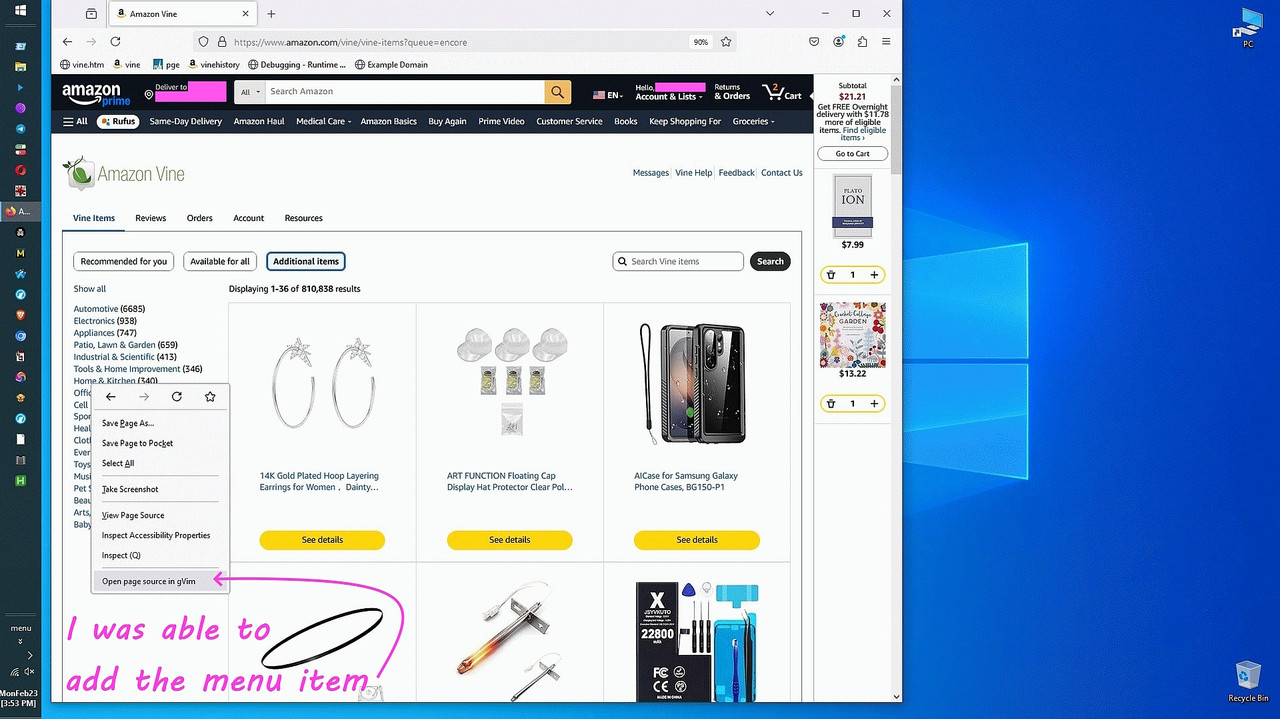
How to force Firefox to expose 'Edit Source' (Ctrl+U) in the context
menu.
On Mon, 23 Feb 2026 14:02:15 -0600, Maria Sophia wrote:
How to force Firefox to expose 'Edit Source' (Ctrl+U) in the context
menu.
Quicker to just press CTRL-U. And actually it's viewing the source,
not editing the source.
Note the context menu adds an option |View Selection Sourcei if you
have any part of the page selected. This shows the source of the page
as it is rendered, not as it might originally have been read from the
server.
where pythonC:\app\os\python\python.exe
python --versionPython 3.14.1
mkdir c:\app\browser\ff\openwith
copy open_with_windows.py c:\app\browser\ff\openwith\.
python C:\app\browser\ff\openwith\open_with_windows.py install
I might try building my own extension, but that's ambitious.
Maria Sophia wrote:Does that now restore peace and comfort for the rest of us following
I might try building my own extension, but that's ambitious.
Aurgh! <slaps head!> I fixed this years ago, and simply had forgotten!
I'll write up that tutorial for Windows Firefox users separately so
that the two hours spent learning how to write my first extension
isn't completely wasted (I love teaching others how to do things).
On Mon, 23 Feb 2026 20:22:59 -0600, Maria Sophia wrote:
I'll write up that tutorial for Windows Firefox users separately so
that the two hours spent learning how to write my first extension
isn't completely wasted (I love teaching others how to do things).
I suspect that the Venn diagram of "Hacker" versus "uses Microsoft
Windows" shows a dwindling overlap ...
Maria Sophia wrote:
I might try building my own extension, but that's ambitious.
Aurgh! <slaps head!> I fixed this years ago, and simply had forgotten!
Sometimes I get so immersed in fighting a problem that I don't step back
and look at it from a different angle, which just happened moments ago!
I was almost done building my own extension, when I accidentally clicked on "View page source" instead of on my extension "Open page source in gVim".
<https://i.postimg.cc/8Cw8Wg3W/edit-context-menu.jpg>
And the source to https://example.com came up in an editable gVim session! Likewise with the HTML text "file:///C:/data/amazon/vine.htm" file edits.
So, the ability to rightclick and *edit* the source was already there!
Mea culpa. My mistake. I went down a rathole for no good reason other than
I will never leet any application defeat me when I want it to do something.
Yet, in this case, I had already solved the problem. Years ago in fact.
I simply forgot that I already had the solution awaiting me all this time.
I had *forgotten* that these settings *also* affect the "View page source" menu item, so the ability to edit from the context menu was *always* there!
about:config > view_source.editor
view_source.editor.external = true
view_source.editor.path = C:\app\editor\txt\vi\gvim.exe
Since I already wrote my first extension that does the same thing, I will post a separate thread so that others can get the mechanics of extensions.
I'm working on the final step, which is Windows related, and not Firefox.
1. Extension loading
Working correctly. The background script loads, the context menu
is created, and the extension activates without errors.
2. Content script behavior
Working correctly. The background script sends GET_HTML,
the content script returns full HTML, and message passing is reliable.
3. Native messaging pipeline
Working correctly. Firefox finds the registry key, loads the JSON
manifest, launches the BAT file, and the BAT launches Python.
4. Python host behavior
Working correctly. The host receives messages, decodes JSON,
writes temp files, logs activity, and returns success responses.
5. Temp file creation
Working correctly. Each request produces a unique HTML file
in the system temp directory.
6. Editor launch command execution
Partially working. The subprocess call executes without errors,
but the editor window does not appear because it is launched
in a non-interactive desktop session.
7. Editor visibility
Not working. GUI editors launched directly from the native host
do not appear on the user's desktop. This is the final unresolved issue.
8. Required fix
Pending. On Windows, the editor must be launched using
"cmd.exe /c start"
to force it into the interactive session so the window becomes visible.
I'll write up that tutorial for Windows Firefox users separately so
that the two hours spent learning how to write my first extension
isn't completely wasted (I love teaching others how to do things).
I actually use custom protocol (e.g. 'external:') for adding bookmarks and bookmarklets which runs external application. IMO, it's much simpler and easier to maintain & extend. Albeit not as context menu items.
| Sysop: | Amessyroom |
|---|---|
| Location: | Fayetteville, NC |
| Users: | 59 |
| Nodes: | 6 (0 / 6) |
| Uptime: | 22:33:20 |
| Calls: | 810 |
| Calls today: | 1 |
| Files: | 1,287 |
| D/L today: |
12 files (21,036K bytes) |
| Messages: | 195,759 |