Another datapoint: On similar other hardware: live LM 22.1 Firefox 134.0 default condition, no added extensions or other changes - same faulty
street view as above, troubleshooting mode fixes the problem.
Next, back to the LM 22.1 live, up Cinn to 6.4.8, up Ffx to 146.0.1;
same blackscreen. This is kernel 6.8.0-51
Linux Mint Firefox 134.0
Routine google maps works fine; when I drag the person icon onto the map
to enable street view, I only get a black screen when shifted into streetview.
I have two extensions; uBlock origin and Privacy Badger.
If I use Ffx in troubleshooting mode, the street view works correctly.
If I use Ffx w/ both extensions above disabled, street view does not
work correctly.
The other conditions said to be affected by troubleshooting are the
hardware acceleration, userchrome & usercontent, JIT compiler.
How do I deal w/ this condition/problem next? I have not personally modified my userchrome.
Another datapoint: On similar other hardware: live LM 22.1 Firefox 134.0 default condition, no added extensions or other changes - same faulty
street view as above, troubleshooting mode fixes the problem.
Also, one more minor data point: when the person icon is dragged to a
street position but *before* shifting into the street view, a small
'inset' appears by the person icon which is a 'miniature' version of the street view. That miniature view does work correctly on both the live
and installed LM Ffx which do not streetview properly.
Mike Easter wrote:
How do I deal w/ this condition/problem next? I have not personally
modified my userchrome.
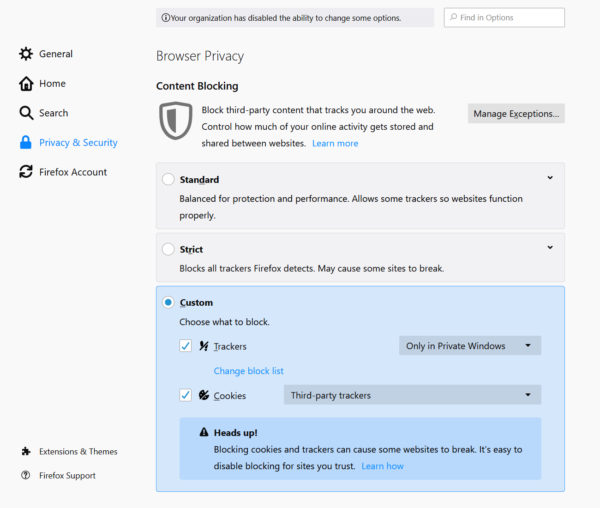
Have you tried adjusting the fingerprinting protection level aka ETP (Enhanced Threat Protection)? Maybe you set to high.
Running in safe (troublehooting) mode only disables some features of
Firefox, like the add-ons, user and prefs files, etc. It does not
eradicate any tweaks you made in about:config. Create a new Firefox
profile which starts with no add-ons, and no tweaks. You get the factory/install state of Firefox. Having a fresh profile that you never pollute can help diagnose problems with your active profile. You can
use the Profile Manager to decide which profile to load, and which will
be the default profile when Firefox loads.
Another datapoint: On similar other hardware:
Mike Easter wrote:
Another datapoint: On similar other hardware:
Live Sparky 8; a Deb 13, OpenBox WM, Ffx 146.0 (labeled Sparky Ffx),
kernel 6.12.17 AMD, gfx radeon wayland
Streetview black, inset miniature works, troubleshooting mode works.
Live Sparky 8; a Deb 13, OpenBox WM,
On 1/10/2026 4:19 PM, Mike Easter wrote:
Mike Easter wrote:
Another datapoint: On similar other hardware:
Live Sparky 8; a Deb 13, OpenBox WM, Ffx 146.0 (labeled Sparky Ffx),
kernel 6.12.17 AMD, gfx radeon wayland
Streetview black, inset miniature works, troubleshooting mode works.
Have you changed any of the settings/general/contrast control options?
VanguardLH wrote:
Mike Easter wrote:
How do I deal w/ this condition/problem next? I have not personally
modified my userchrome.
Have you tried adjusting the fingerprinting protection level aka ETP
(Enhanced Threat Protection)? Maybe you set to high.
My ETP is normal. I even changed to custom and lessened normal; no
help.
My several live default Ffx in live LM & LMDE mentioned all have the
default profiles.
On similar other hardware: live LM 22.1
Disable all settings in there.
Heads up! This setting may cause some websites to not display
content or work correctly. If a site seems broken, you may want to
turn off tracking protection for that site to load all content.
Learn how
Linux Mint Firefox 134.0
Routine google maps works fine; when I drag the person icon onto the map
to enable street view, I only get a black screen when shifted into streetview.
Live Sparky 8; a Deb 13, OpenBox WM, Ffx 146.0 (labeled Sparky Ffx),What if you try disabling graphics acceleration?
kernel 6.12.17 AMD, gfx radeon wayland
Streetview black, inset miniature works, troubleshooting mode works.
No problem here with LM 22.2, Cinnamon 6.4.8, and FF 146.0.1 with six extensions including uBlock origin. Kernel is 6.8.0-90-generic.
Have you tried uninstalling FX completely and reinstalling? I see you've tried a live version of LM, but only 22.1. What about trying the beta
22.3 and Cinnamon DE?
Mullvad is based on Fx. If you install that does it work (like Librefox does) or not?
I'll get the fresh 22.3 to replace my 22.1 on that Ventoy SSD.
Linux Mint Firefox 134.0
Routine google maps works fine; when I drag the person icon onto the map
to enable street view, I only get a black screen when shifted into >streetview.--- Synchronet 3.21a-Linux NewsLink 1.2
If 22.2 can update now, there must be a 22.3 .iso 'just around the corner'.
Mike Easter wrote:
If 22.2 can update now, there must be a 22.3 .iso 'just around the
corner'.
Ha. Found it from a blog comment link.
Mike Easter wrote:
Mike Easter wrote:Live LM Cinn 22.3 Ffx 146.0
If 22.2 can update now, there must be a 22.3 .iso 'just around the
corner'.
Ha. Found it from a blog comment link.
Streetview doesn't work.
Troubleshooting ok.
Live LM Cinn 22.3 Mullvad browser 15.0.3 (no Mullvad VPN)
Streetview works OK.
Mike Easter wrote:
Mike Easter wrote:
Mike Easter wrote:Live LM Cinn 22.3 Ffx 146.0 Streetview doesn't work.
If 22.2 can update now, there must be a 22.3 .iso 'just around
the corner'.
Ha. Found it from a blog comment link.
Troubleshooting ok.
Live LM Cinn 22.3 Mullvad browser 15.0.3 (no Mullvad VPN)
Streetview works OK.
How strange that Librewolf and Mullvad are ok, while Fx itself
isn't.
For less extreme privacy: Firefox with Arkenfox user.js or Mullvad
Browser offer good privacy without breaking as much
Which Browser Leaks Your Data? Mullvad vs LibreWolf vs Firefox
Mike Easter wrote:
I'll get the fresh 22.3 to replace my 22.1 on that Ventoy SSD.
Oops. The 22.3 .iso isn't available yet; the beta has a Dec 16 date.
If 22.2 can update now, there must be a 22.3 .iso 'just around the
corner'.
Try Pop! OS on Ventoy:
https://system76.com/pop/download/
invalid wrote:
Try Pop! OS on Ventoy:
https://system76.com/pop/download/
Hmmm. I have a Pop I dl/ed back in '25 Mar, but the 'current' Pop has a slightly different name and is dated '26 Jan.
pop-os_24.04_amd64_intel_16.iso
pop-os_24.04_amd64_generic_22.iso (fresh)
What is up w/ that difference?
Mike Easter wrote:
invalid wrote:
Try Pop! OS on Ventoy:
https://system76.com/pop/download/
Hmmm. I have a Pop I dl/ed back in '25 Mar, but the 'current' Pop has
a slightly different name and is dated '26 Jan.
pop-os_24.04_amd64_intel_16.iso
pop-os_24.04_amd64_generic_22.iso (fresh)
What is up w/ that difference?
It's got new COSMIC Desktop. Are you sure it is dated 25 Jan?
pop-os_24.04_amd64_generic_22.iso (fresh)
Jeff Layman wrote:
Mike Easter wrote:Since then, I've been doing more reading, such as querying about the *disadvantages* of such as Librewolf. Also, while normally I eschew
Mike Easter wrote:
Mike Easter wrote:Live LM Cinn 22.3 Ffx 146.0 Streetview doesn't work.
If 22.2 can update now, there must be a 22.3 .iso 'just around
the corner'.
Ha. Found it from a blog comment link.
Troubleshooting ok.
Live LM Cinn 22.3 Mullvad browser 15.0.3 (no Mullvad VPN)
Streetview works OK.
How strange that Librewolf and Mullvad are ok, while Fx itself
isn't.
watching YT vids, occsly I do, if I haven't yet found a nice text
discussing the same thing.
In this case, I watched a vid comparing Mullvad, Librewolf, and Ffx for privacy, particularly re tracking and fingerprinting. BTW, normally I
am NOT a privacy buff who cares about tracking or fingerprinting.
In any case, the vid gave Mullvad a very slight edge over Librewolf on
one issue while of course Ffx fell flat.
gglAIov google AI overview said that sometimes the privacy browsers
break a website and named a number of other disadvantages which altho' numerous, didn't seem too troublesome. At the end, it said:
For less extreme privacy: Firefox with Arkenfox user.js or Mullvad
Browser offer good privacy without breaking as much
I don't understand why Mullvad would break less than Librewolf.
Here's the vid comparing them:
Which Browser Leaks Your Data? Mullvad vs LibreWolf vs Firefox
https://www.youtube.com/watch?v=SOuHL-Qf3NY
I really don't like YouTube videos when explaining something like that.
Why use a couple of tables on a page which you can scan in half a minute when you can take 10 minutes watching the same thing less clearly on a video.
Have you seen this:
<https://privacytests.org/>
That reminds me of the work of That One Privacy Guy before he sold the
name to commercial interests.
Live LM Cinn 22.3 Ffx 146.0
Streetview doesn't work.
Troubleshooting ok.
Live LM Cinn 22.3 Ffx 146.0
Streetview doesn't work.
Troubleshooting ok.
| Sysop: | Amessyroom |
|---|---|
| Location: | Fayetteville, NC |
| Users: | 54 |
| Nodes: | 6 (1 / 5) |
| Uptime: | 22:45:55 |
| Calls: | 742 |
| Files: | 1,218 |
| D/L today: |
6 files (8,794K bytes) |
| Messages: | 186,546 |
| Posted today: | 1 |