• Google Search

    From Simon@invalid@invalid.invalid to alt.comp.os.windows-10,alt.comp.software.firefox on Sat Jan 10 01:08:50 2026
    From Newsgroup: alt.comp.software.firefox

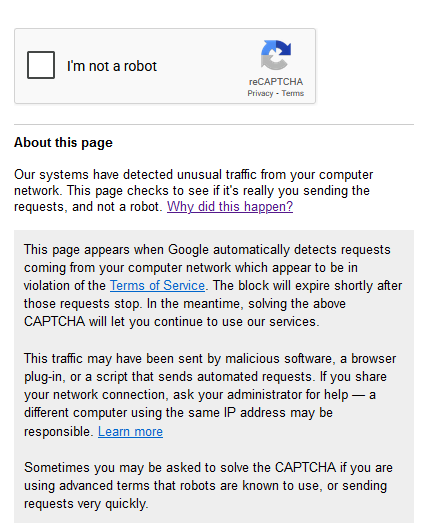
    For some reason, whenever I try to use Google Search, I am prompted to complete a captcha test as shown in this image:

    https://i.postimg.cc/NMWmx7bj/2026-01-10-00-51-52.png.

    I'm using Firefox 115.31 on Windows 11 25H2.

    I'd like to know whether it is Microsoft trying to piss me for not using
    Bing.


    --- Synchronet 3.21a-Linux NewsLink 1.2
  • From Alan K.@alan@invalid.com to alt.comp.os.windows-10,alt.comp.software.firefox on Fri Jan 9 20:45:55 2026
    From Newsgroup: alt.comp.software.firefox

    On 1/9/26 8:08 PM, Simon wrote:
    For some reason, whenever I try to use Google Search, I am prompted to complete a captcha test as shown in this image:

    https://i.postimg.cc/NMWmx7bj/2026-01-10-00-51-52.png.

    I'm using Firefox 115.31 on Windows 11 25H2.

    I'd like to know whether it is Microsoft trying to piss me for not using Bing.


    Well, as the captcha says, too many request etc etc...
    Do you have an unusual setup? VPN or such. It implies some unauthorized usage, not sure
    what that means. Have you tried chrome or Edge?
    --
    Linux Mint 22.2, Mozilla Thunderbird 140.6.0esr, Mozilla Firefox 146.0.1
    Alan K.
    --- Synchronet 3.21a-Linux NewsLink 1.2
  • From Mike Easter@MikeE@ster.invalid to alt.comp.os.windows-10,alt.comp.software.firefox on Fri Jan 9 17:52:36 2026
    From Newsgroup: alt.comp.software.firefox

    Simon wrote:
    For some reason, whenever I try to use Google Search, I am prompted to complete a captcha test as shown in this image:

    https://i.postimg.cc/NMWmx7bj/2026-01-10-00-51-52.png.

    gglAIov has all this to say; I deleted 4 I didn't like incl complete the captcha

    -------
    Disable VPN/Proxy: If you are using a VPN or proxy service, try
    disabling it temporarily and see if the issue persists.
    Clear browser data: Clear your browser's cache and cookies to remove
    any data that might be causing the flag.
    Disable browser extensions: Try disabling your browser extensions one
    by one or test Google Search in an Incognito window (which disables most extensions by default) to identify a potential culprit.
    Scan for malware: Run a full antivirus or anti-malware scan on your computer to ensure it is clean.
    -------
    --
    Mike Easter
    --- Synchronet 3.21a-Linux NewsLink 1.2
  • From Mr. Man-wai Chang@toylet.toylet@gmail.com to alt.comp.os.windows-10,alt.comp.software.firefox on Sat Jan 10 11:33:02 2026
    From Newsgroup: alt.comp.software.firefox

    Clear browser data: Clear your browser's cache and cookies to remove
    any data that might be causing the flag.
    Disable browser extensions: Try disabling your browser extensions one

    by one or test Google Search in an Incognito window (which disables most extensions by default) to identify a potential culprit.

    Clearing cookies should be the first thing to try.
    --
    @~@ Simplicity is Beauty! Remain silent! Drink, Blink, Stretch!
    / v \ May the Force and farces be with you! Live long and prosper!!
    /( _ )\ https://sites.google.com/site/changmw/
    ^ ^ https://github.com/changmw/changmw
    --- Synchronet 3.21a-Linux NewsLink 1.2
  • From VanguardLH@V@nguard.LH to alt.comp.os.windows-10,alt.comp.software.firefox on Sat Jan 10 01:45:17 2026
    From Newsgroup: alt.comp.software.firefox

    Simon <invalid@invalid.invalid> wrote:

    For some reason, whenever I try to use Google Search, I am prompted to complete a captcha test as shown in this image:

    https://i.postimg.cc/NMWmx7bj/2026-01-10-00-51-52.png.

    I'm using Firefox 115.31 on Windows 11 25H2.

    I'd like to know whether it is Microsoft trying to piss me for not using Bing.

    To block web crawlers from crawling the Master Crawler.

    I get than searching Google Images. When I scroll down several pages,
    that CAPTCHA appears. Once I respond, more the web page paints to show
    more images.

    The message regarding the CAPTCHA is bogus. When scrolling through lots
    of images, yeah, Google has to deliver a lot of images if you scroll
    really fast, but scrolling is not malicious behavior. They want to slow
    the rate at which the images are delivered, so the CAPTCHA affords a
    pause. It also blocks web crawlers aka spiders from snagging copies of
    all the images.

    Most times I just have to click on the checkbox. A few times I get a
    set of squares with various images from which I'm to pick those that are related to a reference image, like picking multiple pics of computer
    mice to go with a pic of a keyboard.
    --- Synchronet 3.21a-Linux NewsLink 1.2
  • From J. P. Gilliver@G6JPG@255soft.uk to alt.comp.os.windows-10,alt.comp.software.firefox on Sat Jan 10 15:13:57 2026
    From Newsgroup: alt.comp.software.firefox

    On 2026/1/10 1:8:50, Simon wrote:
    For some reason, whenever I try to use Google Search, I am prompted to > complete a captcha test as shown in this image:

    https://i.postimg.cc/NMWmx7bj/2026-01-10-00-51-52.png.

    I'm using Firefox 115.31 on Windows 11 25H2.

    I'd like to know whether it is Microsoft trying to piss me for not using Bing.

    Well, using (Microsoft's own) Edge on Windows 10, if I bring up Google
    search - either the advanced one I use by default, or the standard one -
    I get no captcha. So it's not universal! (I've hardly ever used bing. or
    DDG.)


    --
    J. P. Gilliver. UMRA: 1960/<1985 MB++G()ALIS-Ch++(p)Ar++T+H+Sh0!:`)DNAf
    --- Synchronet 3.21a-Linux NewsLink 1.2
  • From VanguardLH@V@nguard.LH to alt.comp.os.windows-10,alt.comp.software.firefox on Sat Jan 10 13:29:04 2026
    From Newsgroup: alt.comp.software.firefox

    "J. P. Gilliver" <G6JPG@255soft.uk> wrote:

    Simon wrote:

    For some reason, whenever I try to use Google Search, I am prompted to
    complete a captcha test as shown in this image:

    https://i.postimg.cc/NMWmx7bj/2026-01-10-00-51-52.png.

    I'm using Firefox 115.31 on Windows 11 25H2.

    I'd like to know whether it is Microsoft trying to piss me for not using
    Bing.

    Well, using (Microsoft's own) Edge on Windows 10, if I bring up Google
    search - either the advanced one I use by default, or the standard
    one - I get no captcha. So it's not universal! (I've hardly ever used
    bing. or DDG.)

    Not sure what triggers Google to intercede with continued navigation in
    a web page by showing their CAPTCHA popup. What I found that more often generates the CAPTCHA popup is to search Google Images, and after paging
    down many times then the CAPTCHA pops up. They deliberately interfere
    with displaying more images almost like they're trying to thwart web
    crawler from grabbing their content like how they grab image content
    from elsewhere.

    Getting the Google CAPTCHA is more infrequent when scrolling through
    search results which are text listings to articles. More frequent is
    when I'm scrolling through a list of images. The images are displayed
    as thumbnails, there are lot of them to span many page downs, and as I'm
    paging down I get the CAPTCHA. While the CAPTCHA is up, the image
    thumbnails in the web page are blurred, so you cannot view them, and you
    have to clear the CAPTCHA before the page unblurs, and you can continue scrolling down through more image thumbnails.

    In fact, I've hit the CAPTCHA before Google displays any results. The
    results page is blank (all white), the CAPTCHA appears, I have to click
    "I am not a robot" in the CAPTCHA, have to solve the CAPTCHA, and then
    the web page gets retrieved.

    Here's a snapshot when Google puked out their CAPTCHA before showing any results on a search for "car" (search on articles, not images):

    https://ibb.co/zWnMj14n

    Look at the address bar for the URL. Starts with:

    https://www.google.com/sorry/index?continue=<originalSearchURL>

    After I solve the CAPTCHA, then the search results page gets loaded. In
    this case, you don't get to view any results. The CAPTCHA immediately
    appeared over a blank white page, so you see no results until you solve
    the CAPTCHA. This one is rather new to me. It was scrolling through a
    list of thumbnails in an image search when I mostly got the interfering CAPTCHA. It's gotten worse, and now interferes with an articles search.

    Anyone notice you don't get back as many results as before? I search
    on, say "fern", and after hitting PageDown 30 to 40 times I'm at the end
    of the results. They're capping how many image results they'll display.
    I search Google Images on "car", page down 42 times to get to the end of
    the thumbnails, and that's it. Somewhere around 600 images, and that's
    all you get. Really, there are only 600 images of cars that Google can
    snatch on the Web?
    --- Synchronet 3.21a-Linux NewsLink 1.2
  • From Frank Miller@miller@posteo.ee to alt.comp.os.windows-10,alt.comp.software.firefox on Sat Jan 10 20:48:12 2026
    From Newsgroup: alt.comp.software.firefox

    Simon wrote:
    For some reason, whenever I try to use Google Search, I am prompted to complete a captcha test as shown in this image:

    https://i.postimg.cc/NMWmx7bj/2026-01-10-00-51-52.png.

    I'm using Firefox 115.31 on Windows 11 25H2.

    I'd like to know whether it is Microsoft trying to piss me for not using Bing.

    It's more likely Google trying to piss you for using "the internet" aka
    it's own service. Use another search engine and better no google products
    at all.
    --- Synchronet 3.21a-Linux NewsLink 1.2
  • From VanguardLH@V@nguard.LH to alt.comp.os.windows-10,alt.comp.software.firefox on Sat Jan 10 15:01:31 2026
    From Newsgroup: alt.comp.software.firefox

    Frank Miller <miller@posteo.ee> wrote:

    Simon wrote:

    For some reason, whenever I try to use Google Search, I am prompted
    to complete a captcha test as shown in this image:

    https://i.postimg.cc/NMWmx7bj/2026-01-10-00-51-52.png.

    I'm using Firefox 115.31 on Windows 11 25H2.

    I'd like to know whether it is Microsoft trying to piss me for not using
    Bing.

    It's more likely Google trying to piss you for using "the internet"
    aka it's own service. Use another search engine and better no google
    products at all.

    I use Startpage as my default online search engine. They are an
    anonimizing frontend to Google's search. I have not encountered the
    CAPTCHAS that popup when scrolling through search results, but I cannot guarantee that won't happen. It's only been a couple weeks since I
    encountered the CAPTCHAs at Google Image, and just now with Google
    (search on articles). Will have to wait to see if Startpage starts
    getting interference from Google for Startpage to display Google
    results.

    Google likes to push their popup to switch to Chrome when you visit a
    Google web site with a non-Chrome web browser. Be interesting to see if
    Chrome users get hit with the same interferring CAPTCHA. If not, it is Google's way to punish users of non-Chrome clients.
    --- Synchronet 3.21a-Linux NewsLink 1.2
  • From Chris@ithinkiam@gmail.com to alt.comp.os.windows-10,alt.comp.software.firefox on Sun Jan 11 00:38:51 2026
    From Newsgroup: alt.comp.software.firefox

    Simon <invalid@invalid.invalid> wrote:
    For some reason, whenever I try to use Google Search, I am prompted to complete a captcha test as shown in this image:

    https://i.postimg.cc/NMWmx7bj/2026-01-10-00-51-52.png.

    I'm using Firefox 115.31 on Windows 11 25H2.

    I'd like to know whether it is Microsoft trying to piss me for not using Bing

    Why's your Firefox so old? Current version 146.x

    That might be the reason why you're being CAPTCHA'd.

    --- Synchronet 3.21a-Linux NewsLink 1.2
  • From Frank Slootweg@this@ddress.is.invalid to alt.comp.os.windows-10,alt.comp.software.firefox on Sun Jan 11 16:26:08 2026
    From Newsgroup: alt.comp.software.firefox

    VanguardLH <V@nguard.lh> wrote:
    [...]
    Here's a snapshot when Google puked out their CAPTCHA before showing any results on a search for "car" (search on articles, not images):

    https://ibb.co/zWnMj14n

    Look at the address bar for the URL. Starts with:

    https://www.google.com/sorry/index?continue=<originalSearchURL>

    After I solve the CAPTCHA, then the search results page gets loaded. In
    this case, you don't get to view any results. The CAPTCHA immediately appeared over a blank white page, so you see no results until you solve
    the CAPTCHA. This one is rather new to me. It was scrolling through a
    list of thumbnails in an image search when I mostly got the interfering CAPTCHA. It's gotten worse, and now interferes with an articles search.

    It probably depends on which browser you use or/and the way you
    search.

    I use Chrome and just enter 'car' (without quotes) in the address bar.
    This gives an effective URL of
    <https://www.google.com/search?q=car&oq=car>

    The 'search?q=car&oq=car' part is a little different than the one in
    your screenshot.

    With this/my URL, Chrome just shows three car images with a 'Show more
    images \/' box below them. When I click on that box, I get six more
    images and then a 'All images >' box. When I click on that box, I get
    many more images. How many seems to depend on how fast I page (with the
    'pg dn' key). I got about 40 pages max. I never got a CAPTCHA.

    Anyone notice you don't get back as many results as before? I search
    on, say "fern", and after hitting PageDown 30 to 40 times I'm at the end
    of the results. They're capping how many image results they'll display.
    I search Google Images on "car", page down 42 times to get to the end of
    the thumbnails, and that's it. Somewhere around 600 images, and that's
    all you get. Really, there are only 600 images of cars that Google can snatch on the Web?

    For 'fern' I got about 28 pages and *not* the 'Show more images \/' or
    'All images >' box/prompt.
    --- Synchronet 3.21a-Linux NewsLink 1.2