• Persistent storage

    From BrightonRock@harrymandispose-news@yahoo.com to alt.comp.software.firefox on Thu Dec 18 15:17:46 2025
    From Newsgroup: alt.comp.software.firefox

    I an running Firefox 146 on Window 11. It has taken to storing large quantities of information in a folder in my profile storage>permanent>chrome>idb. I can delete that information but I can't
    find a setting to stop Firefox putting information there in the first
    place. There must be a setting: can someone please point me to it?
    --- Synchronet 3.21a-Linux NewsLink 1.2
  • From David E. Ross@nobody@nowhere.invalid to alt.comp.software.firefox on Thu Dec 18 10:12:08 2025
    From Newsgroup: alt.comp.software.firefox

    On 12/18/2025 7:17 AM, BrightonRock wrote:
    I an running Firefox 146 on Window 11. It has taken to storing large quantities of information in a folder in my profile storage>permanent>chrome>idb. I can delete that information but I can't
    find a setting to stop Firefox putting information there in the first
    place. There must be a setting: can someone please point me to it?


    Some time ago, I noticed that Firefox, SeaMonkey (my preferred browser
    but not my E-mail client), and Thunderbird all have this problem.
    Weekly, I backup my entire system. First. however, I run some scripts
    to delete blocks of data I do not want to save. One of the scripts
    deletes the contents of the default, permanent, and temporary folders
    and the folders themselves from storage.
    --

    David E. Ross
    <http:www.rossde.com>

    Some Republican officials have denounced the assassination
    of Charlie Kirk as a conspiracy by liberal Democrats. Why
    then is the attempted kidnapping of the Democrat governor
    of Michigan, the shooting of a Democrat state senator of
    Minnesota, and the assassination of the Democrat speaker
    of the Minnesota state assembly not denounced as a
    conservative Republican conspiracy?

    --- Synchronet 3.21a-Linux NewsLink 1.2
  • From Andy Burns@usenet@andyburns.uk to alt.comp.software.firefox on Thu Dec 18 18:41:18 2025
    From Newsgroup: alt.comp.software.firefox

    "David E. Ross" wrote:

    BrightonRock wrote:
    I an running Firefox 146 on Window 11. It has taken to storing large
    quantities of information in a folder in my profile
    storage>permanent>chrome>idb. I can delete that information but I can't
    find a setting to stop Firefox putting information there in the first
    place. There must be a setting: can someone please point me to it?


    Some time ago, I noticed that Firefox, SeaMonkey (my preferred browser
    but not my E-mail client), and Thunderbird all have this problem.
    Weekly, I backup my entire system. First. however, I run some scripts
    to delete blocks of data I do not want to save. One of the scripts
    deletes the contents of the default, permanent, and temporary folders
    and the folders themselves from storage.

    If you block a domain from saving cookies, does that not also block it
    from saving "stuff" to persistent storage?
    --- Synchronet 3.21a-Linux NewsLink 1.2
  • From Jeff Layman@Jeff@invalid.invalid to alt.comp.software.firefox on Thu Dec 18 19:05:57 2025
    From Newsgroup: alt.comp.software.firefox

    On 18/12/2025 15:17, BrightonRock wrote:
    I an running Firefox 146 on Window 11. It has taken to storing large quantities of information in a folder in my profile storage>permanent>chrome>idb. I can delete that information but I can't
    find a setting to stop Firefox putting information there in the first
    place. There must be a setting: can someone please point me to it?

    What happens if you make that folder read-only (if you have permission
    to do that)?
    --
    Jeff
    --- Synchronet 3.21a-Linux NewsLink 1.2
  • From Clear History@Trump-is-a-cocaine-dealer @invalid.invalid to alt.comp.software.firefox on Thu Dec 18 22:15:40 2025
    From Newsgroup: alt.comp.software.firefox

    On 18/12/2025 15:17, BrightonRock wrote:
    I an running Firefox 146 on Window 11. It has taken to storing large quantities of information in a folder in my profile storage>permanent>chrome>idb. I can delete that information but I can't
    find a setting to stop Firefox putting information there in the first
    place. There must be a setting: can someone please point me to it?


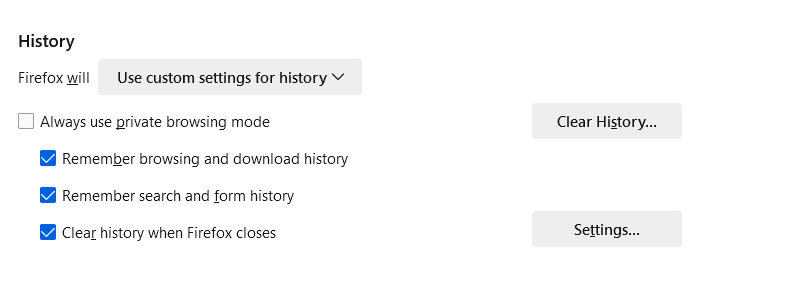
    Privacy & Security >> History >> Use Custom settings for history >>
    Check the three boxes shown in this image.

    Now you will always have clean start when you launch FF. No more temp
    files in your profile.

    <https://postimg.cc/XG9mL4GW> <https://i.postimg.cc/76R4xLq5/2025-12-18-22-10-44.png>


    --- Synchronet 3.21a-Linux NewsLink 1.2
  • From David E. Ross@nobody@nowhere.invalid to alt.comp.software.firefox on Thu Dec 18 21:41:16 2025
    From Newsgroup: alt.comp.software.firefox

    On 12/18/2025 10:41 AM, Andy Burns wrote:
    "David E. Ross" wrote:

    BrightonRock wrote:
    I an running Firefox 146 on Window 11. It has taken to storing large
    quantities of information in a folder in my profile
    storage>permanent>chrome>idb. I can delete that information but I can't
    find a setting to stop Firefox putting information there in the first
    place. There must be a setting: can someone please point me to it?


    Some time ago, I noticed that Firefox, SeaMonkey (my preferred browser
    but not my E-mail client), and Thunderbird all have this problem.
    Weekly, I backup my entire system. First. however, I run some scripts
    to delete blocks of data I do not want to save. One of the scripts
    deletes the contents of the default, permanent, and temporary folders
    and the folders themselves from storage.

    If you block a domain from saving cookies, does that not also block it
    from saving "stuff" to persistent storage?


    I have set the properties for cookies.sqlite to "read only", but I still
    get data in persistent storage.
    --

    David E. Ross
    <http:www.rossde.com>

    Some Republican officials have denounced the assassination
    of Charlie Kirk as a conspiracy by liberal Democrats. Why
    then is the attempted kidnapping of the Democrat governor
    of Michigan, the shooting of a Democrat state senator of
    Minnesota, and the assassination of the Democrat speaker
    of the Minnesota state assembly not denounced as a
    conservative Republican conspiracy?

    --- Synchronet 3.21a-Linux NewsLink 1.2
  • From Andy Burns@usenet@andyburns.uk to alt.comp.software.firefox on Fri Dec 19 07:05:59 2025
    From Newsgroup: alt.comp.software.firefox

    "David E. Ross" wrote:

    I have set the properties for cookies.sqlite to "read only", but I still
    get data in persistent storage.

    If you've prevented writes to cookies.sqlite in an unorthodox fashion, I expect you'd need to do similar to prevent writes to the storage folder?

    I was meaning on a per domain basis Settings/privacy&security/cookies&siteData/manageExceptions

    reading the description on that dialogue (and the manage browsing data dialogue) implies it affects persistent storage as well as cookies?

    --- Synchronet 3.21a-Linux NewsLink 1.2
  • From R Daneel Olivaw@Danni@hyperspace.vogon.gov.invalid to alt.comp.software.firefox on Fri Dec 19 11:49:33 2025
    From Newsgroup: alt.comp.software.firefox

    Clear History wrote:
    On 18/12/2025 15:17, BrightonRock wrote:
    I an running Firefox 146 on Window 11. It has taken to storing large
    quantities of information in a folder in my profile
    storage>permanent>chrome>idb. I can delete that information but I can't
    find a setting to stop Firefox putting information there in the first
    place. There must be a setting: can someone please point me to it?


    Privacy & Security >> History >> Use Custom settings for history >>
    Check the three boxes shown in this image.

    Now you will always have clean start when you launch FF. No more temp
    files in your profile.

    <https://postimg.cc/XG9mL4GW> <https://i.postimg.cc/76R4xLq5/2025-12-18-22-10-44.png>


    I clear cache that way (via "Settings"), but no way am I going to clear
    the other stuff. Since my FF is 140.6.0esr, this should have been
    resolved by the time the esr line moves to a new base level.
    --- Synchronet 3.21a-Linux NewsLink 1.2
  • From Lawrence =?iso-8859-13?q?D=FFOliveiro?=@ldo@nz.invalid to alt.comp.software.firefox on Fri Dec 19 20:56:58 2025
    From Newsgroup: alt.comp.software.firefox

    On Fri, 19 Dec 2025 11:49:33 +0100, R Daneel Olivaw wrote:

    Since my FF is 140.6.0esr, this should have been
    resolved by the time the esr line moves to a new base level.

    Unless itrCOs actually a Windows problem, not a Firefox problem.
    --- Synchronet 3.21a-Linux NewsLink 1.2
  • From R Daneel Olivaw@Danni@hyperspace.vogon.gov.invalid to alt.comp.software.firefox on Sat Dec 20 11:34:26 2025
    From Newsgroup: alt.comp.software.firefox

    Lawrence DrCOOliveiro wrote:
    On Fri, 19 Dec 2025 11:49:33 +0100, R Daneel Olivaw wrote:

    Since my FF is 140.6.0esr, this should have been
    resolved by the time the esr line moves to a new base level.

    Unless itrCOs actually a Windows problem, not a Firefox problem.


    My X-Mailer string is "Mozilla/5.0 (X11; Linux x86_64; rv:128.0) Gecko/20100101 SeaMonkey/2.53.21"
    so if it's a Windows problem, see if I care.
    --- Synchronet 3.21a-Linux NewsLink 1.2