The one I used to have was Targus brand that lasted for several years,
then I got another called Digipower DP-MCR4, which was a big mistake
because it has never worked well with the cards and I often have to
reformat them.
Suggestions welcome. I see ones for around $5 all over eBay, but are
they decent or would I end up with another dud? Thanks in advance.
On 2026/2/6 23:2:0, Harvey Sanenbum wrote:
The one I used to have was Targus brand that lasted for several years,
then I got another called Digipower DP-MCR4, which was a big mistake
because it has never worked well with the cards and I often have to
reformat them.
Suggestions welcome. I see ones for around $5 all over eBay, but are
they decent or would I end up with another dud? Thanks in advance.
Could you clarify "never worked well" - are we talking speed problems, not-seeing-card-at-all problems, or mechanical problems?
The one I used to have was Targus brand that lasted for several years,
then I got another called Digipower DP-MCR4, which was a big mistake
because it has never worked well with the cards and I often have to
reformat them.
Suggestions welcome.-a I see ones for around $5 all over eBay, but are
they decent or would I end up with another dud?-a Thanks in advance.
The one I used to have was Targus brand that lasted for several years, then I got another called Digipower DP-MCR4, which was a big mistake because it has never worked well with the cards and I often have to reformat them.
Suggestions welcome.-a I see ones for around $5 all over eBay, but are they decent or would I end up with another dud?-a Thanks in advance.
The one I used to have was Targus brand that lasted for several years,
then I got another called Digipower DP-MCR4, which was a big mistake
because it has never worked well with the cards and I often have to
reformat them.
Suggestions welcome.-a I see ones for around $5 all over eBay, but are
they decent or would I end up with another dud?-a Thanks in advance.
The one I used to have was Targus brand that lasted for several years,
then I got another called Digipower DP-MCR4, which was a big mistake
because it has never worked well with the cards and I often have to
reformat them.
Suggestions welcome. I see ones for around $5 all over eBay, but are
they decent or would I end up with another dud? Thanks in advance.
Harvey Sanenbum <harvey50120@micro.net> wrote:
The one I used to have was Targus brand that lasted for several years,
then I got another called Digipower DP-MCR4, which was a big mistake
because it has never worked well with the cards and I often have to
reformat them.
Suggestions welcome. I see ones for around $5 all over eBay, but are
they decent or would I end up with another dud? Thanks in advance.
I would never put any trust in a $5 one, at least not for writing, formatting, etc..
If I were you, I would buy something from a reputable brand - i.e. not some made-up Chines etc. brand - at a sensible price. Mine, with USB-A
and USB-C plugs was EUR 20, i.e. about $200 in current US currency! :-)
Harvey Sanenbum wrote:
The one I used to have was Targus brand that lasted for several years,
then I got another called Digipower DP-MCR4, which was a big mistake
because it has never worked well with the cards and I often have to
reformat them.
Suggestions welcome.-a I see ones for around $5 all over eBay, but are
they decent or would I end up with another dud?-a Thanks in advance.
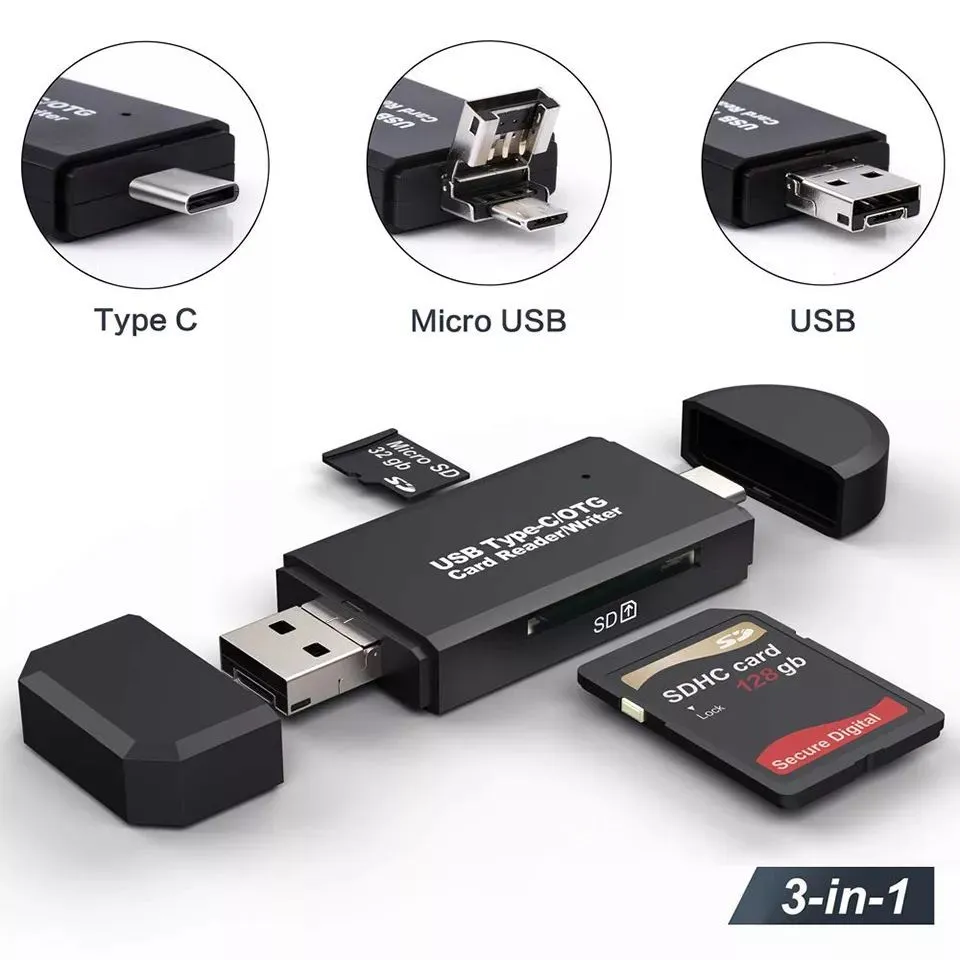
I have this one (url below).-a $5 US at Amazon.
It is around 2-3 years old and is used to transfer data from SDHC class
10 cards from camera to desktop.-a It did find a couple of bad cards
which I verfied by putting them into the laptop's built in reader and
also in the camera's reader.
Have never had a problem with it.-a The blue light is pretty.
It can also read my phone's micro card.
It has usb3.0-A 9 pins but I have not run a speed test on it.
A dislike is there is no place to attach the plastic usb cover. https://www.amazon.com/Reader-Adapter-Camera-Memory-Wansurs/dp/B0B9QZ4W4Y
On 2/7/26 2:03 PM, Frank Slootweg wrote:
Harvey Sanenbum <harvey50120@micro.net> wrote:
The one I used to have was Targus brand that lasted for several years,
then I got another called Digipower DP-MCR4, which was a big mistake
because it has never worked well with the cards and I often have to
reformat them.
Suggestions welcome.-a I see ones for around $5 all over eBay, but are
they decent or would I end up with another dud?-a Thanks in advance.
-a-a I would never put any trust in a $5 one, at least not for writing,
formatting, etc..
-a-a If I were you, I would buy something from a reputable brand - i.e. not >> some made-up Chines etc. brand - at a sensible price. Mine, with USB-A
and USB-C plugs was EUR 20, i.e. about $200 in current US currency! :-)
Wow, I've never owned an entire PC costing that much since always purchasing them used.-a
On a used one now that has more or less been fully operational since 2008.-a Cost <$50.
My prior decent media reader was Targus brand costing around $10.-a It lasted
about a decade and finally simply fell apart.-a In fact, I still have the pieces
and tried to resuscitate the unit by resoldering some pins, but to no avail.
I guess we all have our priorities based on what we can afford.-a
What brand or model of unit are you using, just out of curiosity?
On Sat, 2/7/2026 5:08 PM, Harvey Sanenbum wrote:
On 2/7/26 2:03 PM, Frank Slootweg wrote:
Harvey Sanenbum <harvey50120@micro.net> wrote:
The one I used to have was Targus brand that lasted for several years, >>>> then I got another called Digipower DP-MCR4, which was a big mistake
because it has never worked well with the cards and I often have to
reformat them.
Suggestions welcome.-a I see ones for around $5 all over eBay, but are >>>> they decent or would I end up with another dud?-a Thanks in advance.
-a-a I would never put any trust in a $5 one, at least not for writing, >>> formatting, etc..
-a-a If I were you, I would buy something from a reputable brand - i.e. not
some made-up Chines etc. brand - at a sensible price. Mine, with USB-A
and USB-C plugs was EUR 20, i.e. about $200 in current US currency! :-)
Wow, I've never owned an entire PC costing that much since always purchasing them used.
On a used one now that has more or less been fully operational since 2008.-a Cost <$50.
My prior decent media reader was Targus brand costing around $10.-a It lasted
about a decade and finally simply fell apart.-a In fact, I still have the pieces
and tried to resuscitate the unit by resoldering some pins, but to no avail. >>
I guess we all have our priorities based on what we can afford.
What brand or model of unit are you using, just out of curiosity?
I was more curious on the topic, as to how healthy the SD industry
is, and whether paying more or less makes a difference.
https://www.storagenewsletter.com/2026/02/06/from-sd-association-state-of-memory-technology-and-trends-to-watch-in-2026/
"and PCIe/USB to SD Express bridge solutions from Realtek, Genesys, JMicron, and BayHub ,
further expand the ecosystem and simplify integration for developers
"
That means there are more than just Genesys based adapters out there.
But some of the players will have been doing this for longer than others
and not all those players will be making a USB2 unit.
And the newsletter, does not align with what people are buying. There has always been an "upper crust" market for flash storage on expensive digital camera bodies. And those people always chose the fastest SD card available. Whereas the RPi people are still sporting Class 10 SD similar to the
one I have here in a Point And Shoot camera. I doubt anyone in the newsgroup has even laid eyes on an SD Express unit yet (has a PCI Express lane for transport).
My concern with the chat in that newsletter, is they could easily make
a microSD get "too hot" by putting PCIe Rev4 lanes on a small piece of silicon.
Historically, SD have been pretty cool-running.
And the claim in some advertising I saw, that the USB to SD chip has an
8051 processing core. Now, that's some old silicon. The 8051 is anywhere
from 2700 gates to 10000 gates (tiny, by modern silicon standards). The
RAM to run the flash code in there, is likely bigger than that. While
the code could be in first level metal ROM, having flash is less risky
when making chips.
But without reviews for the devices, it's hard to say whether any of
the designs are superior to competitors.
Paul
Paul wrote:
On Sat, 2/7/2026 5:08 PM, Harvey Sanenbum wrote:
On 2/7/26 2:03 PM, Frank Slootweg wrote:
Harvey Sanenbum <harvey50120@micro.net> wrote:Wow, I've never owned an entire PC costing that much since always
The one I used to have was Targus brand that lasted for several years, >>>>> then I got another called Digipower DP-MCR4, which was a big mistake >>>>> because it has never worked well with the cards and I often have to
reformat them.
Suggestions welcome.-a I see ones for around $5 all over eBay, but are >>>>> they decent or would I end up with another dud?-a Thanks in advance.
-a-a-a I would never put any trust in a $5 one, at least not for writing, >>>> formatting, etc..
-a-a-a If I were you, I would buy something from a reputable brand -
i.e. not
some made-up Chines etc. brand - at a sensible price. Mine, with USB-A >>>> and USB-C plugs was EUR 20, i.e. about $200 in current US currency! :-) >>>
purchasing them used.
On a used one now that has more or less been fully operational since
2008.-a Cost <$50.
My prior decent media reader was Targus brand costing around $10.-a It
lasted
about a decade and finally simply fell apart.-a In fact, I still have
the pieces
and tried to resuscitate the unit by resoldering some pins, but to no
avail.
I guess we all have our priorities based on what we can afford.
What brand or model of unit are you using, just out of curiosity?
I was more curious on the topic, as to how healthy the SD industry
is, and whether paying more or less makes a difference.
-a-a https://www.storagenewsletter.com/2026/02/06/from-sd-association-
state-of-memory-technology-and-trends-to-watch-in-2026/
-a-a-a-a "and PCIe/USB to SD Express bridge solutions from Realtek,
Genesys, JMicron, and BayHub ,
-a-a-a-a-a further expand the ecosystem and simplify integration for
developers
-a-a-a-a "
That means there are more than just Genesys based adapters out there.
But some of the players will have been doing this for longer than others
and not all those players will be making a USB2 unit.
And the newsletter, does not align with what people are buying. There has
always been an "upper crust" market for flash storage on expensive
digital
camera bodies. And those people always chose the fastest SD card
available.
Whereas the RPi people are still sporting Class 10 SD similar to the
one I have here in a Point And Shoot camera. I doubt anyone in the
newsgroup
has even laid eyes on an SD Express unit yet (has a PCI Express lane
for transport).
My concern with the chat in that newsletter, is they could easily make
a microSD get "too hot" by putting PCIe Rev4 lanes on a small piece of
silicon.
Historically, SD have been pretty cool-running.
And the claim in some advertising I saw, that the USB to SD chip has an
8051 processing core. Now, that's some old silicon. The 8051 is anywhere
from 2700 gates to 10000 gates (tiny, by modern silicon standards). The
RAM to run the flash code in there, is likely bigger than that. While
the code could be in first level metal ROM, having flash is less risky
when making chips.
But without reviews for the devices, it's hard to say whether any of
the designs are superior to competitors.
-a-a-a Paul
I will be impressed when the cards stop coming apart at the seams and
the contacts stop breaking.
The one I used to have was Targus brand that lasted for several years,
then I got another called Digipower DP-MCR4, which was a big mistake
because it has never worked well with the cards and I often have to
reformat them.
Suggestions welcome. I see ones for around $5 all over eBay, but are
they decent or would I end up with another dud? Thanks in advance.
Thanks, I'm giving this one a try. I don't have Amazon or prime, but a >relative does and they ordered one for me that arrives tomorrow.
On 2/7/26 2:03 PM, Frank Slootweg wrote:
Harvey Sanenbum <harvey50120@micro.net> wrote:
The one I used to have was Targus brand that lasted for several years,
then I got another called Digipower DP-MCR4, which was a big mistake
because it has never worked well with the cards and I often have to
reformat them.
Suggestions welcome. I see ones for around $5 all over eBay, but are
they decent or would I end up with another dud? Thanks in advance.
I would never put any trust in a $5 one, at least not for writing,
formatting, etc..
If I were you, I would buy something from a reputable brand - i.e. not
some made-up Chines etc. brand - at a sensible price. Mine, with USB-A
and USB-C plugs was EUR 20, i.e. about $200 in current US currency! :-)
Wow, I've never owned an entire PC costing that much since always
purchasing them used. On a used one now that has more or less been
fully operational since 2008. Cost <$50.
My prior decent media reader was Targus brand costing around $10. It--- Synchronet 3.21b-Linux NewsLink 1.2
lasted about a decade and finally simply fell apart. In fact, I still
have the pieces and tried to resuscitate the unit by resoldering some
pins, but to no avail.
I guess we all have our priorities based on what we can afford. What
brand or model of unit are you using, just out of curiosity?
I've actually been considering applying some two part epoxy to vulnerable areas.-a
That was exactly what happened with my old Targus card reader, which never gave
trouble except that it fell apart and the contacts failed.-a Glue applied to certain
areas might remedy the problem.-a That is, if it is non-conductive.
I have an old Dell XPS 420 desktop that, up until recently, never
gave me trouble since 2008.-a Then, suddenly it wouldn't power up.-a
I'm still uncertain what actually failed, but my solution was to cut the green wire leading from the power supply to the motherboard and then use
a toggle switch to ground the green wire manually.-a Once that is done, I can press the power button at the front of the desktop and it boots up as normal.
So, I've posted to several groups and forums, and no one seems to know what has
actually failed.-a Anyway, getting OT here, but I glued the toggle switch alongside
the outside of the desktop casing using JB two part plastic weld.-a The desktop is
so old that I'm not all that concerned about esthetics.-a >
Even though I only had the "plastic" weld available, it has taken well to both the plastic and metal it encountered between the switch and desktop.-a I'll
have to now check the cured epoxy for conductivity and, if ok, might use it for firming up the weak areas of the card reader stick.
In alt.comp.os.windows-10, on Fri, 6 Feb 2026 18:02:00 -0500, Harvey
Sanenbum <harvey50120@micro.net> wrote:
The one I used to have was Targus brand that lasted for several years,
then I got another called Digipower DP-MCR4, which was a big mistake
because it has never worked well with the cards and I often have to
reformat them.
Suggestions welcome. I see ones for around $5 all over eBay, but are
they decent or would I end up with another dud? Thanks in advance.
I'm a well-known cheapskate, but for $6, I'd buy a new one the moment
the one I was using made me reformat.
The one I used to have was Targus brand that lasted for several years,
then I got another called Digipower DP-MCR4, which was a big mistake
because it has never worked well with the cards and I often have to
reformat them.
Suggestions welcome.-a I see ones for around $5 all over eBay, but are
they decent or would I end up with another dud?-a Thanks in advance.
I don't know why people, other than employees and their friends,
complain aobut Amazon. They do almost eveything right and the
competition has had over 20 years to learn from Amazon but they don't.
I can't believe that lawsuit against them was sucessful. She claimed
iiuc it was hard to avoid subscribing and hard to unsubscirbe. Nonsense.
On Sat, 2/7/2026 11:34 PM, Harvey Sanenbum wrote:
I've actually been considering applying some two part epoxy to vulnerable areas.
That was exactly what happened with my old Targus card reader, which never gave
trouble except that it fell apart and the contacts failed.-a Glue applied to certain
areas might remedy the problem.-a That is, if it is non-conductive.
The SD cage and connector contacts, might be a single piece part
from places like Digikey. If it was a microSD and an SD in a "stack"
on a PCB, that can still be a standard part, with two rows of solder tails. You can't get glue anywhere within the "cage" the item slides in,
neither can you interfere with the gold plated leaf springs used for contacts. It something needs glue, you'll have to be pretty careful
about where the glue goes.
I have an old Dell XPS 420 desktop that, up until recently, never
gave me trouble since 2008.-a Then, suddenly it wouldn't power up.
I'm still uncertain what actually failed, but my solution was to cut the
green wire leading from the power supply to the motherboard and then use
a toggle switch to ground the green wire manually.-a Once that is done, I
can press the power button at the front of the desktop and it boots up as normal.
So, I've posted to several groups and forums, and no one seems to know what has
actually failed.-a Anyway, getting OT here, but I glued the toggle switch alongside
the outside of the desktop casing using JB two part plastic weld.-a The desktop is
so old that I'm not all that concerned about esthetics.-a >
Even though I only had the "plastic" weld available, it has taken well to
both the plastic and metal it encountered between the switch and desktop.-a I'll
have to now check the cured epoxy for conductivity and, if ok, might use it >> for firming up the weak areas of the card reader stick.
ATX12V_PSDG_2_2_public_br2.pdf Page 37
https://web.archive.org/web/20070112183223if_/http://www.formfactors.org:80/developer/specs/ATX12V_PSDG_2_2_public_br2.pdf
"Green" is PS_ON#, an open collector output driver from the motherboard. Grounding the wire is OK, because it is wiredOR logic.
It has a rather humorous history, and has failed many many times, leading
to these questions repeatedly being asked here. The thing is, the pullup
on the PSU end, is only supposed to be 2.2K ohms or so. It is only supposed to be a couple milliamps of transistor drive to ground it and make the PSU "active".
When PS_ON# is high, only +5VSB is running. When PS_ON# is low (grounded), or driven low by the motherboard logic, all the fans should start to spin and
at least the major 3.3, 5, 12V rails energize.
In one reference schematic I could find, the hardware engineer fitted an F series
driver with 64mA drive capability. This is a bit of a "wink" from the engineer
and it basically says "boy, am I tired of hearing that this part of my design keeps dying". Most of the retail motherboards would use an 8mA part, because they're only expecting to sink 2mA or so because a PSU is connected and that's
approximately what the green wire represents. In that reference schematic with
the overdrive part, the engineer is saying "we will see who wins this battle of wits".
If the motherboard driver can no longer drive PS_ON# (the chip output is presumably cooked), then we get your symptoms, as without the PSU switching to "fully ON mode", nothing good can happen.
Now, the soft-power-button on the front of a PC, is not in a direct power control
path. The button is momentary contact. A two pin female connector with a twisted
pair on it, attaches to the motherboard. If you pull the wire pair, and use your
ohmmeter to check the switch contacts, the two pins "conduct" when the button is
pushed momentarily. Only a small current flows in that circuit too. Sometimes,
the company makes a dome-switch, where the dome crumbles and the movement of the button it thwarted, and then you have to find a spare to replace it.
The soft-power-button goes to a logic block (presumably on the Southbridge but some SuperIO also have a block for a thing like that). A momentary pulse from the switch, is latched with an RS latch. The output of the RS latch
can be a steady level. Upon being amplified (like by the 64mA 74F part in
the joke of a schematic), that signal can be PS_ON# (active low).
But in addition to PS_ON#, the push button also asserts RESET# on the motherboard,
a RESET# connected to the CPU. The RESET# is now active and the CPU cannot fetch instructions or talk to RAM or anything. What are they waiting for ? The PWR_OK signal must be received from the PSU (grey wire). And not only PWR_OK from the PSU is needed, any little regulators like the DIMM regulator on the motherboard, also have to signal PWR_OK. When all power rails are ruled to be fully operational, RESET# is released (goes high) and computing begins.
Later, if the soft-power-switch is pressed and held down for 4 seconds,
this can trigger the deassertion of PS_ON# (goes high). When your
shorting wire on green is present, the PS_ON# does not mind, as the
open collector drive stops driving low, and the assumption is that (eventually) the pullup resistor will make the thing a logic 1 (OFF).
You can flip your toggle at that point and cause the PSU to power off.
What do we know so far ?
1) Poster reports pressing the button, cause the CPU start sequence OK.
2) Poster notes that without his GREEN MOD, the PC won't start.
3) That means the 74F monster open collector driver (motherboard side) is damaged and
it refuses to go to logic 0 (ground level).
But, that's not the end of the story. The neat part, is the PS_ON# on the
PSU is not an ordinary logic gate. You might notice there are no "plastic jelly bean logics" on the printed circuit board in the PSU. Instead,
to "interpret" this carefully crafted logic level signal from the motherboard, the PSU side uses a transistor circuit to measure
on or off. It is actually an *analog* circuit, not a digital one.
In some cases, with just the right voltage applied to the green
wire, the PSU "runs but is very weak and overloads easily". This
is the "half-ON" state. Embarrassing.
It can actually be the PSU, which is not interpreting the PS_ON# well.
when you use your toggle switch on the GREEN wire, that makes a nice
low noise 0.0 volt level on the wire. When the 74F drives the line,
the level could be 0.4V to 0.8V. The PSU should for certain, interpret
a voltage over about 2.0V as a logic one. But sometimes that circuit
does not function properly. We call this then, a "bad PSU" :-)
I think you are beginning to see the humor of it all.
4) Rat shit interface
5) Hardly "technical treatment" of a signal level.
6) Everyone acts surprised, when fault isolation indicates
either a "bad motherboard" (PS_ON# driver) or a "bad PSU"
(flaky transistor circuit where a TTL chip would have worked).
So, you've done all the right things. When the motherboard cannot
drive the GREEN wire to ground, with a multimeter you could measure
that. The motherboard must be connected to the PSU while you test.
With motherboard in the assumed OFF state, you expect the PSU +5VSB
pullup to pull the GREEN wire to 5.0 volts . When the motherboard
(without TOGGLE MOD) attempts to start, you again measure the green wire.
Is the voltage 0.0v, 0.7v, or roughly 2.0v or a bit higher ?
This indicates the degree of failure. Your TOGGLE MOD would make the
wire 0.0 and we don't need to check in that case, as you have a direct
short there. If the output is 0.4V to 0.7V, that's "normal" and
we now cannot blame the motherboard (we check the chip spec of the
thing doing the driving). If the output is 2.0V or higher,
then the motherboard is "guilty of not driving PS_ON# properly".
The analysis then, consists of your analog opinion of what is
going on with the green wire (no TOGGLE_MOD in place). You replace
one end of the thing (Mobo or PSU), depending on what the symptoms suggest.
Well, what's wrong with all of this ? You buy a part, you fit it...
and the thing still does not work :-) You could have a double-fault
(two failures). And so on. These things can try your patience.
And this is why my comment about what a "high runner fault" this is.
As an engineer, why oh why, does this happen... Now you're beginning
to see the reference schematic and the 74F 64mA drive humor, where
the engineer doing that schematic is "expressing frustration with
a situation that should have been fixed decades ago".
*******
Above and to the left of "SECOND POWER SUPPLY" is the PS_ON# interface. Someone went to the trouble of tracing a schematic via visual examination
of a two layer PCB in a PSU. (He can only do this, if the copper wiring
is on the outside layers.)
http://www.pavouk.org/hw/en_atxps.html
That's to give some idea what a PSU could use for a PS_ON# circuit.
Notice that none of the resistors are strong ones, it should not
take a monster IC to drive that.
We can check how a humorless engineer drives the signal, via this schematic.
25281202-Intel-Reference-Schematic.pdf (naive version) "PS_ON# 64 75"
PDF page 68 had document page 64, and Port Angeles (a fake superIO) drives PS_ON#.
This means this generation of reference schematic, is useless.
https://web.archive.org/web/20050217113347/http://www.intel.com/design/chipsets/schematics/25281202.pdf
If I consult a SuperIO datasheet, W83627HG, Vol on PWRCTR# (equivalent to PS_ON#) is 0.4V at 12mA.
Which is a relatively good drive. It's not 64mA joke level though. The Winbond datasheet is
useless, in that it does not describe the conditioning logic taking PSIN# from the front
panel switch, and making PWRCTL# for the PSU and PSOUT# for the "wake logic". But
for our purposes, it at least describes the drive capability of an integrated signal intended for the purpose. The state machine inside the chip, does things like
"time the soft-power-button to detect a four second press". It conditions the switch,
and makes the "useful" signals like the PWRCTL#/PS_ON# signal.
Paul
On 2/7/26 2:03 PM, Frank Slootweg wrote:
Harvey Sanenbum <harvey50120@micro.net> wrote:
The one I used to have was Targus brand that lasted for several years,
then I got another called Digipower DP-MCR4, which was a big mistake
because it has never worked well with the cards and I often have to
reformat them.
Suggestions welcome. I see ones for around $5 all over eBay, but are
they decent or would I end up with another dud? Thanks in advance.
I would never put any trust in a $5 one, at least not for writing, formatting, etc..
If I were you, I would buy something from a reputable brand - i.e. not some made-up Chines etc. brand - at a sensible price. Mine, with USB-A
and USB-C plugs was EUR 20, i.e. about $200 in current US currency! :-)
Wow, I've never owned an entire PC costing that much since always
purchasing them used. On a used one now that has more or less been
fully operational since 2008. Cost <$50.
My prior decent media reader was Targus brand costing around $10. It
lasted about a decade and finally simply fell apart. In fact, I still
have the pieces and tried to resuscitate the unit by resoldering some
pins, but to no avail.
I guess we all have our priorities based on what we can afford. What
brand or model of unit are you using, just out of curiosity?
In alt.comp.os.windows-10, on Fri, 6 Feb 2026 18:02:00 -0500, Harvey
Sanenbum <harvey50120@micro.net> wrote:
The one I used to have was Targus brand that lasted for several years,
then I got another called Digipower DP-MCR4, which was a big mistake
because it has never worked well with the cards and I often have to
reformat them.
Suggestions welcome. I see ones for around $5 all over eBay, but are
they decent or would I end up with another dud? Thanks in advance.
I'm a well-known cheapskate, but for $6, I'd buy a new one the moment
the one I was using made me reformat.
In alt.comp.os.windows-10, on Sat, 7 Feb 2026 17:08:00 -0500, Harvey
Sanenbum <harvey50120@micro.net> wrote:
On 2/7/26 2:03 PM, Frank Slootweg wrote:
Harvey Sanenbum <harvey50120@micro.net> wrote:
The one I used to have was Targus brand that lasted for several years, >>>> then I got another called Digipower DP-MCR4, which was a big mistake
because it has never worked well with the cards and I often have to
reformat them.
Suggestions welcome. I see ones for around $5 all over eBay, but are
they decent or would I end up with another dud? Thanks in advance.
I would never put any trust in a $5 one, at least not for writing,
formatting, etc..
If I were you, I would buy something from a reputable brand - i.e. not >>> some made-up Chines etc. brand - at a sensible price. Mine, with USB-A
and USB-C plugs was EUR 20, i.e. about $200 in current US currency! :-)
Wow, I've never owned an entire PC costing that much since always
purchasing them used. On a used one now that has more or less been
fully operational since 2008. Cost <$50.
I don't understand Frank. 20 Euros is about 24 dollars.
My prior decent media reader was Targus brand costing around $10. It
lasted about a decade and finally simply fell apart. In fact, I still
have the pieces and tried to resuscitate the unit by resoldering some
pins, but to no avail.
I guess we all have our priorities based on what we can afford. What
brand or model of unit are you using, just out of curiosity?
In addition they keep offeeing me free prime for 30 days, or 7 days for
$2. I've had prime at least 7 time, 6 times for free. I unsubscred
just before it's going to charge me for a month, but I actually don't
have to do that. If I unsubscribe the next day, it still covers me
until the origial expriation date. And one time I was 3 or 4 days
late, and they had billed me $15 for the coming month, but when I
cancelled, it noticed that I had not bought anything during those 4 days and it refunded the month I had paid. I did not expect that.
On Sun, 8 Feb 2026 15:27:45 +0000, "J. P. Gilliver" <G6JPG@255soft.uk>
wrote:
--In addition they keep offeeing me free prime for 30 days, or 7 days for
$2. I've had prime at least 7 time, 6 times for free. I unsubscred
just before it's going to charge me for a month, but I actually don't
have to do that. If I unsubscribe the next day, it still covers me
until the origial expriation date. And one time I was 3 or 4 days
late, and they had billed me $15 for the coming month, but when I
cancelled, it noticed that I had not bought anything during those 4 days and it refunded the month I had paid. I did not expect that.
I've had those experiences as well, in the UK.
Prime is easy to cancel. I don't understand why some people complain
that it is difficult.
A recent experience was ordering some labels amd finding that I had
ordered a 'subscription' to have labels delivered every month, which
they said I would have the opportunity to canel every month. I just
cancelled the order and placed a non-subscription order. (In the
listing the subscription option was placed above the non-subscription
option and I hadn't noticed.)
On 2026/2/8 9:4:29, micky wrote:
In alt.comp.os.windows-10, on Sat, 7 Feb 2026 17:08:00 -0500, Harvey
Sanenbum <harvey50120@micro.net> wrote:
On 2/7/26 2:03 PM, Frank Slootweg wrote:
Harvey Sanenbum <harvey50120@micro.net> wrote:Wow, I've never owned an entire PC costing that much since always
The one I used to have was Targus brand that lasted for several years, >>>>> then I got another called Digipower DP-MCR4, which was a big mistake >>>>> because it has never worked well with the cards and I often have to
reformat them.
Suggestions welcome. I see ones for around $5 all over eBay, but are >>>>> they decent or would I end up with another dud? Thanks in advance.
I would never put any trust in a $5 one, at least not for writing, >>>> formatting, etc..
If I were you, I would buy something from a reputable brand - i.e. not >>>> some made-up Chines etc. brand - at a sensible price. Mine, with USB-A >>>> and USB-C plugs was EUR 20, i.e. about $200 in current US currency! :-) >>>
purchasing them used. On a used one now that has more or less been
fully operational since 2008. Cost <$50.
I don't understand Frank. 20 Euros is about 24 dollars.
I think he was allowing for inflation - not his use of the word
"current". Though I think he's over-allowing - if USB-C plugs are
involved, it's not going to be so far back in time that 20 Euros was equivalent to $200 today.
My prior decent media reader was Targus brand costing around $10. It
lasted about a decade and finally simply fell apart. In fact, I still
have the pieces and tried to resuscitate the unit by resoldering some
pins, but to no avail.
I guess we all have our priorities based on what we can afford. What
brand or model of unit are you using, just out of curiosity?
I've never had _software_ or speed problems with card readers, either external USB ones or the ones built into laptops; only mechanical, i. e.
they needed wiggling or fell apart. Aesthetically, for use in a proper desktop with a case, I rather like the ones that go where a (3.5")
floppy drive went.
Harvey Sanenbum wrote:
The one I used to have was Targus brand that lasted for several years,
then I got another called Digipower DP-MCR4, which was a big mistake
because it has never worked well with the cards and I often have to
reformat them.
Suggestions welcome.-a I see ones for around $5 all over eBay, but are
they decent or would I end up with another dud?-a Thanks in advance.
I have this one (url below).-a $5 US at Amazon.
It is around 2-3 years old and is used to transfer data from SDHC class
10 cards from camera to desktop.-a It did find a couple of bad cards
which I verfied by putting them into the laptop's built in reader and
also in the camera's reader.
Have never had a problem with it.-a The blue light is pretty.
It can also read my phone's micro card.
It has usb3.0-A 9 pins but I have not run a speed test on it.
A dislike is there is no place to attach the plastic usb cover. https://www.amazon.com/Reader-Adapter-Camera-Memory-Wansurs/dp/B0B9QZ4W4Y
On 2/6/26 8:02 PM, Paul in Houston TX wrote:
Harvey Sanenbum wrote:
The one I used to have was Targus brand that lasted for several years, then I got another called Digipower DP-MCR4, which was a big mistake because it has never worked well with the cards and I often have to reformat them.
Suggestions welcome.-a I see ones for around $5 all over eBay, but are they decent or would I end up with another dud?-a Thanks in advance.
I have this one (url below).-a $5 US at Amazon.
It is around 2-3 years old and is used to transfer data from SDHC class 10 cards from camera to desktop.-a It did find a couple of bad cards which I verfied by putting them into the laptop's built in reader and also in the camera's reader.
Have never had a problem with it.-a The blue light is pretty.
It can also read my phone's micro card.
It has usb3.0-A 9 pins but I have not run a speed test on it.
A dislike is there is no place to attach the plastic usb cover.
https://www.amazon.com/Reader-Adapter-Camera-Memory-Wansurs/dp/B0B9QZ4W4Y
Arrived today.-a First test was to boot into Win 10 and then use Recuva to see if I could retrieve audio files that were corrupted by the prior reader.-a Success!-a 9 files recovered in a very timely manner too, I guess because the prior reader might have been USB 2.-a \
Quick question: Does the blue light continue to illuminate once electronically
disconnecting the reader?-a Only when I physically removed it did the light go off.-a
Thanks.
On 2/8/26 10:46 AM, J. P. Gilliver wrote:
On 2026/2/8 9:4:29, micky wrote:
In alt.comp.os.windows-10, on Sat, 7 Feb 2026 17:08:00 -0500, Harvey
Sanenbum <harvey50120@micro.net> wrote:
On 2/7/26 2:03 PM, Frank Slootweg wrote:
Harvey Sanenbum <harvey50120@micro.net> wrote:Wow, I've never owned an entire PC costing that much since always
The one I used to have was Targus brand that lasted for several years, >>>>>> then I got another called Digipower DP-MCR4, which was a big mistake >>>>>> because it has never worked well with the cards and I often have to >>>>>> reformat them.-a-a-a I would never put any trust in a $5 one, at least not for writing, >>>>> formatting, etc..
Suggestions welcome.-a I see ones for around $5 all over eBay, but are >>>>>> they decent or would I end up with another dud?-a Thanks in advance. >>>>>
-a-a-a If I were you, I would buy something from a reputable brand - i.e. not
some made-up Chines etc. brand - at a sensible price. Mine, with USB-A >>>>> and USB-C plugs was EUR 20, i.e. about $200 in current US currency! :-) >>>>
purchasing them used.-a On a used one now that has more or less been
fully operational since 2008.-a Cost <$50.
I don't understand Frank.-a 20 Euros is about 24 dollars.
I think he was allowing for inflation - not his use of the word
"current". Though I think he's over-allowing - if USB-C plugs are
involved, it's not going to be so far back in time that 20 Euros was
equivalent to $200 today.
My prior decent media reader was Targus brand costing around $10.-a It >>>> lasted about a decade and finally simply fell apart.-a In fact, I still >>>> have the pieces and tried to resuscitate the unit by resoldering some
pins, but to no avail.
I guess we all have our priorities based on what we can afford.-a What >>>> brand or model of unit are you using, just out of curiosity?
I've never had _software_ or speed problems with card readers, either
external USB ones or the ones built into laptops; only mechanical, i. e.
they needed wiggling or fell apart. Aesthetically, for use in a proper
desktop with a case, I rather like the ones that go where a (3.5")
floppy drive went.
Actually, this PC I'm on, the Dell XPS 420, has a built in one. which Google says is either a model DM691 or YR887, but it doesn't work. Lights up, in fact lit up now.-a I had the PC cover pulled away yesterday and checked the module and it does have the cable intact between it and the motherboard.-a I thought the BIOS might have been set incorrectly so, after consulting the 420 manual, changed one of the settings relating to the module.-a Still not functional.-a Could be drivers.-a I use dual boot, either Ubuntu or Win 10 selected at start up.-a I went into Win 10 yesterday and I believe it might have been showing in system devices but non-functional in Win as well.
On 2/9/26 1:49 AM, Paul wrote:
On Sun, 2/8/2026 1:05 PM, Harvey Sanenbum wrote:
On 2/8/26 10:46 AM, J. P. Gilliver wrote:
On 2026/2/8 9:4:29, micky wrote:
In alt.comp.os.windows-10, on Sat, 7 Feb 2026 17:08:00 -0500, Harvey >>>>> Sanenbum <harvey50120@micro.net> wrote:
On 2/7/26 2:03 PM, Frank Slootweg wrote:
Harvey Sanenbum <harvey50120@micro.net> wrote:Wow, I've never owned an entire PC costing that much since always
The one I used to have was Targus brand that lasted for several years, >>>>>>>> then I got another called Digipower DP-MCR4, which was a big mistake >>>>>>>> because it has never worked well with the cards and I often have to >>>>>>>> reformat them.-a-a-a-a I would never put any trust in a $5 one, at least not for writing,
Suggestions welcome.-a I see ones for around $5 all over eBay, but are >>>>>>>> they decent or would I end up with another dud?-a Thanks in advance. >>>>>>>
formatting, etc..
-a-a-a-a If I were you, I would buy something from a reputable brand - i.e. not
some made-up Chines etc. brand - at a sensible price. Mine, with USB-A >>>>>>> and USB-C plugs was EUR 20, i.e. about $200 in current US currency! :-) >>>>>>
purchasing them used.-a On a used one now that has more or less been >>>>>> fully operational since 2008.-a Cost <$50.
I don't understand Frank.-a 20 Euros is about 24 dollars.
I think he was allowing for inflation - not his use of the word
"current". Though I think he's over-allowing - if USB-C plugs are
involved, it's not going to be so far back in time that 20 Euros was
equivalent to $200 today.
My prior decent media reader was Targus brand costing around $10.-a It >>>>>> lasted about a decade and finally simply fell apart.-a In fact, I still >>>>>> have the pieces and tried to resuscitate the unit by resoldering some >>>>>> pins, but to no avail.
I guess we all have our priorities based on what we can afford.-a What >>>>>> brand or model of unit are you using, just out of curiosity?
I've never had _software_ or speed problems with card readers, either
external USB ones or the ones built into laptops; only mechanical, i. e. >>>> they needed wiggling or fell apart. Aesthetically, for use in a proper >>>> desktop with a case, I rather like the ones that go where a (3.5")
floppy drive went.
Actually, this PC I'm on, the Dell XPS 420, has a built in one. which Google says is either a model DM691 or YR887, but it doesn't work. Lights up, in fact lit up now.-a I had the PC cover pulled away yesterday and checked the module and it does have the cable intact between it and the motherboard.-a I thought the BIOS might have been set incorrectly so, after consulting the 420 manual, changed one of the settings relating to the module.-a Still not functional.-a Could be drivers.-a I use dual boot, either Ubuntu or Win 10 selected at start up.-a I went into Win 10 yesterday and I believe it might have been showing in system devices but non-functional in Win as well.
It has a Bluetooth adapter inside as well. This means it is a composite
device, perhaps it has a USB hub chip (Windows inbox driver). The OS should >> be able to enumerate everything in the floppy-drive-like package and
show them in Device Manager.
Check and see if the Bluetooth is detected (especially if you have
no other Bluetooth and it is the only one that could respond). Some
Wifi have a Bluetooth as well, but the Bluetooth is on a different
bus than the wifi chip is.
This tool can enumerate things on USB buses. Download link is
towards bottom of page.
-a-a https://www.uwe-sieber.de/usbtreeview_e.html
-a-a-a Download latest release for Windows 8 and higher:
-a-a-a x64:-a-a https://www.uwe-sieber.de/files/UsbTreeView_x64.zip-a-a (~490KB)
There is no takeapart available for the thing, so it's not possible
to say much more about it.
In Ubuntu, lsusb could provide some declarations, but then
the PNP numbers don't always cough up a useful text string.
-a-a-a Paul
Earlier today, I noted any specs while in Win 10.-a It detected-a TEAC Corp CAB-200 which is bluetooth.-a I just rant lsusb and same detection at the top of the list:
https://imgur.com/a/Cjt5aru
Can I assume the same Bus 003 underneath (2nd line down from top) would be for the card reader portion of the device?
On Mon, 2/9/2026 3:19 AM, Harvey Sanenbum wrote:
On 2/9/26 1:49 AM, Paul wrote:
On Sun, 2/8/2026 1:05 PM, Harvey Sanenbum wrote:
On 2/8/26 10:46 AM, J. P. Gilliver wrote:
On 2026/2/8 9:4:29, micky wrote:
In alt.comp.os.windows-10, on Sat, 7 Feb 2026 17:08:00 -0500, Harvey >>>>>> Sanenbum <harvey50120@micro.net> wrote:
On 2/7/26 2:03 PM, Frank Slootweg wrote:
Harvey Sanenbum <harvey50120@micro.net> wrote:
The one I used to have was Targus brand that lasted for several years,-a-a-a-a I would never put any trust in a $5 one, at least not for writing,
then I got another called Digipower DP-MCR4, which was a big mistake >>>>>>>>> because it has never worked well with the cards and I often have to >>>>>>>>> reformat them.
Suggestions welcome.-a I see ones for around $5 all over eBay, but are
they decent or would I end up with another dud?-a Thanks in advance. >>>>>>>>
formatting, etc..
-a-a-a-a If I were you, I would buy something from a reputable brand - i.e. not
some made-up Chines etc. brand - at a sensible price. Mine, with USB-A >>>>>>>> and USB-C plugs was EUR 20, i.e. about $200 in current US currency! :-)
Wow, I've never owned an entire PC costing that much since always >>>>>>> purchasing them used.-a On a used one now that has more or less been >>>>>>> fully operational since 2008.-a Cost <$50.
I don't understand Frank.-a 20 Euros is about 24 dollars.
I think he was allowing for inflation - not his use of the word
"current". Though I think he's over-allowing - if USB-C plugs are
involved, it's not going to be so far back in time that 20 Euros was >>>>> equivalent to $200 today.
My prior decent media reader was Targus brand costing around $10.-a It >>>>>>> lasted about a decade and finally simply fell apart.-a In fact, I still >>>>>>> have the pieces and tried to resuscitate the unit by resoldering some >>>>>>> pins, but to no avail.
I guess we all have our priorities based on what we can afford.-a What >>>>>>> brand or model of unit are you using, just out of curiosity?
I've never had _software_ or speed problems with card readers, either >>>>> external USB ones or the ones built into laptops; only mechanical, i. e. >>>>> they needed wiggling or fell apart. Aesthetically, for use in a proper >>>>> desktop with a case, I rather like the ones that go where a (3.5")
floppy drive went.
Actually, this PC I'm on, the Dell XPS 420, has a built in one. which Google says is either a model DM691 or YR887, but it doesn't work. Lights up, in fact lit up now.-a I had the PC cover pulled away yesterday and checked the module and it does have the cable intact between it and the motherboard.-a I thought the BIOS might have been set incorrectly so, after consulting the 420 manual, changed one of the settings relating to the module.-a Still not functional.-a Could be drivers.-a I use dual boot, either Ubuntu or Win 10 selected at start up.-a I went into Win 10 yesterday and I believe it might have been showing in system devices but non-functional in Win as well.
It has a Bluetooth adapter inside as well. This means it is a composite
device, perhaps it has a USB hub chip (Windows inbox driver). The OS should >>> be able to enumerate everything in the floppy-drive-like package and
show them in Device Manager.
Check and see if the Bluetooth is detected (especially if you have
no other Bluetooth and it is the only one that could respond). Some
Wifi have a Bluetooth as well, but the Bluetooth is on a different
bus than the wifi chip is.
This tool can enumerate things on USB buses. Download link is
towards bottom of page.
-a-a https://www.uwe-sieber.de/usbtreeview_e.html
-a-a-a Download latest release for Windows 8 and higher:
-a-a-a x64:-a-a https://www.uwe-sieber.de/files/UsbTreeView_x64.zip-a-a (~490KB)
There is no takeapart available for the thing, so it's not possible
to say much more about it.
In Ubuntu, lsusb could provide some declarations, but then
the PNP numbers don't always cough up a useful text string.
-a-a-a Paul
Earlier today, I noted any specs while in Win 10.-a It detected-a TEAC Corp CAB-200 which is bluetooth.-a I just rant lsusb and same detection at the top of the list:
https://imgur.com/a/Cjt5aru
Can I assume the same Bus 003 underneath (2nd line down from top) would be for the card reader portion of the device?
Most likely. There is a takeapart here of a CAB 200. It uses one of two USB ports on the 2x5.
Which, if they wanted, would leave a second USB for a Bluetooth adapter (does not appear to be
present on the SMSC chip).
https://goughlui.com/2014/03/15/tested-teac-ca-200-internal-usb2-0-card-reader-oem-for-dell/
USB2228 (SMSC, bought by microchip)
Upstream Port:USB 2.0
USB Speed:Hi Speed
Down stream Ports:CF, SD, MMC, MS, xD
MCU Interface:USB
Tx Buffer Size:640
Rx Buffer Size:640
As long as you did not misalign that plug when
power was present, there isn't really a good excuse for
it to die. With that keying pin scheme, it's a good idea
to be plugging that back in, with all power removed.
You can always unscrew the unit from the PC it is in, and
find another motherboard with the 2x5 with corner pin missing
and re-test over there.
Paul
The one I used to have was Targus brand that lasted for
several years, then I got another called Digipower DP-MCR4,
which was a big mistake because it has never worked well with
the cards and I often have to reformat them.
Suggestions welcome. I see ones for around $5 all over eBay,
but are they decent or would I end up with another dud?
Thanks in advance.
some cello tape, to cover the LED. This attenuates it a bit, without
complete obscuring it.
A second trend, is to fit a blue LED, then leave a pinhole, or rely
on a gap between the USB connector and the plastic housing. On those, sometimes you can *only* see the LED if using a USB2 extension cable.
I have two Bluetooth adapters, one where the blue can be seen without
a circus performance, the other I wasn't sure it had a LED. But
not only do both have blue LEDs, the blue LEDs even flash a different
rate when "waiting-to-pair" and "paired". I only discovered these
things, a lot of years after buying them -- that not only did they
have visual indicators, the indicators actually had a purpose!
On 2026/2/9 6:34:28, Paul wrote:
[]
some cello tape, to cover the LED. This attenuates it a bit, without
complete obscuring it.
Is that tape normally used for repairing large string instruments? :-)
| Sysop: | Amessyroom |
|---|---|
| Location: | Fayetteville, NC |
| Users: | 59 |
| Nodes: | 6 (0 / 6) |
| Uptime: | 24:09:40 |
| Calls: | 810 |
| Calls today: | 1 |
| Files: | 1,287 |
| D/L today: |
12 files (21,036K bytes) |
| Messages: | 195,978 |