• Windows locked hard drive

    From knuttle@keith_nuttle@yahoo.com to alt.comp.os.windows-10 on Sat Jan 10 14:55:34 2026
    From Newsgroup: alt.comp.os.windows-10

    My brother in law die. We have his computer but it is locked with a
    pass word.

    If we pull the hard drive, and place it in an external drive enclosure,
    can we unlock the drive so it can be used as a primary drive in another computer?
    --- Synchronet 3.21a-Linux NewsLink 1.2
  • From Maria Sophia@mariasophia@comprehension.com to alt.comp.os.windows-10 on Sat Jan 10 15:20:51 2026
    From Newsgroup: alt.comp.os.windows-10

    knuttle wrote:
    My brother in law die. We have his computer but it is locked with a
    pass word.

    If we pull the hard drive, and place it in an external drive enclosure,
    can we unlock the drive so it can be used as a primary drive in another computer?

    Hi Keith,

    I'm not sure if my suggestion below is correct (which others will correct
    if I'm wrong) but if you simply make it the second drive in any other PC, I would think that OS (Windows, Linux) can access the file system just fine.

    Even with the same PC, you should be able to boot to a Linux flash drive.

    Then you should be able to r/w access the hard disk, although Paul and I
    have found, years ago, only certain files in C:\Windows\ are not writable.

    Re-reading your post to make sure I'm answering the question for you, if
    you only want to use the drive itself, and not its contents, then you can
    boot to a flash stick (I just did it yesterday) and format the drive and reinstall the operating system.

    I just did it using Rufus where all you need is an 8GB or bigger flash
    stick. that way you don't have to remove anything.

    As I recall, it never asks for a password so you can "repair" the old
    drive, but it probably won't wipe out the password.

    I used to wipe out passwords in the Windows XP days (or was in it Win95),
    but I haven't done it in years. But you can likely wipe it out even now.

    Hope this helps. If not, someone else (like Paul) will know the answers.
    --- Synchronet 3.21a-Linux NewsLink 1.2
  • From VanguardLH@V@nguard.LH to alt.comp.os.windows-10 on Sat Jan 10 14:57:22 2026
    From Newsgroup: alt.comp.os.windows-10

    knuttle <keith_nuttle@yahoo.com> wrote:

    My brother in law die. We have his computer but it is locked with a
    pass word.

    If we pull the hard drive, and place it in an external drive enclosure,
    can we unlock the drive so it can be used as a primary drive in another computer?

    Locking by permissions is an OS-level feature. If you move the drive to another computer, the permissions on the drive are not valid or enforced
    under a different instance of the OS. The permissions under a different instance of the OS are not present for the other OS.

    Not sure what you mean by locked. Do you mean Bitlocker was used to
    encrypt the drive? If so, you're not getting anything off that drive.
    There is no backdoor to Bitlocker.
    --- Synchronet 3.21a-Linux NewsLink 1.2
  • From knuttle@keith_nuttle@yahoo.com to alt.comp.os.windows-10 on Sat Jan 10 16:14:56 2026
    From Newsgroup: alt.comp.os.windows-10

    On 01/10/2026 3:57 PM, VanguardLH wrote:
    knuttle <keith_nuttle@yahoo.com> wrote:

    My brother in law die. We have his computer but it is locked with a
    pass word.

    If we pull the hard drive, and place it in an external drive enclosure,
    can we unlock the drive so it can be used as a primary drive in another
    computer?

    Locking by permissions is an OS-level feature. If you move the drive to another computer, the permissions on the drive are not valid or enforced under a different instance of the OS. The permissions under a different instance of the OS are not present for the other OS.

    Not sure what you mean by locked. Do you mean Bitlocker was used to
    encrypt the drive? If so, you're not getting anything off that drive.
    There is no backdoor to Bitlocker.
    locked with Windows start up password.
    _____________
    I have a 2TB drive from my old desktop and a 1TB drive one from my
    brother in laws computer. Long term I would like to keep the 2TB drive
    as an external backup to back up my existing 25 year old back up 1TB
    external drive.

    On my brother in law's drive there is data that I would download to
    another drive. I would then like to put my Brother in Law's 1TB drive
    in my old Desktop before I donate it, ie get rid of it.

    We could not get pass the login password on my Brother in laws computer,
    so we removed the drive. (Long irrelevant story)
    --- Synchronet 3.21a-Linux NewsLink 1.2
  • From Maria Sophia@mariasophia@comprehension.com to alt.comp.os.windows-10 on Sat Jan 10 16:44:58 2026
    From Newsgroup: alt.comp.os.windows-10

    knuttle wrote:
    We could not get pass the login password on my Brother in laws computer,
    so we removed the drive. (Long irrelevant story)

    Hi Keith,

    Maybe I'm missing something because, essentially, a drive is a drive.
    It doesn't matter if that drive was previously used for something.

    Unless it's encrypted, isn't any drive easily re-formatted & re-used?
    Even if it's encrypted, isn't it easily formatted so it's a new drive?

    I don't see what the problem is, unless you want to log in as the user.
    Only in that case, would it not work (unless you remove the password).

    The entire PC will still work with the old operating system version
    because Windows doesn't tie itself to a drive but to the other hardware.

    I just did this yesterday because I smashed the drive pins on the boot
    drive trying to stuff a new power supply with lots more cables in the box.

    So I just took another drive, and loaded Windows 10 on it.
    When it asked for a NEW password I gave it a new password.
    --- Synchronet 3.21a-Linux NewsLink 1.2
  • From J. P. Gilliver@G6JPG@255soft.uk to alt.comp.os.windows-10 on Sat Jan 10 21:56:21 2026
    From Newsgroup: alt.comp.os.windows-10

    On 2026/1/10 21:44:58, Maria Sophia wrote:
    knuttle wrote:
    We could not get pass the login password on my Brother in laws computer,
    so we removed the drive. (Long irrelevant story)

    Hi Keith,

    Maybe I'm missing something because, essentially, a drive is a drive.
    It doesn't matter if that drive was previously used for something.

    Unless it's encrypted, isn't any drive easily re-formatted & re-used?
    Even if it's encrypted, isn't it easily formatted so it's a new drive?

    Yes. But that's no good if you want access to data that was on the drive
    - which you've not given the OP a chance to say whether he does or not.
    []
    --
    J. P. Gilliver. UMRA: 1960/<1985 MB++G()ALIS-Ch++(p)Ar++T+H+Sh0!:`)DNAf

    Europeans see luxury as a badge of civilisation. Whereas we [British]
    have shabbiness as a badge of civilisation.
    - Laurence Llewelyn-Bowen, in Radio Times 12-18 October 2013
    --- Synchronet 3.21a-Linux NewsLink 1.2
  • From VanguardLH@V@nguard.LH to alt.comp.os.windows-10 on Sat Jan 10 18:00:21 2026
    From Newsgroup: alt.comp.os.windows-10

    knuttle <keith_nuttle@yahoo.com> wrote:

    On 01/10/2026 3:57 PM, VanguardLH wrote:
    knuttle <keith_nuttle@yahoo.com> wrote:

    My brother in law die. We have his computer but it is locked with a
    pass word.

    If we pull the hard drive, and place it in an external drive enclosure,
    can we unlock the drive so it can be used as a primary drive in another
    computer?

    Locking by permissions is an OS-level feature. If you move the drive to
    another computer, the permissions on the drive are not valid or enforced
    under a different instance of the OS. The permissions under a different
    instance of the OS are not present for the other OS.

    Not sure what you mean by locked. Do you mean Bitlocker was used to
    encrypt the drive? If so, you're not getting anything off that drive.
    There is no backdoor to Bitlocker.
    locked with Windows start up password.
    _____________
    I have a 2TB drive from my old desktop and a 1TB drive one from my
    brother in laws computer. Long term I would like to keep the 2TB drive
    as an external backup to back up my existing 25 year old back up 1TB external drive.

    On my brother in law's drive there is data that I would download to
    another drive. I would then like to put my Brother in Law's 1TB drive
    in my old Desktop before I donate it, ie get rid of it.

    We could not get pass the login password on my Brother in laws computer,
    so we removed the drive. (Long irrelevant story)

    Since you already removed the drive, you could attach it to a different computer. If it was an internal SATA drive, you can use a drive docking station:

    https://www.walmart.com/ip/ORICO-2-Bay-2-5-3-5-Inch-SATA-External-Hard-Drive-Docking-Station-with-Duplicator-Offline-Clone-Up-to-10Gbps/3932497122

    or put it inside a USB enclosure. There are docking stations and USB enclosures for IDE drives, too. Considering the size of the drive,
    unlikely it is IDE.

    Unless it was a 2.5" laptop drive which would run okay on a single USB
    cable to the computer, you should get a USB enclosure with its own power supply.

    We had old computers from which drives were salvaged. I used a docking
    station for quick and easy setup to attach to a different computer.
    --- Synchronet 3.21a-Linux NewsLink 1.2
  • From Paul@nospam@needed.invalid to alt.comp.os.windows-10 on Sat Jan 10 22:14:50 2026
    From Newsgroup: alt.comp.os.windows-10

    On Sat, 1/10/2026 2:55 PM, knuttle wrote:
    My brother in law die.-a We have his computer but it is locked with a pass word.

    If we pull the hard drive, and place it in an external drive enclosure, can we unlock the drive so it can be used as a primary drive in another computer?

    locked with Windows start up password.
    _____________
    I have a 2TB drive from my old desktop and a 1TB drive one from my brother in laws computer.
    Long term I would like to keep the 2TB drive as an external backup to back up my existing
    25 year old back up 1TB external drive.

    On my brother in law's drive there is data that I would download to another drive. I would
    then like to put my Brother in Law's 1TB drive in my old Desktop before I donate it, ie get rid of it.

    We could not get pass the login password on my Brother in laws computer,
    so we removed the drive. (Long irrelevant story)

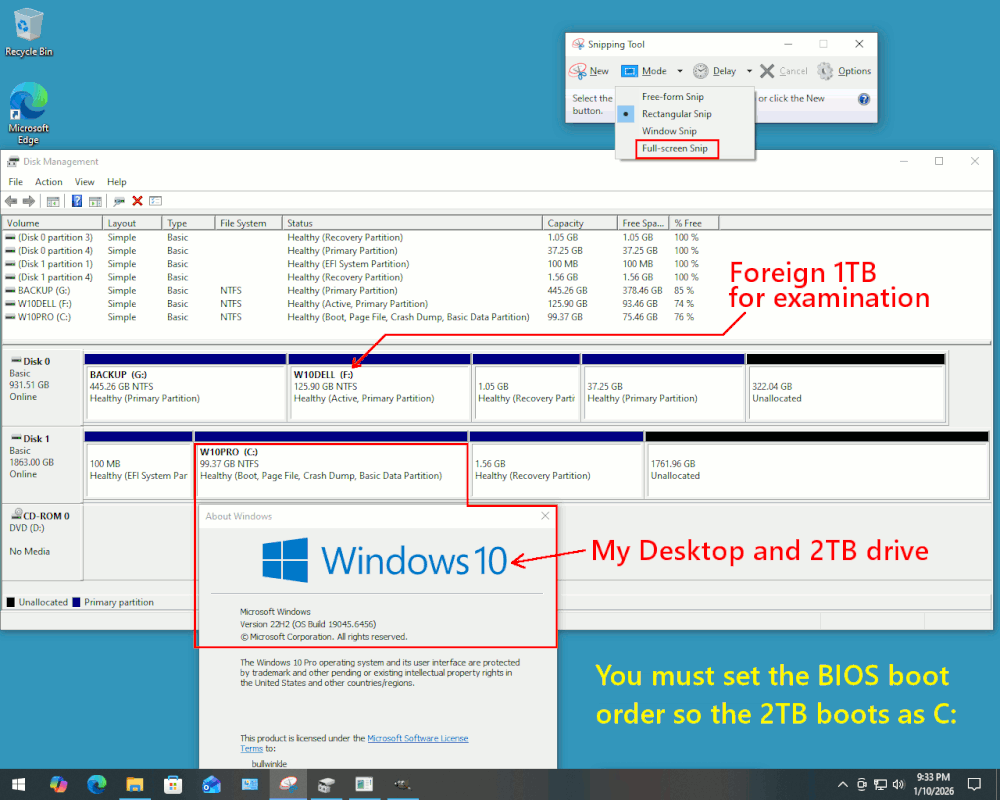
    When you place the Guest drive into the technician machine (your old desktop), the boot order on the Technician Machine must be checked at BIOS level so
    the 2TB drive which is native to the machine, boots it. That way, no "blocking" will occur during boot.

    +------------+ +----------------+
    | | | |
    | B-I-L PC | | My Old Desktop |
    | WindowsPC | | WindowsPC |
    +------------+ +----------------+
    | 1TB drive |-----+ | 2TB drive |
    +------------+ | +----------------+
    | | +----->| |
    +------------+ +----------------+

    You can place the 1TB drive in a bay in the second
    computer for examination. For example, when the
    1TB drive is moved over, the situation could look like this.

    [Picture] Use "Download Original" to collect the picture

    https://i.postimg.cc/g0FczW8Q/The-Desktop-Computer-With-Guest-HDD.gif

    https://imgur.com/a/dOE0Pfd

    Using an Administrator terminal window, I can check for BitLocker.
    I'm just showing the status I collected for my Guest drive and its Windows partition.
    The Guest is unprotected, and I can now use File Explorer and examine the F: partition.

    PS C:\Windows\system32> manage-bde -status
    BitLocker Drive Encryption: Configuration Tool version 10.0.19041
    Copyright (C) 2013 Microsoft Corporation. All rights reserved.

    Disk volumes that can be protected with BitLocker Drive Encryption:
    Volume F: [W10DELL]
    [Data Volume]

    Size: 125.90 GB
    BitLocker Version: None
    Conversion Status: Fully Decrypted
    Percentage Encrypted: 0.0%
    Encryption Method: None
    Protection Status: Protection Off
    Lock Status: Unlocked
    Identification Field: None
    Automatic Unlock: Disabled
    Key Protectors: None Found

    *******

    To erase the Guest Hard Drive (1TB), using the same Administrator terminal window.
    This is not Secure Erase, but it has the advantage of writing zeroes over
    the entire 1TB drive and a recycling center for the PC cannot recover your B-I-L
    files if erased this way. My assumption when suggesting this, is that the 1TB B-I-L drive is "healthy" and has no CRC errors. The command will likely abort and report a problem, if the disk was not healthy enough to complete the erasure
    done by a "Clean All". Clean All, cleans only the "Selected Disk". Make
    doubly sure you are erasing the thing you wanted to erase. This command
    as shown, does NOT do a double check, does NOT say "are you sure?".
    It just does it!

    PS C:\Windows\system32> diskpart.exe

    Microsoft DiskPart version 10.0.19041.3636

    Copyright (C) Microsoft Corporation.
    On computer: WOOLY

    DISKPART> list disk

    Disk ### Status Size Free Dyn Gpt
    -------- ------------- ------- ------- --- ---
    Disk 0 Online 931 GB 0 B <=== We can erase the 1TB one
    Disk 1 Online 1863 GB 1761 GB *

    DISKPART> select disk 0

    Disk 0 is now the selected disk.

    DISKPART> clean all <=== This would take some hours, for the command to complete.
    All private information is removed when this completes.
    Enter "exit" as your next command, to end the Diskpart session.

    Anyway, if you need more assistance with your project, try to take a picture using snippingtool.exe , so the audience can contribute further ideas. Using
    a smartphone camera, is not the only option for taking pictures of Windows screens.
    The "snippingtool.exe" also takes pictures, of a Windows or the Whole Screen. Using image editing tools, you can snip or cover any privacy infringements.

    The imgur.com "New Post" button can upload a photo. The UK audience cannot
    see the photos, due to a new law they enacted. But nevertheless, imgur.com represents a relatively easy option for obtaining a URL to an uploaded image. If there is a need to share your artwork, we can upload the picture again
    to a different site that the UK audience can see. [2026, my ass]

    *******

    Some of the audience would like to see the picture of the B-I-L PC denying access, to see if it is a BIOS password, or a BitLocker password, or whatever. But if you've given up on "cracking" the B-I-L machine entirely, that's
    fine and we will concentrate on getting the files off the Guest OS partition.

    For such a picture, a smartphone camera can capture the screen of the B-I-L machine. There will be a bit of aliasing between the camera sensor and the
    rows of pixels, creating Moire, and use your best photographic skills to suppress that. If you turn off room lighting, that can slightly enhance
    the contrast ratio, but the bright pixels tend to "bloom" and cameras
    have trouble focusing properly when that is going on.

    And the "Clean All" can remove content when you are finished.

    Paul


    --- Synchronet 3.21a-Linux NewsLink 1.2
  • From Maria Sophia@mariasophia@comprehension.com to alt.comp.os.windows-10 on Sat Jan 10 22:29:19 2026
    From Newsgroup: alt.comp.os.windows-10

    J. P. Gilliver wrote:
    Unless it's encrypted, isn't any drive easily re-formatted & re-used?
    Even if it's encrypted, isn't it easily formatted so it's a new drive?

    Yes. But that's no good if you want access to data that was on the drive
    - which you've not given the OP a chance to say whether he does or not.

    But I already told the OP all the data is still there, on the drive.
    I showed the OP how to access all that data.

    Paul and I have done it many (many!) times. As had almost everyone here.
    It's not difficult to do. But since it's so trivial, maybe I misunderstand?

    The only thing that is difficult is to log into the operating system after
    you BOOT to that drive, but if you boot on another drive, the data is free.
    --
    Just one person paying it forward by helping others who later help me.
    --- Synchronet 3.21a-Linux NewsLink 1.2
  • From knuttle@keith_nuttle@yahoo.com to alt.comp.os.windows-10 on Sun Jan 11 08:11:44 2026
    From Newsgroup: alt.comp.os.windows-10

    On 01/10/2026 10:29 PM, Maria Sophia wrote:
    The only thing that is difficult is to log into the operating system after you BOOT to that drive, but if you boot on another drive, the data is free.
    So as I understand what your are saying.

    If I put the locked computer drive into a second computer with known
    passwords as the primary (boot drive), the second computer will initiate
    the OS and the data will be unavailable.
    --- Synchronet 3.21a-Linux NewsLink 1.2
  • From Maria Sophia@mariasophia@comprehension.com to alt.comp.os.windows-10 on Sun Jan 11 09:00:22 2026
    From Newsgroup: alt.comp.os.windows-10

    knuttle wrote:
    On 01/10/2026 10:29 PM, Maria Sophia wrote:
    The only thing that is difficult is to log into the operating system after >> you BOOT to that drive, but if you boot on another drive, the data is free.
    So as I understand what your are saying.

    If I put the locked computer drive into a second computer with known passwords as the primary (boot drive), the second computer will initiate
    the OS and the data will be unavailable.

    Hi Keith,

    Unfortunately, you're using terms which aren't explicit, since a "locked computer drive" can mean a whole bunch of things, each of which can be different.

    I can't count the number of times I used a boot drive as a data drive
    simply by not booting to it, but I've never been able to unencrypt any
    drive that was wholly encrypted without the login/passwd.

    In the interest of clarity, may I ask...
    a. Is the drive completely encrypted?
    b. Or is it just a normal boot drive with a user login/password on the OS?

    If it's a normal boot drive, like billions of other boot drives, that just happens to boot to Windows 10 and then ask for a password, you can access
    it trivially.

    Just don't boot to it.
    Boot to any other operating system, and access it as a secondary drive.

    I do that all the time.

    Just two days ago, I installed Windows 10 on top of a boot drive.
    All without knowing the login/password of the account on the boot drive.

    It's trivial to do.
    I do it all the time.
    --- Synchronet 3.21a-Linux NewsLink 1.2
  • From s|b@me@privacy.invalid to alt.comp.os.windows-10 on Sun Jan 11 15:23:13 2026
    From Newsgroup: alt.comp.os.windows-10

    On Sat, 10 Jan 2026 14:55:34 -0500, knuttle wrote:

    My brother in law die. We have his computer but it is locked with a
    pass word.

    If we pull the hard drive, and place it in an external drive enclosure,
    can we unlock the drive so it can be used as a primary drive in another computer?

    Have you tried a live USB boot with something like Linux Mint for
    instance?
    --
    s|b
    --- Synchronet 3.21a-Linux NewsLink 1.2
  • From Paul@nospam@needed.invalid to alt.comp.os.windows-10 on Sun Jan 11 09:46:47 2026
    From Newsgroup: alt.comp.os.windows-10

    On Sun, 1/11/2026 8:11 AM, knuttle wrote:
    On 01/10/2026 10:29 PM, Maria Sophia wrote:
    The only thing that is difficult is to log into the operating system after >> you BOOT to that drive, but if you boot on another drive, the data is free.
    So as I understand what your are saying.

    If I put the locked computer drive into a second computer with known passwords
    as the primary (boot drive), the second computer will initiate the OS and the data will be unavailable.

    In the dim and distant past, there were schemes that just prevented booting, and they involved a password. (This would not be the BIOS password, but it would appear soon after that, and perhaps before the OS started booting. Typically, business-class computers have more of these goofy schemes,
    than consumer class computers.)

    Today, if you're facing a password, it is more likely that crypto is involved.

    As an example of a "recognizable" crypto on a Windows PC, you can try

    +------------+ +----------------+
    | | | |
    | B-I-L PC | | My Old Desktop |
    | WindowsPC | | WindowsPC |
    +------------+ +----------------+
    | 1TB drive |-----+ | 2TB drive | Booted on this drive
    +------------+ | +----------------+
    | | +----->| | Asking questions that include this drive
    +------------+ +----------------+

    manage-bde -status

    *******

    If the disk had Truecrypt on it, or something in that class,
    it might not be possible to guess what the protection is.

    Bitlocker, on a W10 Home, could be implemented as FDE (Full Disk Encryption by Seagate/WDC).
    The password you type there "opens the drive" and delivers the correct "key"
    to the disk drive CPU to extract the data.

    Bitlocker on W10 Pro, could use a software stack Bitlocker. You still
    have to authenticate, but the key is used/generated by the software
    stack that runs on the PC.

    One of the disadvantages of software stacks, is some day they will be
    a "forgotten technology" and there may not be any software stack
    that opens them any more. With the disk drive CPU schemes, the drives
    don't receive updates so the scheme is frozen in time.

    *******

    Some of the crypto schemes have "plausible deniability". Bitlocker is not
    one of them. Note that ordinary human beings have and do use this stuff,
    even when they don't need to. The existence of it, does not prove or
    disprove a thing. I don't use crypto here, except as a way to keep
    Windows Defender out of some downloaded files (ProduKey!) :-)

    https://en.wikipedia.org/wiki/Plausible_deniability

    "Use in cryptography

    In cryptography, deniable encryption may be used to describe steganographic
    techniques in which the very existence of an encrypted file or message is
    deniable in the sense that an adversary cannot prove that an encrypted message
    exists. In that case, the system is said to be "fully undetectable".[citation needed]

    Some systems take this further, such as MaruTukku, FreeOTFE and
    (to a much lesser extent) TrueCrypt and VeraCrypt, which nest encrypted data.
    The owner of the encrypted data may reveal one or more keys to decrypt
    certain information from it, and then deny that more keys exist, a statement
    which cannot be disproven without knowledge of all encryption keys involved.

    The existence of "hidden" data within the overtly encrypted data is
    then deniable in the sense that it cannot be proven to exist.
    "

    So that text, gives some ideas of crypto programs. Truecrypt, the developers
    of it delivered a message hinting it was likely compromised. VeraCrypt was
    the response to that, so if anything were to be in usage, it is more likely
    to be a VeraCrypt than an (older) Truecrypt. You would use these, for example, if you thought BitLocker didn't work well enough.

    Just the disk-level protection available via FDE, is plenty of aggravation
    for the executor of an estate :-) The higher level stuff, does not visibly
    make the situation worse.

    Some version of FDE was known to be break-able, but Bitlocker likely
    knows about those drives and Bitlocker would then not use FDE if it was
    known to be "weak".

    Paul


    --- Synchronet 3.21a-Linux NewsLink 1.2
  • From J. P. Gilliver@G6JPG@255soft.uk to alt.comp.os.windows-10 on Sun Jan 11 17:22:28 2026
    From Newsgroup: alt.comp.os.windows-10

    On 2026/1/10 19:55:34, knuttle wrote:
    My brother in law die. We have his computer but it is locked with a
    pass word.

    If we pull the hard drive, and place it in an external drive enclosure,
    can we unlock the drive so it can be used as a primary drive in another computer?

    I've been following this thread, and can we all hold back a bit, until
    knuttle (assuming we've not frigtened him off altogether) clarifies what
    he wants to do?

    If he just wants to re-use the drive (which "so it can be used as a
    primary drive in another computer" suggests is possible), then I think
    we all agree that's trivial (the answer would be "yes". Installation
    media for whatever OS is desired would be required, along with drivers
    for the hardware in the new computer, if not included in the
    installation media).

    If he wants to access _files_ on the drive, then it depends whether the
    "pass word" means just a BIOS lock to get into the computer, or
    something that invokes bitlocker (or similar) on the drive itself; if it
    does, he's probably screwed; if it's just a BIOS lock, then moving the
    drive to another computer _should_ make them accessible, at least user
    files.

    If he wants to get access to the old computer (e. g. to use it, or give
    it away), there _are_ ways - especially if an older computer.


    But we have been far too quick to come up with lots of excellent advice
    - which IMO clouds the issue until we know which of the three above
    options he actually wants to do!
    --
    J. P. Gilliver. UMRA: 1960/<1985 MB++G()ALIS-Ch++(p)Ar++T+H+Sh0!:`)DNAf

    If liberty means anything at all, it means the right to tell people
    what they don't want to hear. - Preface to "Animal Farm"
    --- Synchronet 3.21a-Linux NewsLink 1.2
  • From Maria Sophia@mariasophia@comprehension.com to alt.comp.os.windows-10 on Sun Jan 11 15:52:52 2026
    From Newsgroup: alt.comp.os.windows-10

    J. P. Gilliver wrote:
    if it's just a BIOS lock, then moving the
    drive to another computer _should_ make them accessible, at least user
    files.

    I agree with everything John said in his post I'm responding to but I want
    to delve deeper in the explanation of his sentence above, where sometimes people are on laptops or maybe they don't want to open up the case to
    install a second SATA or M.2 NVMe SSD drive.

    We don't necessarily need to put the target drive in another computer.
    We can just boot to an >=8GB flash stick containing the Win10 ISO.

    I recently created that Win10 ISO using Rufus on a 64GB flash stick and was delighted that it worked perfectly for the desktop to boot to it.

    Notice I only needed 8GB on the flash drive but I used a larger one.
    Why?

    Modern Rufus doesn't partition the drive to "only 8GB" anymore.
    It leaves the rest of the flash card as 'extra space'.

    So here's my experience that "might" be useful to the OP (assuming his situation is "normal" in that it doesn't include business-like crypto).

    1. Boot the laptop/desktop PC to the RUFUS flash drive Windows 10 ISO
    2. Copy what you want from the original boot disk to the flash card

    Voila!

    As John stated, the "data" should transfer over easily, unless it's like
    Paul said, cryptographically encrypted (e.g., using Truecrypt/Veracrypt).
    --- Synchronet 3.21a-Linux NewsLink 1.2