OT I'm going out of town for 3 months, and I'm 1) making an image of my
SDD before I go, and 2) separately backing up all my data except maybe
the stuff in the User folder, on two different drives.
Should I take drive 2, my 2.5 inch spinner data backup drive, with me?
I'm afraid I'll lose it, because of the airline or somewhere else, and
I'll have nothing. In the past it never even occurred to me to take
it.
OT I'm going out of town for 3 months, and I'm 1) making an image of my
SDD before I go, and 2) separately backing up all my data except maybe
the stuff in the User folder, on two diffeent drives.
Should I take drive 2, my 2.5 inch spinner data backup drive, with me?
I'm afraid I'll lose it, because of the airline or somewhere else, and
I'll have nothing. In the past it never even occurred to me to take
it.
OT I'm going out of town for 3 months, and I'm 1) making an image of my
SDD before I go, and 2) separately backing up all my data except maybe
the stuff in the User folder, on two diffeent drives.
Should I take drive 2, my 2.5 inch spinner data backup drive, with me?
I'm afraid I'll lose it, because of the airline or somewhere else, and
I'll have nothing. In the past it never even occurred to me to take
it.
OT I'm going out of town for 3 months, and I'm 1) making an image of my
SDD before I go, and 2) separately backing up all my data except maybe
the stuff in the User folder, on two diffeent drives.
Should I take drive 2, my 2.5 inch spinner data backup drive, with me?
I'm afraid I'll lose it, because of the airline or somewhere else, and
I'll have nothing. In the past it never even occurred to me to take
it.
On Wed, 2/11/2026 8:58 AM, micky wrote:
OT I'm going out of town for 3 months, and I'm 1) making an image of my
SDD before I go, and 2) separately backing up all my data except maybe
the stuff in the User folder, on two diffeent drives.
Should I take drive 2, my 2.5 inch spinner data backup drive, with me?
I'm afraid I'll lose it, because of the airline or somewhere else, and
I'll have nothing. In the past it never even occurred to me to take
it.
007, you should sew an SD card into your jacket :-)
They are available up to around the 1TB level.
My laptop has a connector hole for one, but then
the hardware there only runs at 10MB/sec.
There will be a lot of activity at borders and airports,
so lots of opportunities to "lose this and that".
There are various rules about bringing personal
items across borders. Generally speaking, traveling
naked is the absolutely safest option when it comes
to bureaucracy. Nobody can ask you "do you have
anything to declare?" when they can see you don't
have anything to declare.
OT I'm going out of town for 3 months, and I'm 1) making an image of my
SDD before I go, and 2) separately backing up all my data except maybe
the stuff in the User folder, on two diffeent drives.
Should I take drive 2, my 2.5 inch spinner data backup drive, with me?
I'm afraid I'll lose it, because of the airline or somewhere else, and
I'll have nothing. In the past it never even occurred to me to take
it.
micky <NONONOmisc07@fmguy.com> wrote:
OT I'm going out of town for 3 months, and I'm 1) making an image of my
SDD before I go, and 2) separately backing up all my data except maybe
the stuff in the User folder, on two diffeent drives.
Should I take drive 2, my 2.5 inch spinner data backup drive, with me?
I'm afraid I'll lose it, because of the airline or somewhere else, and
I'll have nothing. In the past it never even occurred to me to take
it.
As it's *backup* (not archival storage), losing it should not be a problem, except of course that others might/will get hold of your
personal data.
OT I'm going out of town for 3 months, and I'm 1) making an image of my
SDD before I go, and 2) separately backing up all my data except maybe
the stuff in the User folder, on two diffeent drives.
Should I take drive 2, my 2.5 inch spinner data backup drive, with me?
I'm afraid I'll lose it, because of the airline or somewhere else, and
I'll have nothing. In the past it never even occurred to me to take
it.
I remember a SciFi novel, I don't remember the name, where she was an >interstellar courier; she had a little pouch on her belly, surgically
made, to carry the stuff. So even naked she was carrying it.
ChatGpt says it is Friday (1982) by Robert A. Heinlein.
OT I'm going out of town for 3 months, and I'm 1) making an image of my
SDD before I go, and 2) separately backing up all my data except maybe
the stuff in the User folder, on two diffeent drives.
Should I take drive 2, my 2.5 inch spinner data backup drive, with me?
I'm afraid I'll lose it, because of the airline or somewhere else, and
I'll have nothing. In the past it never even occurred to me to take
it.
On 2026-02-11 17:27, Frank Slootweg wrote:
micky <NONONOmisc07@fmguy.com> wrote:
OT I'm going out of town for 3 months, and I'm 1) making an image of my >> SDD before I go, and 2) separately backing up all my data except maybe
the stuff in the User folder, on two diffeent drives.
Should I take drive 2, my 2.5 inch spinner data backup drive, with me?
I'm afraid I'll lose it, because of the airline or somewhere else, and
I'll have nothing. In the past it never even occurred to me to take
it.
As it's *backup* (not archival storage), losing it should not be a problem, except of course that others might/will get hold of your
personal data.
Encryption comes to mind in that case, but this is not something to do
in a hurry. I wouldn't know what to advise with Windows.
micky <NONONOmisc07@fmguy.com> wrote:
OT I'm going out of town for 3 months, and I'm 1) making an image of my
SDD before I go, and 2) separately backing up all my data except maybe
the stuff in the User folder, on two diffeent drives.
Should I take drive 2, my 2.5 inch spinner data backup drive, with me?
I'm afraid I'll lose it, because of the airline or somewhere else, and
I'll have nothing. In the past it never even occurred to me to take
it.
Definitely not! If the drive is unencrypted then if it does get lost then whoever finds ithas got EVERYTHING!
Get a cloud account (i.e. oneDrive, dropbox or google drive) to save any
new files while away.
On Wed, 2/11/2026 8:58 AM, micky wrote:
OT I'm going out of town for 3 months, and I'm 1) making an image of my
SDD before I go, and 2) separately backing up all my data except maybe
the stuff in the User folder, on two diffeent drives.
Should I take drive 2, my 2.5 inch spinner data backup drive, with me?
I'm afraid I'll lose it, because of the airline or somewhere else, and
I'll have nothing. In the past it never even occurred to me to take
it.
007, you should sew an SD card into your jacket :-)
They are available up to around the 1TB level.
My laptop has a connector hole for one, but then
the hardware there only runs at 10MB/sec.
There will be a lot of activity at borders and airports,
so lots of opportunities to "lose this and that".
There are various rules about bringing personal
items across borders. Generally speaking, traveling
naked is the absolutely safest option when it comes
to bureaucracy. Nobody can ask you "do you have--- Synchronet 3.21b-Linux NewsLink 1.2
anything to declare?" when they can see you don't
have anything to declare.
Paul
micky <NONONOmisc07@fmguy.com> wrote:
OT I'm going out of town for 3 months, and I'm 1) making an image of my
SDD before I go, and 2) separately backing up all my data except maybe
the stuff in the User folder, on two diffeent drives.
Should I take drive 2, my 2.5 inch spinner data backup drive, with me?
I'm afraid I'll lose it, because of the airline or somewhere else, and
I'll have nothing. In the past it never even occurred to me to take
it.
As it's *backup* (not archival storage), losing it should not be a
problem, except of course that others might/will get hold of your
personal data.
If you only have carry-on luggage, I would put the disk in a pouch
which you can't lose (except at the security check :-(). (We normally
have the disk in a suitcase in the hold and the laptop in my carry-on >backpack.)
As to the risk of losing both the laptop and the disk: Proper backup
means you will have at least two backup copies. So leave one of those
copies at home or another safe place.
FYI, I have at least four backup copies: On NAS, on an on-site disk,
on an off-site disk and on my travel disk.
BTW, I don't understand your comment "backing up all my data except
maybe the stuff in the User folder"! Why wouldn't you backup your \Users >folder?
Carlos E. R. <robin_listas@es.invalid> wrote:
On 2026-02-11 17:27, Frank Slootweg wrote:
micky <NONONOmisc07@fmguy.com> wrote:
OT I'm going out of town for 3 months, and I'm 1) making an image of my >> >> SDD before I go, and 2) separately backing up all my data except maybe >> >> the stuff in the User folder, on two diffeent drives.
Should I take drive 2, my 2.5 inch spinner data backup drive, with me?
I'm afraid I'll lose it, because of the airline or somewhere else, and
I'll have nothing. In the past it never even occurred to me to take
it.
As it's *backup* (not archival storage), losing it should not be a
problem, except of course that others might/will get hold of your
personal data.
Encryption comes to mind in that case, but this is not something to do
in a hurry. I wouldn't know what to advise with Windows.
I assume that 'Device encryption' (for Windows Home) and 'BitLocker
drive encryption' (for Windows Pro) also work for additional portable
disks. Not that I would recommend either, surely not for micky.
Other than that, WD (Western Digital) has portable disks with built-in
encryption, WD Passport.
I think micky's laptop isn't using encryption,
so there's probably
little point encrypting the portable disk, but not the laptop.
On 2026-02-11 13:58, micky wrote:
OT I'm going out of town for 3 months, and I'm 1) making an image of my
SDD before I go, and 2) separately backing up all my data except maybe
the stuff in the User folder, on two diffeent drives.
Should I take drive 2, my 2.5 inch spinner data backup drive, with me?
I'm afraid I'll lose it, because of the airline or somewhere else, and
I'll have nothing. In the past it never even occurred to me to take
it.
Recently I spent some time away over Hogmanay helping a cousin sort
through the last (I hope) of his family documents, which involved doing
a lot of scanning. Besides the scanner, I took two identical and >identically set up laptops and several 120GB USB sticks. I kept the
spare laptop in my bedroom, so that, if the house was burgled overnight,
it would likely survive, and I hid the USB sticks in various places
around my luggage, so there was a good chance not all of them would be >stolen and/or go down. Every night I backed up the data to the spare PC
and the USB sticks.
Needless to say, nothing was stolen, they're cousins after all and they--- Synchronet 3.21b-Linux NewsLink 1.2
live in a fairly close knit community, and nothing went down, so perhaps
I was over cautious, but I did a lot of work there that I really, really >didn't want to lose!
OT I'm going out of town for 3 months, and I'm 1) making an image of my
SDD before I go, and 2) separately backing up all my data except maybe
the stuff in the User folder, on two diffeent drives.
Should I take drive 2, my 2.5 inch spinner data backup drive, with me?
I'm afraid I'll lose it, because of the airline or somewhere else, and
I'll have nothing. In the past it never even occurred to me to take
it.
In alt.comp.os.windows-11, on Wed, 11 Feb 2026 15:07:12 +0000, Java Jive <java@evij.com.invalid> wrote:
On 2026-02-11 13:58, micky wrote:
OT I'm going out of town for 3 months, and I'm 1) making an image of my >>> SDD before I go, and 2) separately backing up all my data except maybe
the stuff in the User folder, on two diffeent drives.
Should I take drive 2, my 2.5 inch spinner data backup drive, with me?
I'm afraid I'll lose it, because of the airline or somewhere else, and
I'll have nothing. In the past it never even occurred to me to take
it.
Recently I spent some time away over Hogmanay helping a cousin sort
through the last (I hope) of his family documents, which involved doing
a lot of scanning. Besides the scanner, I took two identical and
identically set up laptops and several 120GB USB sticks. I kept the
NOw that you say USB sticks. That is so obvious. I can live the
spinner at home and take a flashdrive, which is smaller anyhow.
I'm pretty smart, but I'm also slow.
In alt.comp.os.windows-11, on 11 Feb 2026 18:53:17 GMT, Frank Slootweg <this@ddress.is.invalid> wrote:
Carlos E. R. <robin_listas@es.invalid> wrote:
On 2026-02-11 17:27, Frank Slootweg wrote:
micky <NONONOmisc07@fmguy.com> wrote:
OT I'm going out of town for 3 months, and I'm 1) making an image of my >>>>> SDD before I go, and 2) separately backing up all my data except maybe >>>>> the stuff in the User folder, on two diffeent drives.
Should I take drive 2, my 2.5 inch spinner data backup drive, with me? >>>>> I'm afraid I'll lose it, because of the airline or somewhere else, and >>>>> I'll have nothing. In the past it never even occurred to me to take >>>>> it.
As it's *backup* (not archival storage), losing it should not be a
problem, except of course that others might/will get hold of your
personal data.
Encryption comes to mind in that case, but this is not something to do
in a hurry. I wouldn't know what to advise with Windows.
I assume that 'Device encryption' (for Windows Home) and 'BitLocker
drive encryption' (for Windows Pro) also work for additional portable
disks. Not that I would recommend either, surely not for micky.
Other than that, WD (Western Digital) has portable disks with built-in
encryption, WD Passport.
I think micky's laptop isn't using encryption,
You're right.
so there's probably
little point encrypting the portable disk, but not the laptop.
Good, so I don't have to do that.
micky wrote:
OT I'm going out of town for 3 months, and I'm 1) making an image
of my SDD before I go, and 2) separately backing up all my data
except maybe the stuff in the User folder, on two different
drives.
Should I take drive 2, my 2.5 inch spinner data backup drive, with
me? I'm afraid I'll lose it, because of the airline or somewhere
else, and I'll have nothing. In the past it never even occurred to
me to take it.
Do you need its data with you?
How secure is your home? Have you a good reason to think that your--
data is not safe there? Leave a backup with a trusted friend?
In alt.comp.os.windows-11, on 11 Feb 2026 16:27:40 GMT, Frank Slootweg <this@ddress.is.invalid> wrote:
BTW, I don't understand your comment "backing up all my data except
maybe the stuff in the User folder"! Why wouldn't you backup your \Users
folder?
Because I'm a jackass, and until recently I don't think I kept anything there. I can fix that before I leave.
On 12/02/2026 1:28 am, Graham J wrote:
micky wrote:
OT I'm going out of town for 3 months, and I'm 1) making an image of my SDD-a before I go, and 2) separately backing up all my data except maybe the stuff in the User folder, on two different drives.
Should I take drive 2, my 2.5 inch spinner data backup drive, with
me? I'm afraid I'll lose it, because of the airline or somewhere else, and I'll have nothing. In the past it never even occurred to
me to take it.
Do you need its data with you?
Yeap. if you don't actually NEED the Data with you, why take it
yourself?? Why not leave it with a trusted Neighbour/Relative so, if you
need it, you know where it is??
On Thu, 2/12/2026 4:54 AM, Daniel70 wrote:
On 12/02/2026 1:28 am, Graham J wrote:
micky wrote:
OT I'm going out of town for 3 months, and I'm 1) making an
image of my SDD before I go, and 2) separately backing up all
my data except maybe the stuff in the User folder, on two
different drives.
Should I take drive 2, my 2.5 inch spinner data backup drive,
with me? I'm afraid I'll lose it, because of the airline or
somewhere else, and I'll have nothing. In the past it never
even occurred to me to take it.
Do you need its data with you?
Yeap. if you don't actually NEED the Data with you, why take it
yourself?? Why not leave it with a trusted Neighbour/Relative so,
if you need it, you know where it is??
On his trip, this is his duplicate copy of materials on other
devices. If the laptop is swiped, then the external device might
still be around to save the day.
It's like if I take pictures on the digital camera and they're on the
32GB SD. I transfer them off to other storage.
If the 32GB SD becomes corrupted, I haven't lost all the materials.
That would be my duplicate copy.
Paul
On 2/11/26 9:17 AM, Carlos E. R. wrote:
I remember a SciFi novel, I don't remember the name, where she was an
interstellar courier; she had a little pouch on her belly, surgically
made, to carry the stuff. So even naked she was carrying it.
Same with drug dealers. They have been carrying stuff in their natural
pouch for years.
ChatGpt says it is Friday (1982) by Robert A. Heinlein.
But then I don't suppose that would go over all that well in a sci-fi
book... 8-O
On Wed, 2/11/2026 7:17 PM, micky wrote:
In alt.comp.os.windows-11, on Wed, 11 Feb 2026 15:07:12 +0000, Java Jive
<java@evij.com.invalid> wrote:
On 2026-02-11 13:58, micky wrote:
OT I'm going out of town for 3 months, and I'm 1) making an image of my >>>> SDD before I go, and 2) separately backing up all my data except maybe >>>> the stuff in the User folder, on two diffeent drives.
Should I take drive 2, my 2.5 inch spinner data backup drive, with me? >>>> I'm afraid I'll lose it, because of the airline or somewhere else, and >>>> I'll have nothing. In the past it never even occurred to me to take
it.
Recently I spent some time away over Hogmanay helping a cousin sort
through the last (I hope) of his family documents, which involved doing
a lot of scanning. Besides the scanner, I took two identical and
identically set up laptops and several 120GB USB sticks. I kept the
NOw that you say USB sticks. That is so obvious. I can live the
spinner at home and take a flashdrive, which is smaller anyhow.
I'm pretty smart, but I'm also slow.
They also make larger-capacity USB sticks.
Buy them from a reputable source.
Examples of some premium units.
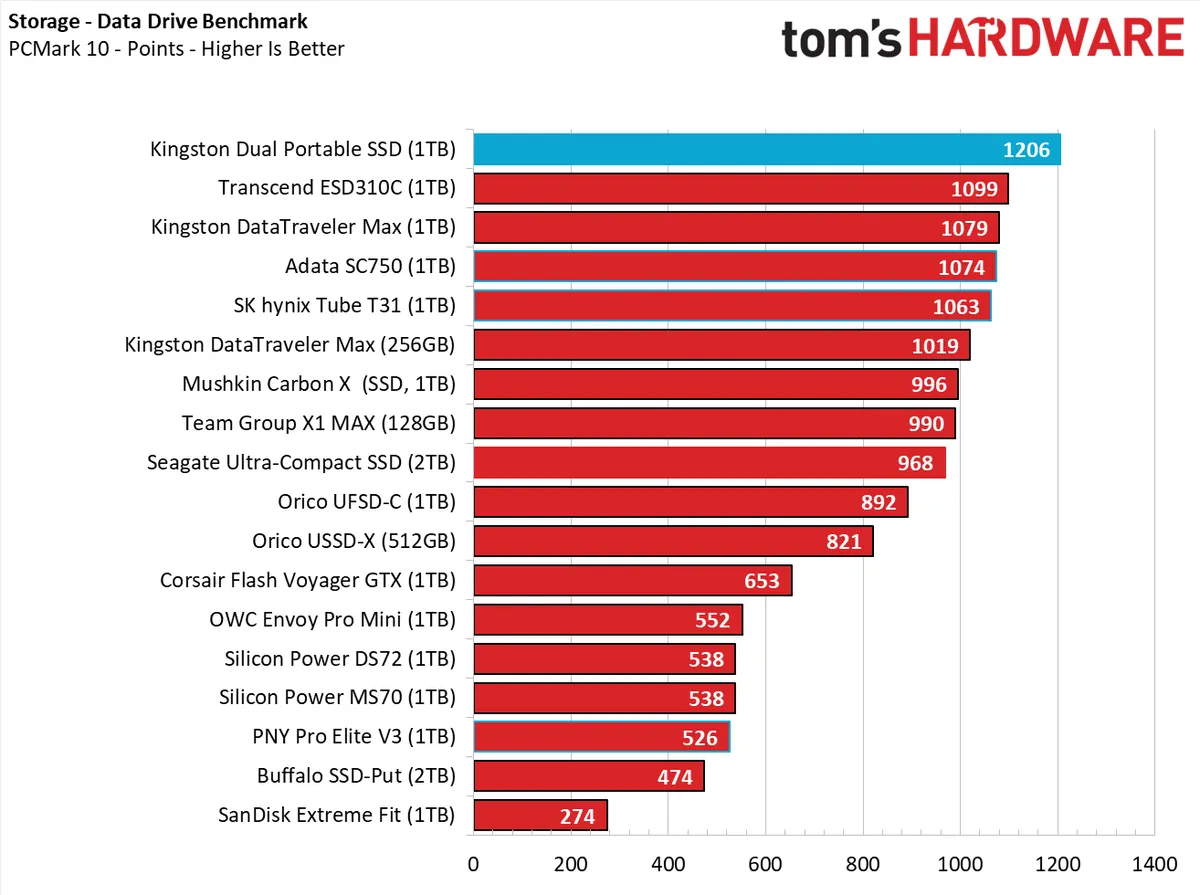
https://www.tomshardware.com/best-picks/best-flash-drives
https://cdn.mos.cms.futurecdn.net/oLLUokYysx8Nffxc3bKqbb-1200-80.png.webp
A 2TB one is listed as unavailable, and as near as I can determine locally, there is no longer a lot of stock of garbage USB sticks near me. The supply seemed to dry up last year, and the boards holding them on hooks were
getting thinner and thinner on stock.
But at least that shows you that larger capacity ones nominally exist.
On 12/02/2026 11:04 am, micky wrote:
In alt.comp.os.windows-11, on 11 Feb 2026 16:27:40 GMT, Frank Slootweg
<this@ddress.is.invalid> wrote:
<Snip>
BTW, I don't understand your comment "backing up all my data except
maybe the stuff in the User folder"! Why wouldn't you backup your \Users >>> folder?
Because I'm a jackass, and until recently I don't think I kept anything
there. I can fix that before I leave.
For me ..... Why would I want to put anything where Windows/Microsoft
wants it to be??
I keep a lot of 'Stuff' in a C:\Fred\Stuff directory. (and No, my name--- Synchronet 3.21b-Linux NewsLink 1.2
isn't Fred, it's just that those four keys are grouped, conveniently, >together.) ;-P
On Wed, 2/11/2026 7:17 PM, micky wrote:
In alt.comp.os.windows-11, on Wed, 11 Feb 2026 15:07:12 +0000, Java Jive
<java@evij.com.invalid> wrote:
On 2026-02-11 13:58, micky wrote:
OT I'm going out of town for 3 months, and I'm 1) making an image of my >>>> SDD before I go, and 2) separately backing up all my data except maybe >>>> the stuff in the User folder, on two diffeent drives.
Should I take drive 2, my 2.5 inch spinner data backup drive, with me? >>>> I'm afraid I'll lose it, because of the airline or somewhere else, and >>>> I'll have nothing. In the past it never even occurred to me to take
it.
Recently I spent some time away over Hogmanay helping a cousin sort
through the last (I hope) of his family documents, which involved doing >>> a lot of scanning. Besides the scanner, I took two identical and
identically set up laptops and several 120GB USB sticks. I kept the
NOw that you say USB sticks. That is so obvious. I can live the
spinner at home and take a flashdrive, which is smaller anyhow.
I'm pretty smart, but I'm also slow.
They also make larger-capacity USB sticks.
Buy them from a reputable source.
Examples of some premium units.
https://www.tomshardware.com/best-picks/best-flash-drives
https://cdn.mos.cms.futurecdn.net/oLLUokYysx8Nffxc3bKqbb-1200-80.png.webp
A 2TB one is listed as unavailable, and as near as I can determine locally, >there is no longer a lot of stock of garbage USB sticks near me. The supply >seemed to dry up last year, and the boards holding them on hooks were
getting thinner and thinner on stock.
But at least that shows you that larger capacity ones nominally exist.
Paul--- Synchronet 3.21b-Linux NewsLink 1.2
micky <NONONOmisc07@fmguy.com> wrote:
In alt.comp.os.windows-11, on 11 Feb 2026 18:53:17 GMT, Frank Slootweg
<this@ddress.is.invalid> wrote:
Carlos E. R. <robin_listas@es.invalid> wrote:
On 2026-02-11 17:27, Frank Slootweg wrote:
micky <NONONOmisc07@fmguy.com> wrote:
OT I'm going out of town for 3 months, and I'm 1) making an image of my >>>>>> SDD before I go, and 2) separately backing up all my data except maybe >>>>>> the stuff in the User folder, on two diffeent drives.
Should I take drive 2, my 2.5 inch spinner data backup drive, with me? >>>>>> I'm afraid I'll lose it, because of the airline or somewhere else, and >>>>>> I'll have nothing. In the past it never even occurred to me to take >>>>>> it.
As it's *backup* (not archival storage), losing it should not be a
problem, except of course that others might/will get hold of your
personal data.
Encryption comes to mind in that case, but this is not something to do >>>> in a hurry. I wouldn't know what to advise with Windows.
I assume that 'Device encryption' (for Windows Home) and 'BitLocker
drive encryption' (for Windows Pro) also work for additional portable
disks. Not that I would recommend either, surely not for micky.
Other than that, WD (Western Digital) has portable disks with built-in
encryption, WD Passport.
I think micky's laptop isn't using encryption,
You're right.
so there's probably
little point encrypting the portable disk, but not the laptop.
Good, so I don't have to do that.
That isn't the conclusion you should take from this. Your personal >information is very valuable to thieves. By not encrypting your laptop
you're leaving it wide open if stolen or lost. You should turn on
bitlocker.
Likewise your backup disk won't even have a user login so will be readable
by literally anyone.
On 2026-02-12 07:29, Paul wrote:
On Wed, 2/11/2026 7:17 PM, micky wrote:
In alt.comp.os.windows-11, on Wed, 11 Feb 2026 15:07:12 +0000, Java Jive >>> <java@evij.com.invalid> wrote:
On 2026-02-11 13:58, micky wrote:
OT I'm going out of town for 3 months, and I'm 1) making an image of my >>>>> SDD before I go, and 2) separately backing up all my data except maybe >>>>> the stuff in the User folder, on two diffeent drives.
Should I take drive 2, my 2.5 inch spinner data backup drive, with me? >>>>> I'm afraid I'll lose it, because of the airline or somewhere else, and >>>>> I'll have nothing. In the past it never even occurred to me to take >>>>> it.
Recently I spent some time away over Hogmanay helping a cousin sort
through the last (I hope) of his family documents, which involved doing >>>> a lot of scanning. Besides the scanner, I took two identical and
identically set up laptops and several 120GB USB sticks. I kept the
NOw that you say USB sticks. That is so obvious. I can live the
spinner at home and take a flashdrive, which is smaller anyhow.
I'm pretty smart, but I'm also slow.
They also make larger-capacity USB sticks.
Buy them from a reputable source.
Examples of some premium units.
https://www.tomshardware.com/best-picks/best-flash-drives
https://cdn.mos.cms.futurecdn.net/oLLUokYysx8Nffxc3bKqbb-1200-80.png.webp
A 2TB one is listed as unavailable, and as near as I can determine locally, >> there is no longer a lot of stock of garbage USB sticks near me. The supply >> seemed to dry up last year, and the boards holding them on hooks were
getting thinner and thinner on stock.
But at least that shows you that larger capacity ones nominally exist.
I would be afraid of using that large capacity flash drives.
In alt.comp.os.windows-11, on Thu, 12 Feb 2026 12:11:28 +0100, "Carlos
E. R." <robin_listas@es.invalid> wrote:
On 2026-02-12 07:29, Paul wrote:
On Wed, 2/11/2026 7:17 PM, micky wrote:
In alt.comp.os.windows-11, on Wed, 11 Feb 2026 15:07:12 +0000, Java Jive >>>> <java@evij.com.invalid> wrote:
On 2026-02-11 13:58, micky wrote:
OT I'm going out of town for 3 months, and I'm 1) making an image of my >>>>>> SDD before I go, and 2) separately backing up all my data except maybe >>>>>> the stuff in the User folder, on two diffeent drives.
Should I take drive 2, my 2.5 inch spinner data backup drive, with me? >>>>>> I'm afraid I'll lose it, because of the airline or somewhere else, and >>>>>> I'll have nothing. In the past it never even occurred to me to take >>>>>> it.
Recently I spent some time away over Hogmanay helping a cousin sort
through the last (I hope) of his family documents, which involved doing >>>>> a lot of scanning. Besides the scanner, I took two identical and
identically set up laptops and several 120GB USB sticks. I kept the
NOw that you say USB sticks. That is so obvious. I can live the
spinner at home and take a flashdrive, which is smaller anyhow.
I'm pretty smart, but I'm also slow.
They also make larger-capacity USB sticks.
Buy them from a reputable source.
Examples of some premium units.
https://www.tomshardware.com/best-picks/best-flash-drives
https://cdn.mos.cms.futurecdn.net/oLLUokYysx8Nffxc3bKqbb-1200-80.png.webp
A 2TB one is listed as unavailable, and as near as I can determine locally, >>> there is no longer a lot of stock of garbage USB sticks near me. The supply >>> seemed to dry up last year, and the boards holding them on hooks were
getting thinner and thinner on stock.
But at least that shows you that larger capacity ones nominally exist.
I would be afraid of using that large capacity flash drives.
How come? My 84-yo friend recently asked me why he can't just use a flashdrive for backups insted of an external drive and I didnt know what
to tell him.
In alt.comp.os.windows-11, on Thu, 12 Feb 2026 12:11:28 +0100, "Carlos
E. R." <robin_listas@es.invalid> wrote:
On 2026-02-12 07:29, Paul wrote:
On Wed, 2/11/2026 7:17 PM, micky wrote:
In alt.comp.os.windows-11, on Wed, 11 Feb 2026 15:07:12 +0000, Java Jive >>>> <java@evij.com.invalid> wrote:
On 2026-02-11 13:58, micky wrote:
OT I'm going out of town for 3 months, and I'm 1) making an image of my >>>>>> SDD before I go, and 2) separately backing up all my data except maybe >>>>>> the stuff in the User folder, on two diffeent drives.
Should I take drive 2, my 2.5 inch spinner data backup drive, with me? >>>>>> I'm afraid I'll lose it, because of the airline or somewhere else, and >>>>>> I'll have nothing. In the past it never even occurred to me to take >>>>>> it.
Recently I spent some time away over Hogmanay helping a cousin sort
through the last (I hope) of his family documents, which involved doing >>>>> a lot of scanning. Besides the scanner, I took two identical and
identically set up laptops and several 120GB USB sticks. I kept the
NOw that you say USB sticks. That is so obvious. I can live the
spinner at home and take a flashdrive, which is smaller anyhow.
I'm pretty smart, but I'm also slow.
They also make larger-capacity USB sticks.
Buy them from a reputable source.
Examples of some premium units.
https://www.tomshardware.com/best-picks/best-flash-drives
https://cdn.mos.cms.futurecdn.net/oLLUokYysx8Nffxc3bKqbb-1200-80.png.webp
A 2TB one is listed as unavailable, and as near as I can determine locally, >>> there is no longer a lot of stock of garbage USB sticks near me. The supply >>> seemed to dry up last year, and the boards holding them on hooks were
getting thinner and thinner on stock.
But at least that shows you that larger capacity ones nominally exist.
I would be afraid of using that large capacity flash drives.
How come? My 84-yo friend recently asked me why he can't just use a flashdrive for backups insted of an external drive and I didnt know what
to tell him.
You've talked me into it.
In alt.comp.os.windows-11, on Thu, 12 Feb 2026 12:11:28 +0100, "Carlos
E. R." <robin_listas@es.invalid> wrote:
I would be afraid of using that large capacity flash drives.
On Thu, 2/12/2026 9:02 AM, micky wrote:
How come? My 84-yo friend recently asked me why he can't just use a
flashdrive for backups insted of an external drive and I didnt know what
to tell him.
TLC based USB devices, I have a couple dead ones here.
The difference with some of the premium sticks, is they are
actually SSDs with internal TRIM, which means the write wear
is smeared over the device. Each location supports 600 writes,
and at end of life, each and every location has been written
600 times.
The "ordinary" (non-SSD-based) USB sticks, if you write location
zero, then write it again, there is no virtual to physical map to
smear the wear around. Whereas the SSD type has a "free pool", and it takes
a sheet off the roll and writes it. The map reports "sector 0 is now
stored at 1234". If you write location 0 even a dozen times
on the "ordinary" USB sticks, the device can go into a spiral of death, pretend to keep sparing out defective blocks... until the device bricks.
This is why we *don't* store permanent copies of things on cheap USB TLC sticks.
The MLC and SLC sticks are better at this (they take the punishment of bad algorithms better). I have a relatively old 8GB device,
I only own one of those, and it just goes and goes. Whereas the TLC, I think I managed to write about six ISO files to it, before it croaked. It's because of the crude way the storage is handled, that makes TLC USB fragile. I should be able to write 600 ISO images to TLC USB, but it does not pan out that
way in practice.
*NO* USB or SSD should be stored in a Time Capsule in a glass jar in
a hole in the back yard, as when you dig it up decades later, it'll be corrupted storage. You can do that with a hard drive, as long as the container is absolutely air tight and there are a couple dessicant packs
in the jar.
[Followup-To: set to alt.unix.geeks because I want to save this
where I can find it later. ]
In alt.comp.os.windows-11, on Thu, 12 Feb 2026 12:11:28 +0100, "Carlos
E. R." <robin_listas@es.invalid> wrote:
I would be afraid of using that large capacity flash drives.
On Thu, 2/12/2026 9:02 AM, micky wrote:
How come? My 84-yo friend recently asked me why he can't just use a
flashdrive for backups insted of an external drive and I didnt know what >>> to tell him.
On 2026-02-12, Paul <nospam@needed.invalid> wrote:
TLC based USB devices, I have a couple dead ones here.
The difference with some of the premium sticks, is they are
actually SSDs with internal TRIM, which means the write wear
is smeared over the device. Each location supports 600 writes,
and at end of life, each and every location has been written
600 times.
The "ordinary" (non-SSD-based) USB sticks, if you write location
zero, then write it again, there is no virtual to physical map to
smear the wear around. Whereas the SSD type has a "free pool", and it takes >> a sheet off the roll and writes it. The map reports "sector 0 is now
stored at 1234". If you write location 0 even a dozen times
on the "ordinary" USB sticks, the device can go into a spiral of death,
pretend to keep sparing out defective blocks... until the device bricks.
This is why we *don't* store permanent copies of things on cheap USB TLC sticks.
The MLC and SLC sticks are better at this (they take the punishment of bad >> algorithms better). I have a relatively old 8GB device,
I only own one of those, and it just goes and goes. Whereas the TLC, I think >> I managed to write about six ISO files to it, before it croaked. It's because
of the crude way the storage is handled, that makes TLC USB fragile. I should
be able to write 600 ISO images to TLC USB, but it does not pan out that
way in practice.
*NO* USB or SSD should be stored in a Time Capsule in a glass jar in
a hole in the back yard, as when you dig it up decades later, it'll be
corrupted storage. You can do that with a hard drive, as long as the
container is absolutely air tight and there are a couple dessicant packs
in the jar.
Kingston Memory company has a great article. https://www.kingston.com/en/blog/pc-performance/difference-between-slc-mlc-tlc-3d-nand
But how do I know what type I have?
Sure, I could search all over the manufacturers' web sites, but the blisterpack in the BestBuy store does not say anything useful like that.
Can I read it directly?
I was pondering if I could do it through smartctl, so I plugged one in
on my Windows-11 desktop. "smartctl --scan" reveals it as /dev/sdb and
calls it a SCSI device, but "smartctl -a /dev/sdb" calls it "Unknown USB bridge [0x154b:0x007e] and asks me to give a description with a -d
option.
And in fact, my Fedora Linux laptop says the same thing.
But I know it is not a missing driver for a USB bridge, because things (including the file stick) actually work in that port.
So a bit of googling reveals that this is a PNY Technologies "Classic Attache" flash drive.
But that does not really tell me anything *useful*, does it?
In alt.comp.os.windows-11, on Thu, 12 Feb 2026 21:13:42 +1100, Daniel70 <daniel47@nomail.afraid.org> wrote:
On 12/02/2026 11:04 am, micky wrote:
In alt.comp.os.windows-11, on 11 Feb 2026 16:27:40 GMT, Frank Slootweg
<this@ddress.is.invalid> wrote:
<Snip>
BTW, I don't understand your comment "backing up all my data except >>>> maybe the stuff in the User folder"! Why wouldn't you backup your \Users >>>> folder?
Because I'm a jackass, and until recently I don't think I kept anything
there. I can fix that before I leave.
Okay, I fixed it already. It only has stuff that I recently sent to the
pc from the phone using bluetooth, and then allowed the files to go to
the default location
On 12/02/2026 11:00 pm, micky wrote:
In alt.comp.os.windows-11, on Thu, 12 Feb 2026 21:13:42 +1100, Daniel70
<daniel47@nomail.afraid.org> wrote:
On 12/02/2026 11:04 am, micky wrote:
In alt.comp.os.windows-11, on 11 Feb 2026 16:27:40 GMT, Frank Slootweg >>>> <this@ddress.is.invalid> wrote:
<Snip>
BTW, I don't understand your comment "backing up all my data except >>>>> maybe the stuff in the User folder"! Why wouldn't you backup your \Users >>>>> folder?
Because I'm a jackass, and until recently I don't think I kept anything >>>> there. I can fix that before I leave.
Okay, I fixed it already. It only has stuff that I recently sent to the
pc from the phone using bluetooth, and then allowed the files to go to
the default location
Hmm! I'll learn how to do that one day. ;-)
It wasn't easy.
You have to do things in the PC to get it ready to receive.
You have to click on the icon in the systray and then click on Receive a file.
And they are serious when they use the singular form. You have to do
that again for each file, although I think you can do several in
advance.
You have to then acknowledge receipt by clicking on Save or browsing to
the directory you want to put it in.
Sending an email seems easier, and I did that easily from the Text app recently, but when I tried to do that from the same app before then, it didn't work, twice, in different ways. Maybe it didn't work when I
used Gmail and did work when I used my email Fastmail. Can't keep track
In alt.comp.os.windows-11, on Fri, 13 Feb 2026 20:04:39 +1100, Daniel70 <daniel47@nomail.afraid.org> wrote:
On 12/02/2026 11:00 pm, micky wrote:
In alt.comp.os.windows-11, on Thu, 12 Feb 2026 21:13:42 +1100, Daniel70
<daniel47@nomail.afraid.org> wrote:
On 12/02/2026 11:04 am, micky wrote:
In alt.comp.os.windows-11, on 11 Feb 2026 16:27:40 GMT, Frank Slootweg >>>>> <this@ddress.is.invalid> wrote:
<Snip>
BTW, I don't understand your comment "backing up all my data except >>>>>> maybe the stuff in the User folder"! Why wouldn't you backup your \Users >>>>>> folder?
Because I'm a jackass, and until recently I don't think I kept anything >>>>> there. I can fix that before I leave.
Okay, I fixed it already. It only has stuff that I recently sent to the >>> pc from the phone using bluetooth, and then allowed the files to go to
the default location
Hmm! I'll learn how to do that one day. ;-)
For when that time comes, things to remember:
It wasn't easy.
You have to do things in the PC to get it ready to receive.
You have to click on the icon in the systray and then click on Receive a file.
And they are serious when they use the singular form. You have to do
that again for each file, although I think you can do several in
advance.
You have to then acknowledge receipt by clicking on Save or browsing to
the directory you want to put it in.
Sending an email seems easier, and I did that easily from the Text app recently, but when I tried to do that from the same app before then, it didn't work, twice, in different ways. Maybe it didn't work when I
used Gmail and did work when I used my email Fastmail. Can't keep track
| Sysop: | Amessyroom |
|---|---|
| Location: | Fayetteville, NC |
| Users: | 59 |
| Nodes: | 6 (0 / 6) |
| Uptime: | 03:10:25 |
| Calls: | 810 |
| Files: | 1,287 |
| D/L today: |
4 files (10,048K bytes) |
| Messages: | 200,610 |